Chatwork Input Tools icon

Chatwork Input Tools Chrome Extension Analysis

Automation & Workflow Efficiency

Chrome extension ID: iaemcpeoioekjbbephpefmdoncmpdcdc

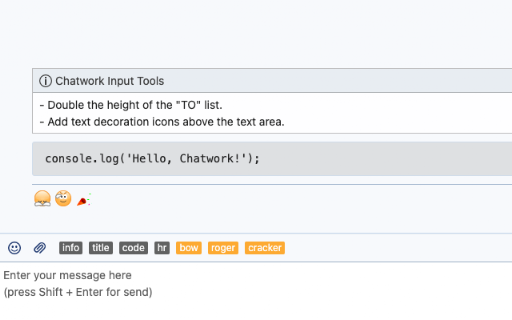
A Chrome extension designed for Chatwork users that simplifies the process of applying formatting tags. It provides UI buttons to automatically insert tags like [info] and [code] into the message input field.

Developer:Takahiro Maeda
Version:1.6.1
Size:6.39KiB
Last updated:

Overview

Installs

50K+

Rating

★ 4.5

15 reviews

Languages

2 locales

Includes English, 日本語

Market analysis

Review-backed positioning, friction, and market signals for this Chrome extension.

Backed by review samples

Macro category

Automation & Workflow Efficiency

Pricing friction

Low review signal

Complaint intensity

Moderate review signal

Listing & review signals
Observed signals from store listing text and review samples.

Listing positioning

The product is positioned as a productivity utility that adds shortcut buttons to Chatwork for inserting specific formatting tags. It emphasizes its ability to help users quickly wrap messages in [info] and [code] tags to improve communication clarity.

Inferred product pattern

A niche UI-enhancement utility for a specific enterprise communication platform.

Review-backed pain points

Users have experienced the input buttons disappearing after browser refreshes or restarts. Additionally, English-speaking users expressed frustration that the extension's description is provided only in Japanese.

Observed feature gaps

Lack of full English localization for the store listing and a history of stability issues following Chatwork or Chrome updates.

Tags
Chatwork ToolInput AssistantProductivityFormatting Utility
Target users

- Chatwork users

- Business professionals

- Developers using Chatwork

Primary use cases

- Inserting [info] blocks

- Inserting [code] blocks

- Fast formatting of chat messages

Positive themes

- Increased input speed

- Convenience of one-click formatting

- Responsive developer updates

Negative themes

- Intermittent UI disappearance

- Lack of English localization in descriptions

- Breakage following browser or platform updates

Observed friction

- Performance complaints detected

- No pricing friction observed as the tool appears to be free.

Evidence boundary: Analysis based on the store listing and 10 provided user reviews. Small sample size of reviews relative to the total user base.
Complaint summaries
Review-backed complaint signals grouped by operational area.

Support

No major support complaints, though one user mentioned difficulty in sending direct feedback to the developer.

Reliability

Reports of the tool intermittently stopping work or UI elements disappearing, often coinciding with browser or platform updates.

Privacy

No privacy or security complaints observed.

Access & pricing

- Free usage observed

- No account requirement observed

- Free plan or free usage claimed

Store listing facts

Listing assets

- Screenshots: 1

- Videos: 0

- Languages: 2

Trust signals

- Developer contact

Store metadata

- Version: 1.6.1

- Size: 6.39KiB

- Last updated:

Listing SEO keywords

Search intent keywords
Keyword signals for evaluating how users may discover, compare, or search for this extension category.

Core discovery

Chatwork formattingChatwork [info] tagChatwork [code] tagChatwork input helper

Comparison

Chatwork manual formatting vs input tools

Problem

Chatwork slow formattingChatwork tag shortcuts

Alternative

Chatwork productivity extensionChatwork helper tool

Similar extensions

Jump to related discovery paths:

Screenshots

Chatwork Input Tools screenshot

Recommended Chrome extensions

Related listings from the same category, trending peers, and the same publisher portfolio.

Browse workflow