Undo Closed Tabs Button icon

Undo Closed Tabs Button Chrome Extension Analysis

Tab & Bookmark Productivity

Chrome extension ID: ieehkmoiljghfkejgahoheemdjpdinml

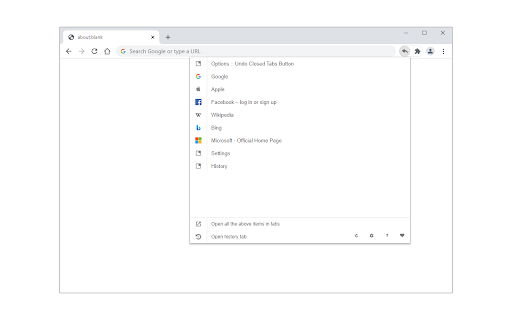
Undo Closed Tabs Button provides a popup list of recently closed browser tabs, allowing users to restore them individually. It includes basic management tools like clearing history or viewing all closed tabs, functioning as an alternative to the native browser history interface.

Developer:unixeco
Version:0.2.4
Size:40.6KiB
Last updated:

Overview

Installs

30K+

Rating

4.4

66 reviews

Languages

1 locales

Includes English

Market analysis

Review-backed positioning, friction, and market signals for this Chrome extension.

Backed by review samples

Macro category

Tab & Bookmark Productivity

Pricing friction

Low review signal

Complaint intensity

Moderate review signal

Listing & review signals
Observed signals from store listing text and review samples.

Listing positioning

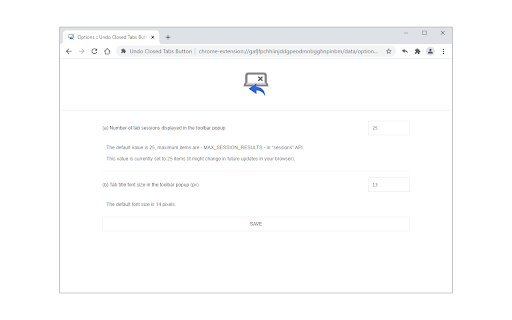
The extension is positioned as a utility for easily reopening closed tabs via a toolbar popup interface. It emphasizes customization features, such as setting the number of visible items and toggling a dark mode theme.

Inferred product pattern

Simple utility extension that wraps browser API access to history/closed sessions in a standard popup UI.

Review-backed pain points

Users are frustrated by a bug where the history limit setting does not persist or apply correctly beyond 25 items, as well as the inability to resize the popup window.

Observed feature gaps

Missing search functionality, inability to customize popup width, lack of timestamp data for closed pages, and missing 'one-click' undo for the most recently closed tab.

Tags
Tab ManagerBrowser ProductivityHistory Tool
Target users

- Power users

- Research-focused browser users

- Multitaskers managing many tabs

Primary use cases

- Restoring accidentally closed tabs

- Managing multiple recently closed sessions

- Quick access to tab history

Positive themes

- Utility as an enhancement to native browser behavior

- Ability to select specific tabs from a list rather than just the last closed one

- Clean, functional interface

Negative themes

- Buggy configuration settings (specifically the cap on stored history items)

- Poor UI spacing/padding

- Lack of advanced features like search or timestamping

- Redundancy with browser native history

Observed friction

- None; the product is free.

Evidence boundary: The analysis is based on user reviews highlighting UI limitations and setting bugs, balanced against the extension's core utility for managing tab history. Review data includes feedback from various years, meaning some bugs may have been addressed or the UI may have evolved beyond early complaints.
Complaint summaries
Review-backed complaint signals grouped by operational area.

Support

Users have reported bugs regarding the history limit settings, but there is no specific complaint about the lack of developer response.

Reliability

Some users report that the history limit settings are ineffective and that the tool interacts unexpectedly with browser history clearing mechanisms.

Privacy

No specific privacy breaches reported; some users expressed concern over the extension's access to browser history data.

Access & pricing

- Free usage observed

- No account requirement observed

- Free plan or free usage claimed

Store listing facts

Listing assets

- Screenshots: 2

- Videos: 0

- Languages: 1

Trust signals

- Privacy policy

- Developer contact

- Official website

Store metadata

- Version: 0.2.4

- Size: 40.6KiB

- Last updated:

Listing SEO keywords

Search intent keywords
Keyword signals for evaluating how users may discover, compare, or search for this extension category.

Core discovery

undo closed tabsreopen closed tab extensionchrome tab managerbrowser history utility

Comparison

Easy Undo Closed Tab alternativechrome restore tabs tool

Problem

cannot reopen closed tabchrome history limittoo many tabs closed

Alternative

best tab manager extensionrestore session chrome

Similar extensions

Jump to related discovery paths:

Screenshots

Undo Closed Tabs Button screenshot

Links

Recommended Chrome extensions

Related listings from the same category, trending peers, and the same publisher portfolio.

Browse tools
Font Finder icon

Font Finder

unixeco

An easy-to-use font inspector to get CSS styles of the selected element

Installs

400K+

Rating

4.5

Google Dictionary (by Google) icon

Google Dictionary (by Google)

dictionary-extension-dev

View definitions easily as you browse the web.

Installs

2.0M+

Rating

4.4

AI Chat for Search icon

AI Chat for Search

AI Chat for Search Team

Display AI Chat response alongside search engine results

Installs

2.0M+

Rating

4.6

WPS浏览器助手:文档在线阅读编辑 icon

WPS浏览器助手:文档在线阅读编辑

金山PDF

PDF、Excel、Word、PPT等文档无需下载即可在线预览,还能对文档进行编辑、打印、转换等处理。

Installs

2.0M+

Rating

3.0

Planet Search icon

Planet Search

Free VPN Planet

Enchanced default search engine.

Installs

2.0M+

Rating

3.4

Lightshot (screenshot tool) icon

Lightshot (screenshot tool)

Skillbrains

Simple and convenient screenshot tool. Select an area, edit your screenshot and upload it to the server.

Installs

2.0M+

Rating

4.4

Screen Recorder & Screenshot App for Chrome | Scrnli icon

Screen Recorder & Screenshot App for Chrome | Scrnli

scrnli

Screen recorder for Chrome: capture, edit, share screenshots and videos instantly

Installs

1.0M+

Rating

4.7

CSFloat Market Checker icon

CSFloat Market Checker

CSFloat Inc.

Shows the float value, paint seed, and more of Counter-Strike (CS:GO & CS2) items on the Steam Market or Inventories

Installs

1.0M+

Rating

3.9

PrintFriendly: Reader Mode, PDF Editor, Save as PDF & Screenshot icon

PrintFriendly: Reader Mode, PDF Editor, Save as PDF & Screenshot

PrintFriendly

Print clean web pages, save as PDF, edit PDFs, and capture full-page screenshots. Integrates with ChatGPT, Claude, and Gemini.

Installs

1.0M+

Rating

4.6

Mobile simulator - responsive testing tool icon

Mobile simulator - responsive testing tool

François Duprat

Smartphone and tablet simulator on computer with several models to test mobile responsive websites.

Installs

1.0M+

Rating

4.9