Bulk Select Google Photos icon

Bulk Select Google Photos Chrome Extension Analysis

Automation & Workflow Efficiency

Chrome extension ID: iiclcpgkbjgfojcnhddidfndclofjbll

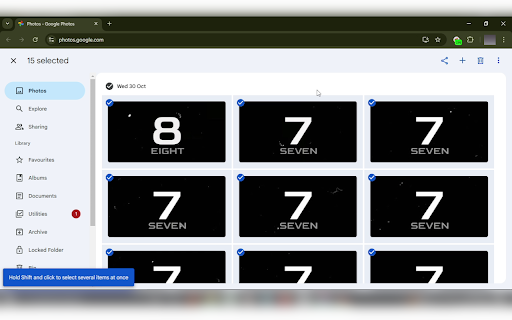
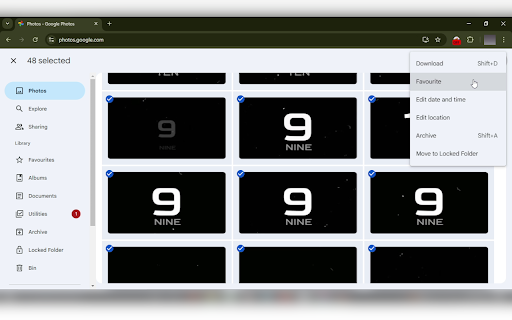
A Chrome extension designed to automate the selection of multiple photos on Google Photos. It allows users to select images automatically as they scroll, eliminating the need for tedious manual clicking.

Developer:App Alchemist
Version:1.40
Size:39.23KiB
Last updated:

Overview

Installs

4K+

Rating

4.2

25 reviews

Languages

1 locales

Includes English (United States)

Market analysis

Review-backed positioning, friction, and market signals for this Chrome extension.

Backed by review samples

Macro category

Automation & Workflow Efficiency

Pricing friction

Low review signal

Complaint intensity

Moderate review signal

Listing & review signals
Observed signals from store listing text and review samples.

Listing positioning

The product positions itself as a powerful utility that enhances the Google Photos experience by enabling one-click bulk selection. It emphasizes efficiency in managing photos through mass deletion, downloading, archiving, and sharing, while highlighting local privacy.

Inferred product pattern

Single-purpose UI overlay that automates a repetitive manual task on a third-party platform.

Review-backed pain points

Users have reported that the extension occasionally stops working or that the download dialogue fails to trigger. Some users noted lag during the selection process and compatibility issues with uBlock Origin.

Observed feature gaps

Lack of seamless integration with popular adblockers and inconsistent reliability of the download trigger.

Tags
Google PhotosBulk SelectionPhoto ManagementProductivity Tool
Target users

- Google Photos users

- People with large digital photo libraries

- Users performing cloud storage cleanup

Primary use cases

- Bulk deleting unwanted photos

- Downloading large sets of images

- Mass archiving photos

Positive themes

- Significant time savings

- Simplicity and ease of use

- Effectiveness for mass deletion

Negative themes

- Intermittent functionality

- Download button failures

- Performance lag

- Conflicts with adblockers

Observed friction

- Performance complaints detected

- No pricing friction observed; the tool appears to be free, with some users mentioning voluntary donations.

Evidence boundary: Extracted from the official store listing and a sample of 10 user reviews. The review sample size is small relative to the total user base.
Complaint summaries
Review-backed complaint signals grouped by operational area.

Support

No direct support complaints, though users have expressed frustration over intermittent technical failures.

Reliability

Reports of the tool not working for some users and inconsistency with the download function.

Privacy

No privacy complaints found; listing claims 100% local operation.

Access & pricing

- Free usage observed

- No account requirement observed

- Free plan or free usage claimed

Store listing facts

Listing assets

- Screenshots: 3

- Videos: 1

- Languages: 1

Trust signals

- Developer contact

- Support link

Store metadata

- Version: 1.40

- Size: 39.23KiB

- Last updated:

Listing SEO keywords

Search intent keywords
Keyword signals for evaluating how users may discover, compare, or search for this extension category.

Core discovery

bulk select google photosgoogle photos mass deletegoogle photos bulk download

Comparison

google photos bulk select vs manualbest google photos management extension

Problem

how to select all photos in google photosgoogle photos bulk delete not workingselect multiple photos google photos fast

Alternative

google photos selection toolmass photo downloader for google photos

Similar extensions

Jump to related discovery paths:

Screenshots

Bulk Select Google Photos screenshot

Links

Recommended Chrome extensions

Related listings from the same category, trending peers, and the same publisher portfolio.

Browse tools
DuckDuckGo Send Email Formatter icon

DuckDuckGo Send Email Formatter

App Alchemist

Generate DuckDuckGo Email special recipient address ([email protected]) with just one click.

Installs

122

Rating

2.7

Transpose ▲▼ pitch ▹ speed ▹ loop icon

Transpose ▲▼ pitch ▹ speed ▹ loop

Transpose Studio

Change the pitch and speed of music and loop sections directly on YouTube, Spotify and many other streaming platforms.

Installs

1.0M+

Rating

4.5

NopeCHA: CAPTCHA Solver icon

NopeCHA: CAPTCHA Solver

NopeCHA, LLC

AI Solver for reCAPTCHA, hCAPTCHA, and all CAPTCHA.

Installs

1.0M+

Rating

4.3

Ecosia - The search engine that plants trees icon

Ecosia - The search engine that plants trees

Ecosia GmbH

This extension sets your search engine to Ecosia and customizes your new tab page so you can plant trees with every search.

Installs

1.0M+

Rating

4.7

Video Downloader Plus icon

Video Downloader Plus

Video Downloader Plus

Download and save videos from any website instantly. A fast, simple video downloader that just works.

Installs

1.0M+

Rating

4.5

Wordtune: AI Paraphrasing and Grammar Tool icon

Wordtune: AI Paraphrasing and Grammar Tool

Wordtune

Unlock your potential with Wordtune's free AI writer – paraphrase, rewrite, translate, fix grammar, and more.

Installs

1.0M+

Rating

4.6

Keep Awake your System or Display icon

Keep Awake your System or Display

Dorian Hiller

Keep your system or display from going to sleep with just one click!

Installs

1.0M+

Rating

5.0

Поиск Яндексa icon

Поиск Яндексa

Yandex

Вводите запросы в адресную строку и получайте ответы от Яндекса

Installs

1.0M+

Rating

3.2

Bing Search and Homepage icon

Bing Search and Homepage

Microsoft Corporation

Set Microsoft Bing as your default homepage and default search engine

Installs

1.0M+

Rating

2.3

uberAgent icon

uberAgent

Cloud Software Group, Inc.

Enables uberAgent to collect web app usage and performance data (e.g., foreground tab, page load duration) from Chrome.

Installs

1.0M+

Rating

3.0