Dark Mode & Grade What-If for Blackboard Learn icon

Dark Mode & Grade What-If for Blackboard Learn Chrome Extension Analysis

Automation & Workflow Efficiency

Chrome extension ID: iinniodbidalfcpiidojklmpjkefnbll

A Chrome extension designed for students using Blackboard Learn (Original and Ultra). It provides a custom dark mode and a local grade 'what-if' calculator to help users track their academic standing without retyping data.

Version:1.0.3
Size:96.89KiB
Last updated:

Overview

Installs

1K+

Rating

★ 5.0

9 reviews

Languages

50 locales

Includes Deutsch, English, Indonesia, Kiswahili...

Market analysis

Review-backed positioning, friction, and market signals for this Chrome extension.

No review samples found

Macro category

Automation & Workflow Efficiency

Pricing friction

Low review signal

Complaint intensity

Low review signal

Listing & review signals
Observed signals from store listing text and review samples.

Listing positioning

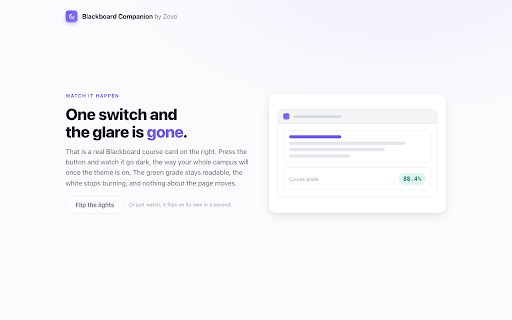
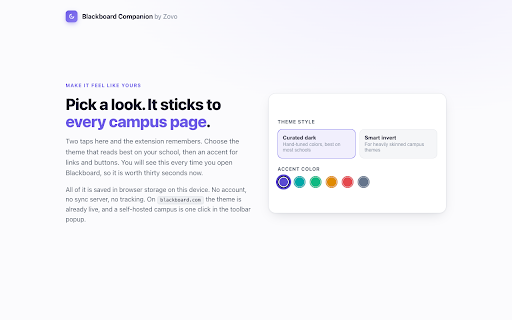
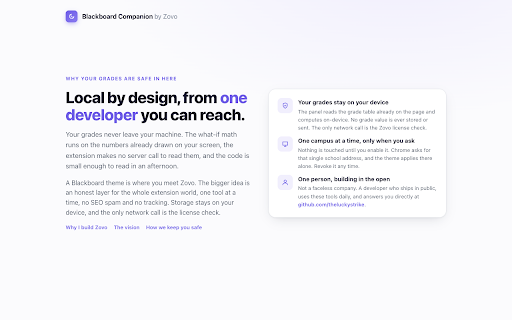
The product positions itself as a specialized utility to improve the Blackboard Learn user experience through a hand-authored dark theme and local grade calculations. It emphasizes privacy and ease of use, specifically highlighting that no account is required and data stays on the device.

Inferred product pattern

A niche productivity utility for specific LMS users featuring a privacy-first, local-only execution model.

Review-backed pain points

review-backed data is not available

Observed feature gaps

The listing implies a lack of cross-device synchronization due to its local-only storage model.

Tags
Dark ModeGrade CalculatorStudent ProductivityBlackboard Utility
Target users

- Students using Blackboard Learn

- Higher education users

Primary use cases

- Applying dark mode to Blackboard

- Calculating required grades for final exams

- Tracking assignment due dates

Positive themes

- review-backed data is not available

Negative themes

- review-backed data is not available

Observed friction

- The product offers a free tier for basic dark mode and read-only grades, with a Pro tier available via a $99 lifetime purchase or a $4.99 monthly subscription.

Evidence boundary: Analysis based on the Chrome Web Store listing description and developer-provided feature sets. No user reviews were available to validate claims or identify user-reported issues.
Complaint summaries
Review-backed complaint signals grouped by operational area.

Support

No complaints found; support contact is provided via email.

Reliability

No complaints found.

Privacy

No complaints found; the developer explicitly states that grades never leave the user's device.

Access & pricing

- Free entry with paid features

- No account requirement observed

- Limited free usage observed

Store listing facts

Listing assets

- Screenshots: 3

- Videos: 0

- Languages: 50

Trust signals

- Developer contact

Store metadata

- Version: 1.0.3

- Size: 96.89KiB

- Last updated:

Listing SEO keywords

Search intent keywords
Keyword signals for evaluating how users may discover, compare, or search for this extension category.

Core discovery

Blackboard dark modeBlackboard grade calculatorBlackboard what-if gradeBlackboard Ultra dark theme

Comparison

Blackboard dark themeBlackboard grade tracker

Problem

Blackboard bright screenBlackboard grade calculationBlackboard eye strain

Alternative

Blackboard dark mode extensionLMS grade calculator

Similar extensions

Jump to related discovery paths:

Screenshots

Dark Mode & Grade What-If for Blackboard Learn screenshot

Recommended Chrome extensions

Related listings from the same category, trending peers, and the same publisher portfolio.

Browse education
CleanJSON — Offline JSON Viewer & Formatter icon

CleanJSON — Offline JSON Viewer & Formatter

Unknown developer

Format, validate and explore JSON offline. Tree view, syntax highlighting, one-click copy. Nothing leaves your browser.

Installs

1K+

Rating

★ 5.0

Echo360 Speed Keeper icon

Echo360 Speed Keeper

Unknown developer

Remembers your preferred Echo360 lecture speed and re-applies it automatically every time you open a recording.

Installs

1K+

Rating

★ 5.0

Google Translate icon

Google Translate

google-translate-chrome-extension-owners

View translations easily as you browse the web. By the Google Translate team.

Installs

38.0M+

Rating

★ 4.2

EndNote Click icon

EndNote Click

EndNote Click

Fast, one-click access to millions of research papers.

Installs

6.0M+

Rating

★ 4.0

BetterCampus (prev. BetterCanvas) icon

BetterCampus (prev. BetterCanvas)

BetterCampus

Feature packed extension for Canvas.

Installs

2.0M+

Rating

★ 4.7

Language Reactor icon

Language Reactor

Dioco

Learn languages effectively by watching films and series in your target language.

Installs

2.0M+

Rating

★ 4.2

MyBib: Free Citation Generator icon

MyBib: Free Citation Generator

MyBib

Automatically create APA style, MLA format, and Harvard referencing style citations with our citation generator add-on for Chrome.

Installs

1.0M+

Rating

★ 4.8

Brisk Teaching - AI that Works Where Teachers Work icon

Brisk Teaching - AI that Works Where Teachers Work

Brisk Teaching

AI for teachers, right inside Google Docs, Classroom, YouTube, and more. Tell Brisk what you need and save 10+ hours a week.

Installs

1.0M+

Rating

★ 4.7

Speechify — Text to Speech icon

Speechify — Text to Speech

Speechify

Read aloud any Google Doc, PDF, webpage, or book with text to speech (TTS). Natural sounding voices in 60+ languages & 1,000 voices.

Installs

1.0M+

Rating

★ 4.6

LibKey Nomad icon

LibKey Nomad

Third Iron LLC

One-click access to millions of scholarly articles.

Installs

1.0M+

Rating

★ 4.5