Full Page Screenshot - Screen Capture & Editor icon

Full Page Screenshot Chrome Extension Analysis

Automation & Workflow Efficiency

Store listing title: Full Page Screenshot - Screen Capture & Editor

Chrome extension ID: ijidfpoenjmfdabnmchmdoopghmjnjij

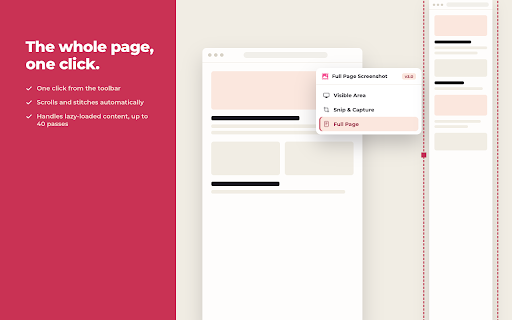
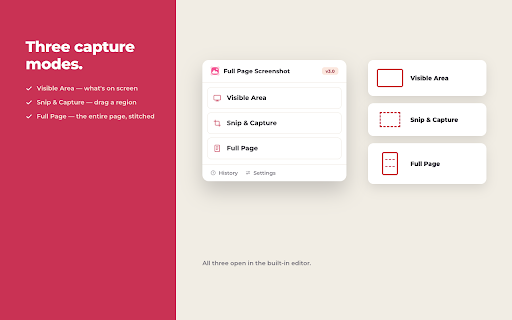
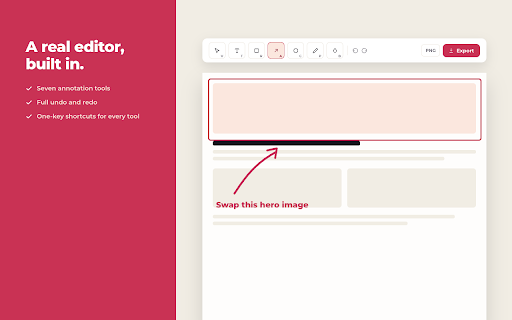
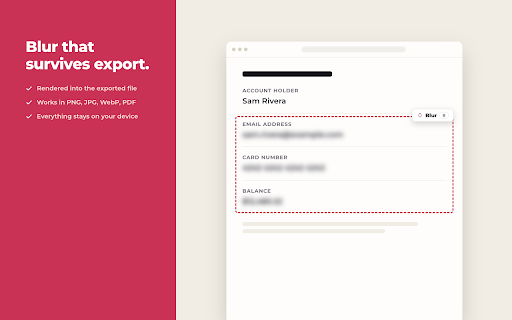
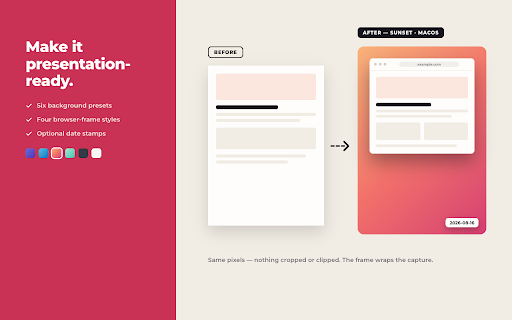
Full Page Screenshot is a Chrome extension designed to capture complete webpages, automatically scrolling and stitching content into a single image. It includes integrated tools for annotating, cropping, blurring, and exporting screenshots in multiple formats such as PNG, JPG, WebP, and PDF. The extension processes all data locally within the browser, ensuring user privacy without requiring accounts or cloud storage.

Developer:Kaushik Prasath
Version:3.1.0
Size:882KiB
Last updated:

Overview

Installs

100K+

Rating

★ 4.8

569 reviews

Languages

55 locales

Includes Deutsch, English, English (Australia), English (United Kingdom)...

Market analysis

Review-backed positioning, friction, and market signals for this Chrome extension.

Backed by review samples

Macro category

Automation & Workflow Efficiency

Pricing friction

Low review signal

Complaint intensity

Low review signal

Listing & review signals
Observed signals from store listing text and review samples.

Listing positioning

The store listing positions 'Full Page Screenshot' as a straightforward, one-click solution for capturing entire webpages, emphasizing its advanced handling of complex layouts. It highlights robust built-in editing features like annotation, cropping, and blurring, alongside various export formats. A key differentiator is its 100% local and private operation, requiring no account or server interaction, targeting professionals like developers, designers, and QA for documentation and review.

Inferred product pattern

A privacy-centric, free Chrome extension that offers robust, one-click full-page screenshot capture with integrated annotation and export capabilities, all processed entirely locally.

Review-backed pain points

The primary pain point observed is the distortion and misalignment of the UI during the automatic scrolling and capture, which can lead to inaccurate screenshots. Users also express a desire for manual scrolling control as a fallback when automatic capture fails.

Observed feature gaps

A notable feature gap is the absence of a manual scrolling option during the capture process, which could provide users more control when the automated engine struggles with specific webpage layouts or encounters UI distortions.

Tags
Full Page CaptureScreenshot ToolWebpage AnnotationProductivity ToolOffline Utility
Target users

- Developers & Designers

- QA & Testing Professionals

- Content Creators

- Students & Researchers

- Business & Marketing Professionals

- Support Teams

Primary use cases

- Capture full webpage designs for review, comparison, or documentation

- Screenshot entire pages to document bugs and visual regressions for QA

- Archive articles, landing pages, or social media profiles

- Save reference pages, papers, or documentation for academic or research purposes

- Screenshot long conversation threads or error pages for support tickets

Positive themes

- Highly effective for product designers to present website references to clients

- Ease of use, enabling full page capture with a single click

- Useful for generating images for AI tools like ChatGPT

- Delivers on its core functionality and is generally helpful

Negative themes

- UI distortion and misalignment during the automatic scrolling capture process

- Lack of an option for manual scrolling to assist with screenshots

Observed friction

- Performance complaints detected

- No pricing friction is observed, as the extension is explicitly described as free with no subscriptions or accounts required, operating entirely locally.

Evidence boundary: This analysis is based on the Chrome Web Store listing's title, short and long descriptions, developer information, and a sample of 10 user reviews, including one low-rated review providing specific feedback. The limited number of available reviews (21 total comments) may restrict the comprehensive identification of all potential user pain points, feature requests, or long-term reliability issues.
Complaint summaries
Review-backed complaint signals grouped by operational area.

Support

No support, account blocking, or refund-related complaints were found in the available review samples.

Reliability

One review indicated issues with the extension's reliability, specifically mentioning UI distortion and misalignment during the automatic scrolling capture process.

Privacy

No privacy or security complaints were found. The listing strongly emphasizes 100% local processing, no data sending, no analytics, and no account requirements.

Access & pricing

- Free usage observed

- No account requirement observed

- Free plan or free usage claimed

Store listing facts

Listing assets

- Screenshots: 5

- Videos: 0

- Languages: 55

Trust signals

- Privacy policy

- Developer contact

- Official website

Store metadata

- Version: 3.1.0

- Size: 882KiB

- Last updated:

Listing SEO keywords

Search intent keywords
Keyword signals for evaluating how users may discover, compare, or search for this extension category.

Core discovery

full page screenshot chromecapture entire webpagewebpage annotation toolscreenshot editor extensionoffline screenshot tool

Comparison

full page screenshot vs [competitor]best chrome full page screenshot

Problem

how to screenshot full pagewebpage screenshot distortion fixannotate long screenshotfull page capture issues

Alternative

full page screenshot alternativeschrome screenshot extensions

Similar extensions

Jump to related discovery paths:

Screenshots

Full Page Screenshot - Screen Capture & Editor screenshot

Links

Recommended Chrome extensions

Related listings from the same category, trending peers, and the same publisher portfolio.

Browse tools
WebChatGPT: Prompt library with web access icon

WebChatGPT: Prompt library with web access

WebChatGPT

Augment your ChatGPT prompts with relevant web search results through web browsing.

Installs

1.0M+

Rating

★ 4.2

Video Downloader Plus icon

Video Downloader Plus

Video Downloader Plus

Download and save videos from any website instantly. A fast, simple video downloader that just works.

Installs

1.0M+

Rating

★ 4.5

Wordtune: AI Paraphrasing and Grammar Tool icon

Wordtune: AI Paraphrasing and Grammar Tool

Wordtune

Unlock your potential with Wordtune's free AI writer – paraphrase, rewrite, translate, fix grammar, and more.

Installs

1.0M+

Rating

★ 4.6

Поиск Яндексa icon

Поиск Яндексa

Yandex

Вводите запросы в адресную строку и получайте ответы от Яндекса

Installs

1.0M+

Rating

★ 3.2

Bing Search and Homepage icon

Bing Search and Homepage

Microsoft Corporation

Set Microsoft Bing as your default homepage and default search engine

Installs

1.0M+

Rating

★ 2.7

uberAgent icon

uberAgent

Cloud Software Group, Inc.

Enables uberAgent to collect web app usage and performance data (e.g., foreground tab, page load duration) from Chrome.

Installs

1.0M+

Rating

★ 3.0

Ace Script icon

Ace Script

Ace Stream

Everything can be scripted, allowing your browser to do more!

Installs

1.0M+

Rating

★ 3.4

MSN + Bing for Chrome icon

MSN + Bing for Chrome

Microsoft Corporation

Set MSN as your homepage and Bing as your search engine

Installs

1.0M+

Rating

★ 4.1

Google Analytics Opt-out Add-on (by Google) icon

Google Analytics Opt-out Add-on (by Google)

ga-extension-publishers

Tells the Google Analytics JavaScript not to send information to Google Analytics.

Installs

1.0M+

Rating

★ 4.0

ActivID CMS extension icon

ActivID CMS extension

hid-global-chrome-web-store

ActivID Credential Management System Extension

Installs

1.0M+

Rating

★ 1.0