PDF Convert – Merge – Resize icon

PDF Convert Chrome Extension Analysis

Automation & Workflow Efficiency

Store listing title: PDF Convert – Merge – Resize

Chrome extension ID: ijkmkaioadigfehngcicbapobilmedeg

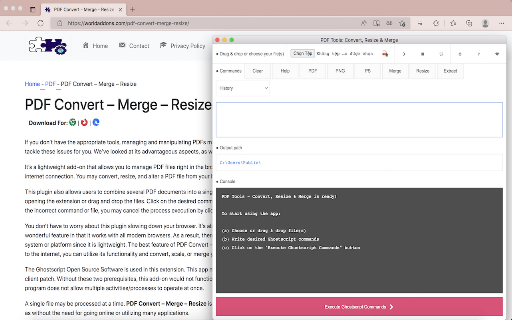
A utility extension for Chrome that provides PDF manipulation capabilities including merging and resizing. It requires the user to install Ghostscript and a native client patch on their local machine to function.

Developer:celinakeisha.us
Version:0.1
Size:41.3KiB
Last updated:

Overview

Installs

166

Rating

4.7

9 reviews

Languages

1 locales

Includes English

Market analysis

Review-backed positioning, friction, and market signals for this Chrome extension.

Backed by review samples

Macro category

Automation & Workflow Efficiency

Pricing friction

Low review signal

Complaint intensity

Low review signal

Listing & review signals
Observed signals from store listing text and review samples.

Listing positioning

The product is positioned as a lightweight browser extension that allows users to edit, convert, resize, and combine PDF files. It leverages Ghostscript, an open-source software, to perform these tasks locally via a native messaging bridge.

Inferred product pattern

Native-bridge utility that provides a browser interface for local open-source software.

Review-backed pain points

A user reported experiencing small, unspecified errors during use.

Observed feature gaps

The setup process is highly complex, requiring both external software (Ghostscript) and a third-party native client patch to be installed on the OS.

Tags
PDF EditorPDF ConverterPDF MergeDocument ManagementGhostscript Utility
Target users

- Office workers

- Students

- Users preferring local file processing over cloud tools

Primary use cases

- Converting DOCX files to PDF

- Resizing PDF documents

- Merging multiple PDF files

- Editing PDFs without leaving the browser

Positive themes

- Effective PDF resizing and editing

- Successful document conversion

- Convenience of browser-based management

Negative themes

- Occasional unspecified errors

Observed friction

- No pricing friction observed; no costs mentioned in listing or reviews.

Evidence boundary: Data extracted from the store listing and 9 user reviews. Small review sample size limits the breadth of sentiment analysis.
Complaint summaries
Review-backed complaint signals grouped by operational area.

Support

No support or account complaints found in provided samples.

Reliability

Generally high reliability, though one user mentioned encountering small errors.

Privacy

No privacy or security complaints observed in review samples.

Access & pricing

- Free usage observed

- No account requirement observed

- Free plan or free usage claimed

Store listing facts

Listing assets

- Screenshots: 1

- Videos: 0

- Languages: 1

Trust signals

- Privacy policy

- Developer contact

- Official website

- Support link

Store metadata

- Version: 0.1

- Size: 41.3KiB

- Last updated:

Listing SEO keywords

Search intent keywords
Keyword signals for evaluating how users may discover, compare, or search for this extension category.

Core discovery

PDF converter browser extensionresize PDF in Chromemerge PDF files locallyGhostscript Chrome extension

Comparison

PDF Convert Merge Resize alternativesbest free PDF browser extensionGhostscript vs online PDF editors

Problem

how to resize PDF in browsercombine PDF files without uploadingconvert docx to PDF chrome

Alternative

PDF merge toollocal PDF editorGhostscript interface

Similar extensions

Jump to related discovery paths:

Screenshots

PDF Convert – Merge – Resize screenshot

Links

Recommended Chrome extensions

Related listings from the same category, trending peers, and the same publisher portfolio.

Browse workflow