Google Vids Screen Recorder icon

Google Vids Screen Recorder Chrome Extension Analysis

Automation & Workflow Efficiency

Chrome extension ID: iklnnbgdcppplombffihcijanngoeifm

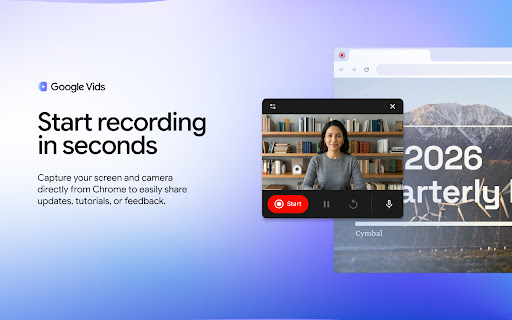
This extension enables users to record their desktop, specific browser windows, or tabs along with webcam and audio. It is designed for quick communication, tutorials, and project feedback, offering a 30-minute recording limit and direct cloud storage integration.

Developer:Google
Version:1.58.1
Size:1.85MiB
Last updated:

Overview

Installs

100K+

Rating

4.5

46 reviews

Languages

31 locales

Includes Deutsch, English, English (United Kingdom), Indonesia...

Market analysis

Review-backed positioning, friction, and market signals for this Chrome extension.

Backed by review samples

Macro category

Automation & Workflow Efficiency

Pricing friction

Low review signal

Complaint intensity

Moderate review signal

Listing & review signals
Observed signals from store listing text and review samples.

Listing positioning

Google Vids Screen Recorder is positioned as a lightweight, integrated productivity tool for capturing screen and camera updates directly within the Chrome browser. It emphasizes seamless integration with the Google Workspace ecosystem, allowing users to move from recording to editing in Google Vids without switching applications.

Inferred product pattern

First-party Google browser utility serving as an acquisition bridge to the Google Vids editing platform.

Review-backed pain points

Users frequently report technical instability, specifically the extension failing to launch, audio capture issues, and screen freezing during recordings.

Observed feature gaps

Missing features include default folder selection in Google Drive, better support for multiple Google account switching, and advanced cursor visibility controls.

Tags
Screen RecorderGoogle VidsVideo CaptureChrome ExtensionProductivity
Target users

- Product Teams

- Educators

- Remote Workers

- Google Workspace Users

Primary use cases

- Recording software demos

- Creating educational tutorials

- Replacing long-form emails with video updates

- Documenting bugs

Positive themes

- Easy to use

- Seamless integration with Google ecosystem

- Free of cost

- Clean interface

Negative themes

- Audio recording failures

- Inconsistent extension startup reliability

- Lack of mouse cursor visibility in recordings

- Inability to select specific Google accounts for saving files

Observed friction

- Performance complaints detected

- No pricing friction reported; the tool is marketed as free for Google Workspace/personal account users.

Evidence boundary: Evidence is based on a mix of positive usability feedback and specific technical bug reports regarding startup and capture reliability found in store reviews. Review sample size is relatively small (38 comments) relative to the 100k user base; performance complaints may be version-specific.
Complaint summaries
Review-backed complaint signals grouped by operational area.

Support

Users expressed frustration over the lack of tutorials or troubleshooting documentation.

Reliability

Significant complaints regarding unreliable startup, screen freezing during recording, and audio capture failure.

Privacy

None observed.

Access & pricing

- Free usage observed

- Account required for core usage

- Free plan or free usage claimed

Store listing facts

Listing assets

- Screenshots: 5

- Videos: 1

- Languages: 31

Trust signals

- Privacy policy

- Developer contact

- Official website

- Support link

Store metadata

- Version: 1.58.1

- Size: 1.85MiB

- Last updated:

Listing SEO keywords

Search intent keywords
Keyword signals for evaluating how users may discover, compare, or search for this extension category.

Core discovery

Google Vids extensionChrome screen recorderrecord screen for Google Vidsbrowser video capture

Comparison

Loom alternativeVidyard for ChromeScreen recorder for work

Problem

screen recorder not workingGoogle Vids audio issueextension won't launch

Alternative

best free screen recordervideo feedback tool

Similar extensions

Jump to related discovery paths:

Screenshots

Google Vids Screen Recorder screenshot

Links

Recommended Chrome extensions

Related listings from the same category, trending peers, and the same publisher portfolio.

Browse communication
Chrome Remote Desktop icon

Chrome Remote Desktop

Chrome Remote Desktop Release Managers

Chrome Remote Desktop extension

Installs

33.0M+

Rating

3.1

Google Translate icon

Google Translate

google-translate-chrome-extension-owners

View translations easily as you browse the web. By the Google Translate team.

Installs

30.0M+

Rating

4.2

TWP - Translate [BETA] icon

TWP - Translate [BETA]

Filipe Dev

THIS EXTENSION IS FOR BETA TESTING

Installs

100K+

Rating

4.8

ScreenPal - Screen Recorder & Video Editor icon

ScreenPal - Screen Recorder & Video Editor

ScreenPal (formerly Screencast-O-Matic)

Record your screen & webcam, take screenshots, edit videos & images - easy & free!

Installs

100K+

Rating

4.3

WEB.DE MailCheck icon

WEB.DE MailCheck

1&1 Mail & Media GmbH

Der sichere Klick in Dein Postfach.

Installs

90K+

Rating

3.4

HyperWrite: AI Writing Assistant and Autocomplete App icon

HyperWrite: AI Writing Assistant and Autocomplete App

Otherside AI

Smart autocomplete for Gmail, Google Docs, ChatGPT, and more. An AI writing assistant that predicts words and sentences.

Installs

80K+

Rating

4.2

Zight Screen Recorder, Screenshot App icon

Zight Screen Recorder, Screenshot App

Zight

The best screen recorder for Chrome. Capture your screen, webcam, and instantly share videos and screenshots in seconds.

Installs

80K+

Rating

4.5

Voila – AI Assistant, Copilot and AI Writer icon

Voila – AI Assistant, Copilot and AI Writer

Initial condition

Seamless personal AI assistant powered by GPT-5 to help you create, write, summarize, brainstorm, and research on any website.

Installs

80K+

Rating

4.7

Multi Email Forward by cloudHQ icon

Multi Email Forward by cloudHQ

cloudHQ

Forward multiple Gmail™ emails with one click. Transfer or migrate your Gmail™ emails.

Installs

80K+

Rating

4.1

FlowCrypt: Encrypt Gmail with PGP icon

FlowCrypt: Encrypt Gmail with PGP

flowcrypt-release

Simple end-to-end encryption to secure email and attachments on Google.

Installs

70K+

Rating

4.7