Team Bookmarks by URLflows icon

Team Bookmarks by URLflows Chrome Extension Analysis

Automation & Workflow Efficiency

Chrome extension ID: jckbodpjjkmjhadflfkjjnbkmockhlcf

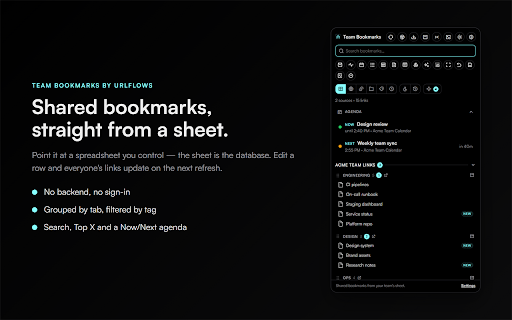
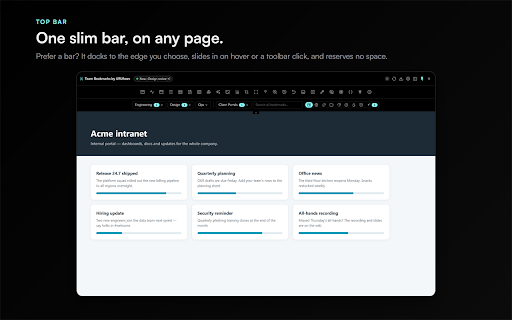
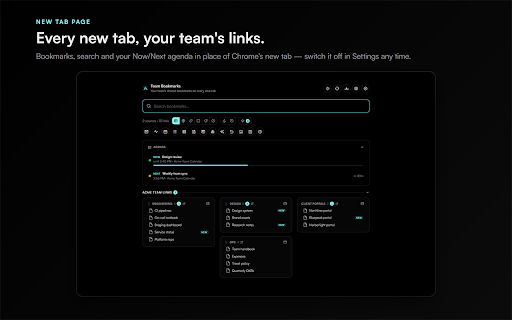
URLflows for Teams is a Chrome extension that renders a customizable, hideable bookmark bar using data from shared spreadsheets or CSVs. It includes additional productivity utilities like window resizing, screenshot tools, and PII masking.

Developer:URLflows (uk)
Version:2.4.1
Size:1.02MiB
Last updated:

Overview

Installs

0

Rating

★ —

0 reviews

Languages

1 locales

Includes English (United States)

Market analysis

Review-backed positioning, friction, and market signals for this Chrome extension.

No review samples found

Macro category

Automation & Workflow Efficiency

Pricing friction

Low review signal

Complaint intensity

Low review signal

Listing & review signals
Observed signals from store listing text and review samples.

Listing positioning

The product is positioned as a non-intrusive team collaboration tool that uses existing Google Sheets as a database. It emphasizes a 'no-account' and 'free forever' model to reduce friction for teams already using spreadsheets.

Inferred product pattern

A spreadsheet-driven utility bar that provides team-shared links and developer/productivity tools without requiring a dedicated backend account.

Review-backed pain points

Review-backed data is not available.

Observed feature gaps

The extension is read-only; bookmarks cannot be managed directly within the extension UI and must be edited in the source spreadsheet.

Tags
Team BookmarksWorkflow ToolGoogle SheetsProductivity Bar
Target users

- Teams using Google Sheets

- Operations teams

- Workflow managers

Primary use cases

- Centralizing team bookmarks via shared spreadsheets

- Quick access to shared team links

- On-page utility tasks like screen resizing and screenshotting

Positive themes

- Review-backed data is not available.

Negative themes

- Review-backed data is not available.

Observed friction

- No pricing friction observed; the developer claims the product is free forever with no paid tiers or ads.

Evidence boundary: Data extracted from the official Chrome Web Store product listing description. No user reviews are available to verify product reliability, performance, or actual user sentiment.
Complaint summaries
Review-backed complaint signals grouped by operational area.

Support

No review data available.

Reliability

No review data available.

Privacy

No review data available.

Access & pricing

- Free usage observed

- No account requirement observed

- Free plan or free usage claimed

Store listing facts

Listing assets

- Screenshots: 5

- Videos: 0

- Languages: 1

Trust signals

- Privacy policy

- Developer contact

- Official website

- Support link

Store metadata

- Version: 2.4.1

- Size: 1.02MiB

- Last updated:

Listing SEO keywords

Search intent keywords
Keyword signals for evaluating how users may discover, compare, or search for this extension category.

Core discovery

team bookmarksshared spreadsheet bookmarksGoogle Sheets bookmark barteam workflow tools

Comparison

shared bookmarks extensionteam link management

Problem

managing team linkssharing bookmarks with teamsyncing team bookmarks

Alternative

shared bookmarksteam link manager

Similar extensions

Jump to related discovery paths:

Screenshots

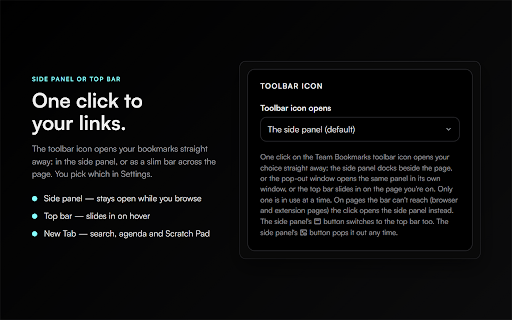
Team Bookmarks by URLflows screenshot

Links

Recommended Chrome extensions

Related listings from the same category, trending peers, and the same publisher portfolio.

Browse workflow
Docs Dimmer by URLflows icon

Docs Dimmer by URLflows

URLflows (uk)

Dark mode for Google Docs, Sheets & Slides. Dim the bright page to ease eye strain and strip dark backgrounds from AI pastes.

Installs

15

Rating

★ —

Meeting Assistant by URLflows icon

Meeting Assistant by URLflows

URLflows (uk)

Your calendars one click away in every meeting, a highlight that follows your pointer, and Scrum Assist for your team's boards.

Installs

9

Rating

★ —

Evernote Web Clipper icon

Evernote Web Clipper

Evernote

Use the Evernote extension to save things you see on the web into your Evernote account.

Installs

2.0M+

Rating

★ 4.5

AI Grammar Checker & Paraphraser – LanguageTool icon

AI Grammar Checker & Paraphraser – LanguageTool

lt-extension-publisher

Instantly Enhance Your Texts with LanguageTool’s Grammar Checker and Paraphrasing Tool

Installs

2.0M+

Rating

★ 3.3

Momentum icon

Momentum

Momentum

Transform your browser into a beautifully designed tab that helps you feel calm, keep focus, and stay energized.

Installs

2.0M+

Rating

★ 4.2

Адаптер Рутокен Коннект icon

Адаптер Рутокен Коннект

АО "Актив-Софт"

Защищенное TLS-соединение в браузере по ГОСТу с Рутокен

Installs

2.0M+

Rating

★ 1.5

MasteryConnect LockDown Browser icon

MasteryConnect LockDown Browser

Respondus Inc

LockDown Browser is a custom browser that locks down the exam environment within specific learning and assessment systems

Installs

2.0M+

Rating

★ 1.5

My Apps Secure Sign-in Extension icon

My Apps Secure Sign-in Extension

Microsoft

My Apps Secure Sign-in Extension

Installs

2.0M+

Rating

★ 1.3

Web Signer icon

Web Signer

Softplan Websigner Developers

Extensão para assinatura digital no browser

Installs

2.0M+

Rating

★ 3.4

Google Scholar PDF Reader icon

Google Scholar PDF Reader

scholar-chrome-extensions

Supercharge your paper reading: follow references, skim outline, jump to figures, cite and save.

Installs

2.0M+

Rating

★ 3.9