Gmail Show Time icon

Gmail Show Time Chrome Extension Analysis

Automation & Workflow Efficiency

Chrome extension ID: jgjaapljoafhkohbnfigoekjgdfddnnn

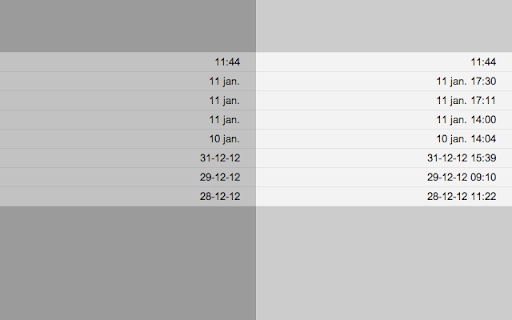
Gmail Show Time is a browser extension designed to enhance the Gmail interface by displaying more detailed timestamps. It allows users to customize how dates and times are shown in their inbox and email detail headers.

Developer:CleverInsert
Version:3.8.0
Size:11.04KiB
Last updated:

Overview

Installs

60K+

Rating

★ 3.9

84 reviews

Languages

1 locales

Includes English

Market analysis

Review-backed positioning, friction, and market signals for this Chrome extension.

Backed by review samples

Macro category

Automation & Workflow Efficiency

Pricing friction

High review signal

Complaint intensity

High review signal

Listing & review signals
Observed signals from store listing text and review samples.

Listing positioning

The extension is positioned as a utility to provide full date and time visibility within Gmail's email list and headers. It emphasizes the ability for users to customize these timestamps through specific formatting options.

Inferred product pattern

A productivity utility that transitioned from a free model to a paid model, resulting in user backlash over transparency and browser search engine redirection.

Review-backed pain points

Users report high frustration with unexpected in-app purchases for previously free features, the extension slowing down Gmail, and the hijacking of browser search settings to redirect through third-party sites.

Observed feature gaps

Users have requested the ability to display seconds within the timestamp.

Tags
Gmail EnhancementTime FormattingProductivity Tool
Target users

- Gmail users

- Productivity power users

Primary use cases

- Customizing email timestamp visibility

- Viewing precise email arrival times in Gmail

Positive themes

- Review-backed positive themes are not available in the provided sample.

Negative themes

- Unexpected monetization and paywalls

- Search engine hijacking and privacy concerns

- Performance degradation in Gmail

- Formatting and functionality bugs

Observed friction

- Payment required for meaningful usage

- Free-tier complaints detected

- Performance complaints detected

- Privacy complaints detected

- Significant friction reported due to perceived lack of transparency regarding an in-app purchase required to make the extension functional.

Evidence boundary: Data extracted from the Chrome Web Store listing and user reviews focusing on feature claims, pricing transitions, and privacy/performance concerns. The provided review sample consists exclusively of low-rating reviews, which may disproportionately reflect negative sentiment.
Complaint summaries
Review-backed complaint signals grouped by operational area.

Support

No specific support or refund complaints were identified in the provided reviews.

Reliability

Users reported issues with the extension failing to work on multiple machines and custom date/time formatting settings not being respected.

Privacy

Multiple users reported the extension hijacking Chrome search engine settings to redirect searches through 'smartwebfinders.com' to Bing.

Access & pricing

- Free entry with paid features

- Account required for core usage

- Trial or limited free usage before paid plan

Store listing facts

Listing assets

- Screenshots: 1

- Videos: 0

- Languages: 1

Trust signals

- Privacy policy

- Developer contact

Store metadata

- Version: 3.8.0

- Size: 11.04KiB

- Last updated:

Listing SEO keywords

Search intent keywords
Keyword signals for evaluating how users may discover, compare, or search for this extension category.

Core discovery

Gmail date timeGmail timestamp formatshow email time Gmail

Comparison

Gmail default date displayGmail timestamp settings

Problem

Gmail missing timeGmail slow extensionGmail date format bug

Alternative

Gmail time extensionsEmail timestamp tools

Similar extensions

Jump to related discovery paths:

Screenshots

Gmail Show Time screenshot

Links

Recommended Chrome extensions

Related listings from the same category, trending peers, and the same publisher portfolio.

Browse workflow
ChatGPT search icon

ChatGPT search

OpenAI

Change default search engine to ChatGPT search.

Installs

4.0M+

Rating

★ 3.3

Free Download Manager icon

Free Download Manager

Free Download Manager.ORG

Free Download Manager integration with browser

Installs

3.0M+

Rating

★ 3.8

Signer.Digital Digital Signature, PKI icon

Signer.Digital Digital Signature, PKI

Chartered Information Systems Pvt. Ltd.

Digital Signature of eReturns, PDF & Web User Auth, RSA Encryption/Decryption, Certificate Enrollment/Download on Smartcard.

Installs

3.0M+

Rating

★ 4.1

Sound Booster - increase volume up icon

Sound Booster - increase volume up

Sound-ultimate.com

Volume Booster helps boost sound video or music on any tab! Increase volume and bass booster, equalizer. Volume control.

Installs

3.0M+

Rating

★ 4.8

Web Threat Shield icon

Web Threat Shield

Webroot

Keeps you safe when browsing the web by identifying and blocking dangerous websites.

Installs

3.0M+

Rating

★ 2.0

TeraBox Download Assistant icon

TeraBox Download Assistant

terabox-developers

Supports screenshots, uploads, and other TeraBox features

Installs

3.0M+

Rating

★ 2.4

夸克网盘-网页嗅探 icon

夸克网盘-网页嗅探

广州市动悦信息技术有限公司

识别到网页资源时,可一键存夸克网盘

Installs

3.0M+

Rating

★ 1.6

Mendeley Web Importer icon

Mendeley Web Importer

Mendeley

Fast, convenient import of references and PDFs to your Mendeley Reference Manager library.

Installs

3.0M+

Rating

★ 2.0

Enable local file links icon

Enable local file links

Takashi Sugimoto (tksugimoto)

Make it possible to open by click a link to a local file that is disabled by Chrome.

Installs

3.0M+

Rating

★ 3.9

Microsoft Defender Browser Protection icon

Microsoft Defender Browser Protection

Microsoft Corporation

Protect yourself against online threats, like phishing and malicious websites, with real-time protection from Microsoft.

Installs

3.0M+

Rating

★ 3.1