Open in GIMP™ photo editor icon

Open in GIMP™ photo editor Chrome Extension Analysis

Developer & Designer Tools

Chrome extension ID: jgpghknlbaljigdhcjimjnkkjniiipmm

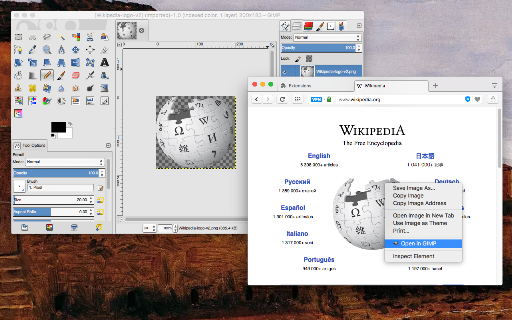
This tool acts as a bridge to automatically open images from the web in the GIMP desktop application. It requires the installation of both the GIMP software and a specific native messaging connector to facilitate communication between the browser and the host machine.

Developer:yokris.dev
Version:0.2.1
Size:192KiB
Last updated:

Overview

Installs

6K+

Rating

2.7

27 reviews

Languages

1 locales

Includes English

Market analysis

Review-backed positioning, friction, and market signals for this Chrome extension.

Backed by review samples

Macro category

Developer & Designer Tools

Pricing friction

Low review signal

Complaint intensity

Moderate review signal

Listing & review signals
Observed signals from store listing text and review samples.

Listing positioning

The extension is positioned as a productivity bridge between the web browser and the desktop GIMP photo editor. It emphasizes streamlining workflows by enabling users to send images directly from web contexts to GIMP, avoiding manual download and import steps.

Inferred product pattern

Native-bridge utility that requires local environment configuration to function.

Review-backed pain points

The requirement for a 'native connector' and manual configuration of file paths is a significant source of user frustration and abandonment.

Observed feature gaps

The UI lacks a 'plug-and-play' experience, often confusing non-technical users who expect simple, immediate functionality upon installation.

Tags
GIMPImage EditorDesktop IntegrationWorkflow Utility
Target users

- GIMP users

- Digital designers

- Casual photo editors

Primary use cases

- Directly opening web images in GIMP

- Avoiding manual file downloads and imports

Positive themes

- Effective utility for GIMP power users

- Serves as a cost-effective alternative to expensive subscription software

Negative themes

- High technical barrier to entry

- Confusing setup process

- Lack of clear instructions

- Broken or inaccessible documentation

Observed friction

- None identified; the software is free, but technical setup friction is high.

Evidence boundary: Evidence based on developer documentation, installation requirements listed in the store, and user reviews detailing setup difficulties. Reviews represent a small subset of the user base and focus primarily on setup friction rather than ongoing daily use.
Complaint summaries
Review-backed complaint signals grouped by operational area.

Support

Users report frustration with inaccessible websites and a lack of clear guidance on how to configure the native host bridge.

Reliability

Performance is reported as inconsistent, largely due to user difficulty in installing the necessary native messaging components correctly.

Privacy

No specific privacy complaints found in review samples.

Access & pricing

- Free usage observed

- No account requirement observed

- Free plan or free usage claimed

Store listing facts

Listing assets

- Screenshots: 1

- Videos: 1

- Languages: 1

Trust signals

- Privacy policy

- Developer contact

- Official website

Store metadata

- Version: 0.2.1

- Size: 192KiB

- Last updated:

Listing SEO keywords

Search intent keywords
Keyword signals for evaluating how users may discover, compare, or search for this extension category.

Core discovery

open image in GIMPGIMP browser extensionsend to GIMPbrowser to GIMP workflow

Comparison

Photoshop vs GIMP extensionimage editor browser integration

Problem

cannot open images in GIMPGIMP extension setup helpextension not working

Alternative

external image editor launcheropen with software extension

Similar extensions

Jump to related discovery paths:

Screenshots

Open in GIMP™ photo editor screenshot

Links

Recommended Chrome extensions

Related listings from the same category, trending peers, and the same publisher portfolio.

Browse developer