rikaikun icon

rikaikun Chrome Extension Analysis

Niche Lifestyle & Gaming Hacks

Chrome extension ID: jipdnfibhldikgcjhfnomkfpcebammhp

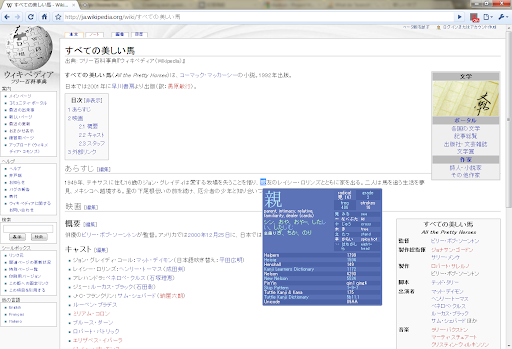
A browser extension designed for Japanese language learners that provides instant pop-up definitions and readings. It features dictionary switching for Kanji and names, text-to-speech capabilities, and a clipboard function for study purposes.

Developer:Erek Speed
Version:3.2.42
Size:28.41MiB
Last updated:

Overview

Installs

200K+

Rating

★ 4.7

1,866 reviews

Languages

1 locales

Includes English

Market analysis

Review-backed positioning, friction, and market signals for this Chrome extension.

Backed by review samples

Macro category

Niche Lifestyle & Gaming Hacks

Pricing friction

Low review signal

Complaint intensity

Moderate review signal

Listing & review signals
Observed signals from store listing text and review samples.

Listing positioning

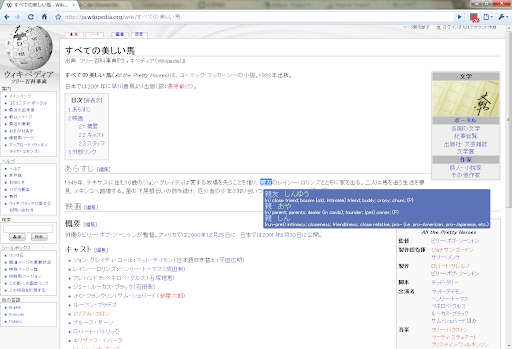
Rikaikun positions itself as a seamless Japanese dictionary that allows users to look up words without losing their reading flow. It emphasizes providing readings and English definitions via a simple hover action.

Inferred product pattern

A niche language utility using hover-based DOM parsing, currently struggling with technical stability and feature parity with its Firefox counterpart.

Review-backed pain points

Users frequently report that the extension stops working abruptly, fails to trigger on hover, or lacks the database depth to recognize essential names and places.

Observed feature gaps

Users have requested the ability to translate selected phrases rather than just hovered characters, more specialized internet slang/chattalk databases, and the ability to toggle off hiragana/katakana readings.

Tags
Japanese DictionaryLanguage LearningKanji ReaderHover Translation
Target users

- Japanese language learners

- Japanese speakers learning English

Primary use cases

- Reading Japanese websites

- Learning Kanji and vocabulary

- Creating flashcards

Positive themes

- Useful for Kanji learning

- Convenient for maintaining reading flow

Negative themes

- Technical unreliability and sudden failure to function

- Inability to recognize names and places

- Incomplete vocabulary database compared to competitors

Observed friction

- Performance complaints detected

- No pricing friction or information observed.

Evidence boundary: Evidence extracted from the product description and various user reviews highlighting utility and technical malfunctions. Review data shows high polarity, with some users finding it indispensable and others reporting total product failure.
Complaint summaries
Review-backed complaint signals grouped by operational area.

Support

No specific support complaints identified.

Reliability

Significant complaints regarding the extension becoming unresponsive, failing to detect text, and having perceived performance issues on Chrome compared to Firefox.

Privacy

No privacy complaints observed.

Access & pricing

- No clear monetization signal

- No account requirement observed

- No clear pricing signal

Store listing facts

Listing assets

- Screenshots: 3

- Videos: 1

- Languages: 1

Trust signals

- Developer contact

- Support link

Store metadata

- Version: 3.2.42

- Size: 28.41MiB

- Last updated:

Listing SEO keywords

Search intent keywords
Keyword signals for evaluating how users may discover, compare, or search for this extension category.

Core discovery

Japanese dictionary extensionhover Japanese translationKanji dictionary Chrome

Comparison

RikaichanRikaikun vs Rikaichan

Problem

Japanese hover translation not workingKanji dictionary bug

Alternative

Japanese language learning toolsJapanese dictionary extension

Similar extensions

Jump to related discovery paths:

Screenshots

rikaikun screenshot
rikaikun screenshot
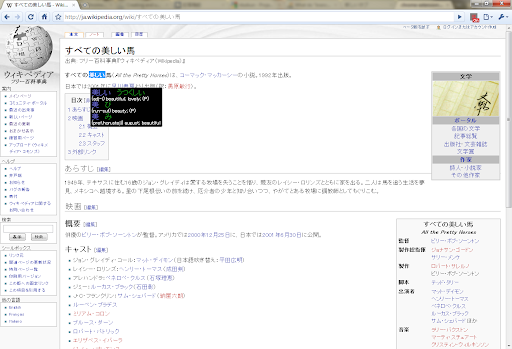
rikaikun screenshot

Links

Recommended Chrome extensions

Related listings from the same category, trending peers, and the same publisher portfolio.

Browse education
GPTZero: AI Detection & Writing Replay icon

GPTZero: AI Detection & Writing Replay

chrome-extension-publisher

Bring AI detection, citation checks, live essay feedback, and writing replays directly into Google Docs and your workflow.

Installs

500K+

Rating

★ 4.7

Google Meet Attendance List icon

Google Meet Attendance List

MeetList

Easiest way to save the attendance list for your meetings or lectures

Installs

400K+

Rating

★ 4.7

Google Meet Breakout by Robert Hudek icon

Google Meet Breakout by Robert Hudek

Unknown developer

Only the teacher needs to install. Completely Free and your Data is Private. Google Classroom integration, Slider Control.

Installs

400K+

Rating

★ 4.3

Revision History: Writing Process Visibility for Google Docs & Slides icon

Revision History: Writing Process Visibility for Google Docs & Slides

Revision History

Built for teachers: See how students write, not just what they wrote. View the writing process in Google Docs & Slides.

Installs

300K+

Rating

★ 3.7

Paperpile Extension icon

Paperpile Extension

Paperpile

Collect, organize, annotate and cite your research papers in Chrome.

Installs

300K+

Rating

★ 4.6

Trancy - AI Translator & Dual Subtitles icon

Trancy - AI Translator & Dual Subtitles

Trancy

Trancy provides bilingual subtitle for platforms like YouTube, Disney+, as well as AI translator for websites.

Installs

300K+

Rating

★ 4.7

Reverso – Translation, dictionary icon

Reverso – Translation, dictionary

Reverso Technologies Inc.

Translate and learn languages while reading or watching movies online. It's free.

Installs

300K+

Rating

★ 4.6

Add to Google Classroom icon

Add to Google Classroom

Canopy

This extension adds the current site to Google Classroom

Installs

300K+

Rating

★ 4.2

Talk & Comment: Voice Notes & Audio Feedback icon

Talk & Comment: Voice Notes & Audio Feedback

TalkandComment.com

Record a voice note on any page and share one link. Students and teammates hear your tone, not just your text.

Installs

200K+

Rating

★ 4.1

Knowt: Quizlet Import, AI Notes & Flashcards icon

Knowt: Quizlet Import, AI Notes & Flashcards

Knowt

Automatically import flashcards and notes from any video, PDF, article, or flashcard site. Knowt is the fastest way to study.

Installs

200K+

Rating

★ 4.9