URLColors icon

URLColors Chrome Extension Analysis

Developer & Designer Tools

Chrome extension ID: jjccpcminoppplpmcfghflolejbdkekm

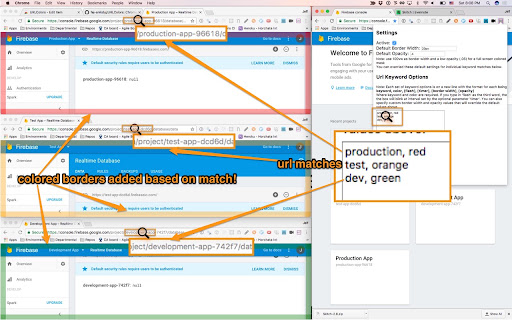
URLColors is a Chrome extension that adds a customizable colored border around the viewport of websites that match user-defined URL keywords. It features adjustable border width, opacity, and blinking intervals, as well as a snooze mode for presentations.

Developer:url-colors
Version:2.2
Size:18.07KiB
Last updated:

Overview

Installs

9K+

Rating

4.7

46 reviews

Languages

1 locales

Includes English (United States)

Market analysis

Review-backed positioning, friction, and market signals for this Chrome extension.

Backed by review samples

Macro category

Developer & Designer Tools

Pricing friction

Low review signal

Complaint intensity

Low review signal

Listing & review signals
Observed signals from store listing text and review samples.

Listing positioning

The product is positioned as a safety utility for developers to prevent critical errors by visually distinguishing between development, test, and production environments. It emphasizes the ability to flag important sites using customizable colored borders to avoid accidental actions on live sites.

Inferred product pattern

Open-source utility for environment-based visual identification.

Review-backed pain points

Users reported ambiguity in the input requirements for border width and opacity, specifically whether to use units (e.g., 'px') or raw integers.

Observed feature gaps

Lack of synchronization between page borders and browser tab colors; potential inconsistencies in wildcard matching implementation.

Tags
Developer ToolEnvironment MarkerURL HighlighterWeb DevelopmentProductivity
Target users

- Web Developers

- QA Engineers

- DevOps Professionals

- System Administrators

Primary use cases

- Distinguishing between staging and production environments

- Visual flagging of specific web applications

- Preventing accidental data modification on live servers

Positive themes

- Prevention of 'career-limiting' mistakes on production sites

- Simple and unobtrusive operation

- Effective replacement for manual CSS hacks

Negative themes

- Confusion regarding configuration syntax

- Desire for more robust regex/wildcard support

- Lack of tab-level coloration

Observed friction

- No pricing friction observed; the extension is presented as a free tool.

Evidence boundary: Analysis based on the store listing and a sample of 10 reviews containing both high and low ratings. The review sample is small relative to the total user count.
Complaint summaries
Review-backed complaint signals grouped by operational area.

Support

Minimal complaints, primarily centered on unclear instructions for input formatting.

Reliability

Generally high reliability, with isolated reports of the extension not working due to configuration errors.

Privacy

No privacy or security complaints observed.

Access & pricing

- Free usage observed

- No account requirement observed

- Free plan or free usage claimed

Store listing facts

Listing assets

- Screenshots: 1

- Videos: 0

- Languages: 1

Trust signals

- Privacy policy

- Developer contact

Store metadata

- Version: 2.2

- Size: 18.07KiB

- Last updated:

Listing SEO keywords

Search intent keywords
Keyword signals for evaluating how users may discover, compare, or search for this extension category.

Core discovery

url color borderchrome extension for developersmark production websitedistinguish dev test prod browser

Comparison

URLColors vs manual CSSbest environment marker extension

Problem

accidentally edited production siteconfused dev and prod tabshow to identify live site in chrome

Alternative

environment indicatorwebsite border highlighterURL visual flag

Similar extensions

Jump to related discovery paths:

Screenshots

URLColors screenshot

Links

Recommended Chrome extensions

Related listings from the same category, trending peers, and the same publisher portfolio.

Browse developer