Google Analytics Debugger icon

Google Analytics Debugger Chrome Extension Analysis

SEO & Traffic Analytics

Chrome extension ID: jnkmfdileelhofjcijamephohjechhna

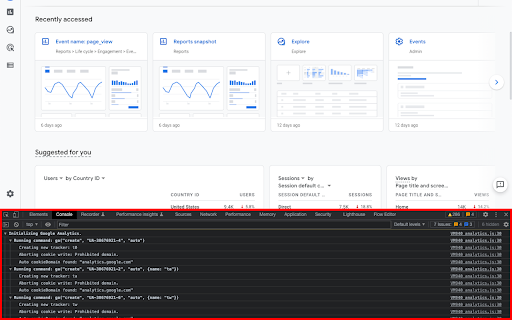
This tool injects a debug version of the Google Analytics JavaScript library into webpages to allow for granular tracking verification. It provides developers with a clear view of tracking beacons and error logs within the Chrome JavaScript console to ensure data collection is configured correctly.

Version:3.0
Size:28.41KiB
Last updated:

Overview

Installs

600K+

Rating

4.2

537 reviews

Languages

1 locales

Includes English

Market analysis

Review-backed positioning, friction, and market signals for this Chrome extension.

Backed by review samples

Macro category

SEO & Traffic Analytics

Pricing friction

Low review signal

Complaint intensity

Moderate review signal

Listing & review signals
Observed signals from store listing text and review samples.

Listing positioning

The extension is positioned as an official utility for developers to audit and troubleshoot Google Analytics implementation. It functions by enabling debug versions of analytics scripts and surfacing data directly in the browser console.

Inferred product pattern

Legacy developer utility experiencing severe maintenance decay.

Review-backed pain points

Users frequently report that the tool is unreliable, often failing to detect tracking hits, crashing pages, or requiring multiple page reloads to initialize.

Observed feature gaps

The tool lacks consistent support for modern GA4 features, suffers from perceived abandonment, and fails to handle complex tracking environments.

Tags
AnalyticsDeveloper ToolsGoogle AnalyticsDebuggingTracking
Target users

- Web Developers

- Data Analysts

- Digital Marketers

- QA Engineers

Primary use cases

- Verifying GA tracking beacon payloads

- Troubleshooting analytics implementation errors

- Debugging event tracking configurations

Positive themes

- Clean display of tracking hits

- Useful diagnostic data when functional

- Preferred over other debugging plugins

Negative themes

- Sporadic failure to load data

- Lack of maintenance/updates

- Incompatibility with newer GA4 standards

- Requirement for repeated page refreshes

Observed friction

- Performance complaints detected

- None; the product is free.

Evidence boundary: Evidence derived from extensive user reviews citing long-term neglect and functional unreliability compared to historical performance. Review data spans over a decade, which may conflate older performance with the current Manifest v3 version.
Complaint summaries
Review-backed complaint signals grouped by operational area.

Support

Users express frustration regarding the lack of active maintenance and documentation from Google despite the extension's critical role for developers.

Reliability

High; users consistently report that the extension requires multiple refreshes, fails to capture hits reliably, and occasionally causes page crashes.

Privacy

No privacy-related complaints found.

Access & pricing

- Free usage observed

- No account requirement observed

- Free plan or free usage claimed

Store listing facts

Listing assets

- Screenshots: 2

- Videos: 0

- Languages: 1

Trust signals

- Privacy policy

- Developer contact

- Official website

- Support link

Store metadata

- Version: 3.0

- Size: 28.41KiB

- Last updated:

Listing SEO keywords

Search intent keywords
Keyword signals for evaluating how users may discover, compare, or search for this extension category.

Core discovery

Google Analytics debug toolGA4 debuggerChrome analytics extensiontracking beacon inspector

Comparison

GA4 vs Universal Analytics toolsGoogle Analytics debugger alternatives

Problem

GA tracking not workingdebug GA console errorstroubleshoot analytics beacon

Alternative

GA4 tag assistantanalytics debugging tools

Similar extensions

Jump to related discovery paths:

Screenshots

Google Analytics Debugger screenshot

Links

Recommended Chrome extensions

Related listings from the same category, trending peers, and the same publisher portfolio.

Browse developer