Save In icon

Save In Chrome Extension Analysis

Automation & Workflow Efficiency

Chrome extension ID: jpblofcpgfjikaapfedldfeilmpgkedf

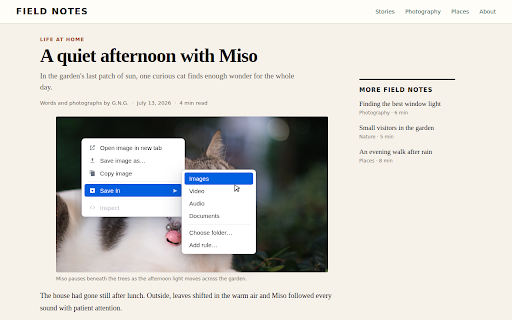
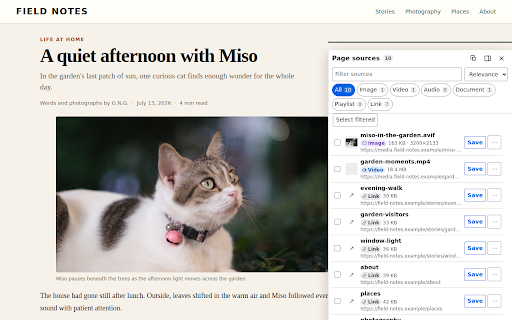
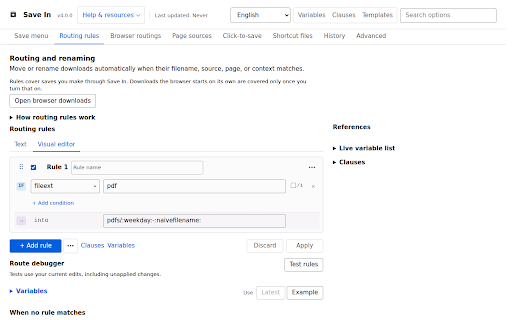
Save In is a productivity extension that automates the sorting and renaming of downloads such as images, videos, and links. It allows users to create complex routing rules based on URL, file type, or date to keep the default download folder organized.

Developer:gyng
Version:4.1.0
Size:2.15MiB
Last updated:

Overview

Installs

40K+

Rating

4.5

28 reviews

Languages

1 locales

Includes English

Market analysis

Review-backed positioning, friction, and market signals for this Chrome extension.

Backed by review samples

Macro category

Automation & Workflow Efficiency

Pricing friction

Low review signal

Complaint intensity

Moderate review signal

Listing & review signals
Observed signals from store listing text and review samples.

Listing positioning

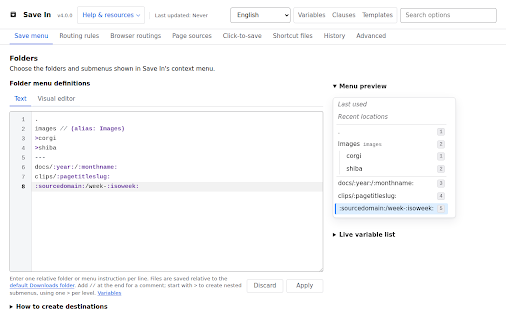
Save In positions itself as a high-utility tool for managing and organizing downloads through automation. It emphasizes configurable rules, hierarchical menus, and customizable routing to sort files into specific subfolders.

Inferred product pattern

A rule-based automation utility for structured browser download management.

Review-backed pain points

Users report difficulty with the scripting-heavy UI, failures when downloading images with dynamic URL parameters, and conflicts with other saving/conversion extensions.

Observed feature gaps

Lack of a user-friendly/no-code interface for non-technical users to build rules.

Tags
File OrganizerDownload ManagerWorkflow AutomationMedia Downloader
Target users

- Power users

- Digital collectors

- Researchers

- Media managers

Primary use cases

- Automated file organization

- Bulk media downloading

- Custom download routing

- Web snippet/text saving

Positive themes

- Highly effective for organization once configured

- Powerful customization via rules and variables

Negative themes

- High technical barrier for rule creation

- Extension conflicts

- Failures with dynamic URL parameters

Observed friction

- No pricing friction observed in the provided reviews.

Evidence boundary: Evidence extracted from the product description and a variety of user reviews covering functionality, usability, and technical conflicts. Analysis is based on a small sample of 27 reviews.
Complaint summaries
Review-backed complaint signals grouped by operational area.

Support

No support complaints observed in the provided reviews.

Reliability

Users report errors with specific file formats (.html), failures with dynamic URLs, and broken functionality following Chrome updates or when conflicting with other extensions.

Privacy

No privacy complaints observed; listing claims data stays on-device.

Access & pricing

- No clear monetization signal

- No account requirement observed

- No clear pricing signal

Store listing facts

Listing assets

- Screenshots: 5

- Videos: 0

- Languages: 1

Trust signals

- Privacy policy

- Developer contact

- Official website

- Support link

Store metadata

- Version: 4.1.0

- Size: 2.15MiB

- Last updated:

Listing SEO keywords

Search intent keywords
Keyword signals for evaluating how users may discover, compare, or search for this extension category.

Core discovery

download organizerautomate downloadsfile routing extensionmedia download manager

Comparison

Save page WE

Problem

download errorfailed downloadextension conflict

Alternative

file management toolbrowser download organizer

Similar extensions

Jump to related discovery paths:

Screenshots

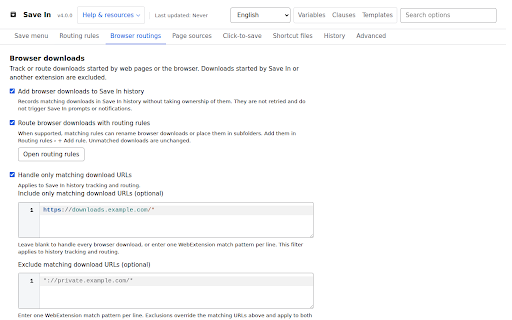
Save In screenshot
Save In screenshot
Save In screenshot
Save In screenshot
Save In screenshot

Links

Recommended Chrome extensions

Related listings from the same category, trending peers, and the same publisher portfolio.

Browse workflow