Display Email Time by cloudHQ icon

Display Email Time by cloudHQ Chrome Extension Analysis

Automation & Workflow Efficiency

Chrome extension ID: kedlbojealkpdllmgjeciofngjeokhno

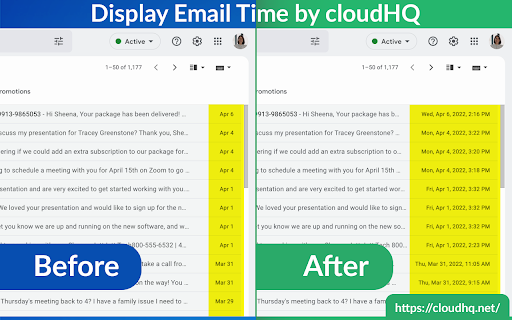
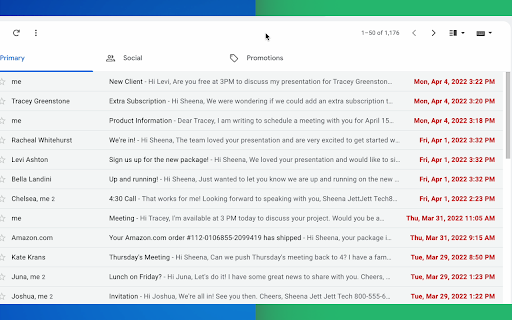
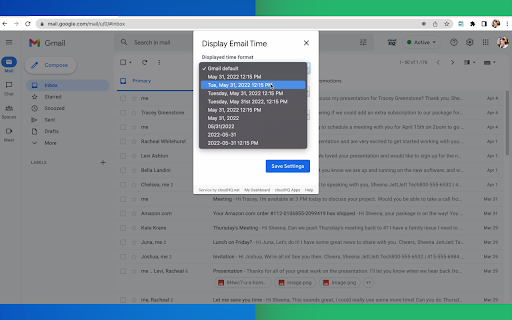
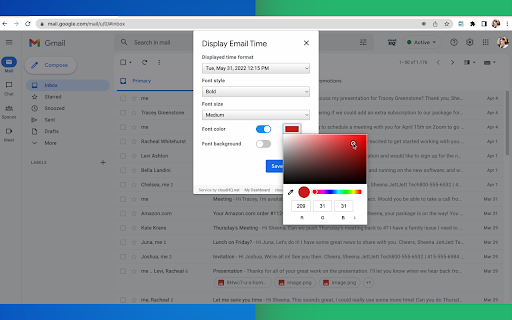
A Gmail extension that replaces standard timestamps with exact, customizable date and time displays. It offers a variety of formatting options, including international date sequences and visual styling for the inbox.

Developer:cloudHQ
Version:1.0.1.3
Size:684KiB
Last updated:

Overview

Installs

8K+

Rating

4.1

32 reviews

Languages

11 locales

Includes Deutsch, English, Nederlands, español...

Market analysis

Review-backed positioning, friction, and market signals for this Chrome extension.

Backed by review samples

Macro category

Automation & Workflow Efficiency

Pricing friction

High review signal

Complaint intensity

Moderate review signal

Listing & review signals
Observed signals from store listing text and review samples.

Listing positioning

The product positions itself as a solution to Gmail's inconsistent date and time display, which can cause confusion. It emphasizes high customization, allowing users to adjust date formats, fonts, colors, and locales for better inbox oversight.

Inferred product pattern

UI utility extension that optimizes a specific platform feature, transitioning from a free tool to an account-gated subscription model.

Review-backed pain points

Users report significant frustration over the tool shifting from a free utility to a trial-based paid model. Additionally, there are reports of critical bugs where dates are displayed incorrectly and a lack of support for specific international standards like the Portuguese dd/mm/yyyy format.

Observed feature gaps

Lack of support for certain regional date formats and inability to display thread-level labels accurately due to Gmail's internal architecture.

Tags
Gmail ExtensionEmail FormattingProductivity ToolDate Time Display
Target users

- Gmail users

- International business professionals

- Power users managing high email volumes

Primary use cases

- Standardizing email timestamps

- Avoiding date confusion in Gmail

- Customizing inbox visual aesthetics

Positive themes

- Improved visibility of exact dates and times

Negative themes

- Unexpected transition to paid/trial model

- Mandatory account creation

- Incorrect date calculation bugs

- Poor localization for non-English languages

Observed friction

- Payment required for meaningful usage

- Free-tier complaints detected

- Performance complaints detected

- Strong friction regarding a move to a trial-then-paid model, with users citing misleading 'free' claims and expensive licensing options.

Evidence boundary: Analysis based on the public store listing and 10 provided review samples. Review data is based on a limited sample of 10 out of 32 total reviews.
Complaint summaries
Review-backed complaint signals grouped by operational area.

Support

No specific support tickets mentioned, but general dissatisfaction with the developer's pricing strategy.

Reliability

Reports of dates being shifted incorrectly (e.g., November appearing as January) and random formatting errors in non-English locales.

Privacy

Users expressed suspicion and annoyance regarding the new requirement to create an account for a simple UI utility.

Access & pricing

- Free entry with paid features

- Account required for core usage

- Trial or limited free usage before paid plan

Store listing facts

Listing assets

- Screenshots: 5

- Videos: 1

- Languages: 11

Trust signals

- Privacy policy

- Developer contact

- Official website

- Support link

Store metadata

- Version: 1.0.1.3

- Size: 684KiB

- Last updated:

Listing SEO keywords

Search intent keywords
Keyword signals for evaluating how users may discover, compare, or search for this extension category.

Core discovery

Gmail date time extensionshow full date in GmailGmail timestamp formatter

Comparison

Gmail date display vs defaultbest Gmail time extension

Problem

Gmail confusing date formatGmail date and time missing

Alternative

Gmail timestamp alternativesDisplay Email Time alternative

Similar extensions

Jump to related discovery paths:

Screenshots

Display Email Time by cloudHQ screenshot

Links

Recommended Chrome extensions

Related listings from the same category, trending peers, and the same publisher portfolio.

Browse communication
Gmail™ Email Templates by cloudHQ icon

Gmail™ Email Templates by cloudHQ

cloudHQ

Beautiful email templates for Gmail. Design your templates or import templates from Mailchimp. With team sharing!

Installs

100K+

Rating

4.2

Save Emails as PDF by cloudHQ icon

Save Emails as PDF by cloudHQ

cloudHQ

Export, convert and save Gmail™ emails as a PDF document

Installs

100K+

Rating

4.3

HTML Editor for Gmail by cloudHQ icon

HTML Editor for Gmail by cloudHQ

cloudHQ

HTML Editor for Gmail™ - code HTML email directly from Gmail

Installs

40K+

Rating

4.0

Noise Cancelling App icon

Noise Cancelling App

AI Webcam Effects

AI mic noise cancellation for calls, streams, and recording. Share with friends to enjoy clear sound in every conversation!

Installs

40K+

Rating

4.7

SendSafely Encryption for Chrome and Gmail icon

SendSafely Encryption for Chrome and Gmail

SendSafely.com

Chrome extension that provides end-to-end encryption for Gmail. Encrypt private emails and securely share files up to 10GB.

Installs

40K+

Rating

4.9

InTouchApp Phone Contacts & Data Saver icon

InTouchApp Phone Contacts & Data Saver

Volare Tech. Pvt. Ltd.

Save unknown numbers & other data from WhatsApp, LinkedIn, Gmail to your phone instantly. Make phone call from web + much more!

Installs

40K+

Rating

4.0

VisualSP icon

VisualSP

visualsp-app-administrators

VisualSP is the enterprise help assistant that delivers answers and guidance for any web site when and where customers need them.

Installs

40K+

Rating

4.6

Insert and Send HTML with Gmail icon

Insert and Send HTML with Gmail

Designmodo

Easily insert custom HTML into your Gmail emails with this handy extension. Create and preview your custom emails directly in Gmail.

Installs

40K+

Rating

3.7

mail.com MailCheck icon

mail.com MailCheck

1&1 Mail & Media GmbH

The safe way to access your personal mail.

Installs

40K+

Rating

4.0

Synthesia - AI Screen Recorder & Editor icon

Synthesia - AI Screen Recorder & Editor

Synthesia

Record screen and create pro-level video in minutes. Edit recording in Synthesia for quality - shareable content in just one take.

Installs

30K+

Rating

4.1