Awesome Custom Cursor icon

Awesome Custom Cursor Chrome Extension Analysis

Niche Lifestyle & Gaming Hacks

Chrome extension ID: kegeajllnfkfhcljjebedaeedpmkcbpe

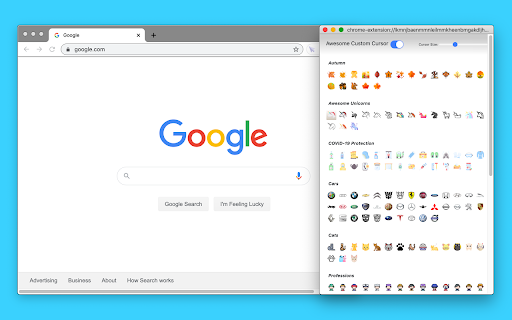
Awesome Custom Cursor is a Chrome extension that allows users to replace their default mouse cursor with a variety of fun and cool designs. The extension offers over 100 cursor options, with some customization settings available for helper cursor style and color. It aims to provide a personalized and enjoyable browsing experience.

Version:3.1
Size:6.08MiB
Last updated:

Overview

Installs

5K+

Rating

2.9

29 reviews

Languages

1 locales

Includes English

Market analysis

Review-backed positioning, friction, and market signals for this Chrome extension.

Backed by review samples

Macro category

Niche Lifestyle & Gaming Hacks

Pricing friction

Low review signal

Complaint intensity

High review signal

Listing & review signals
Observed signals from store listing text and review samples.

Listing positioning

The store listing positions Awesome Custom Cursor as a fun and cool way to replace the default boring cursor with over 100 customized options. It highlights the ability to define your own cursor style to enhance the user's browsing experience.

Inferred product pattern

A free browser extension offering cosmetic personalization, facing functional limitations in its core promise due to browser security restrictions and implementation issues.

Review-backed pain points

Users frequently report that the custom cursor only works when they are actively selecting or choosing a cursor, and it disappears or reverts to the default cursor when they move to a different tab, document, or perform other actions. Some users also express frustration about accidentally removing the extension and being unable to revert their cursor settings.

Observed feature gaps

The extension appears to have significant limitations in its ability to consistently apply custom cursors across all browser tabs and web pages, as indicated by user feedback. It also cannot function on internal browser pages, Chrome Web Store pages, or other extension-related pages due to security restrictions.

Tags
Custom CursorPersonalizationFun ExtensionBrowser Theme
Target users

- Users seeking desktop customization

- Gamers

- Younger demographics

Primary use cases

- Personalizing browser appearance

- Adding aesthetic appeal to the user interface

- Expressing individuality through cursor design

Positive themes

- Availability of many different cursor designs

Negative themes

- Cursor not working in other tabs or documents

- Cursor reverting to default after brief use

- Difficulty in applying or keeping custom cursors

Observed friction

- The extension is free to use, and no specific pricing friction was observed in the provided data.

Evidence boundary: Data was analyzed from the Chrome Web Store listing, including short and long descriptions, user numbers, ratings, comment counts, and a sample of user reviews. The provided review sample is limited in size, and sentiment analysis is based solely on the text of these reviews. The full spectrum of user experiences might not be captured.
Complaint summaries
Review-backed complaint signals grouped by operational area.

Support

No direct support complaints were observed. However, users who accidentally removed the extension expressed difficulty in changing their cursor back, suggesting a potential need for clearer uninstallation or reset instructions.

Reliability

Users report significant reliability issues, with the custom cursor frequently failing to work consistently across different tabs and sessions, often reverting to the default cursor.

Privacy

No privacy complaints were observed in the provided data.

Access & pricing

- Free usage observed

- No clear access signal

- Free plan or free usage claimed

Store listing facts

Listing assets

- Screenshots: 1

- Videos: 0

- Languages: 1

Trust signals

- Privacy policy

- Developer contact

- Official website

Store metadata

- Version: 3.1

- Size: 6.08MiB

- Last updated:

Listing SEO keywords

Search intent keywords
Keyword signals for evaluating how users may discover, compare, or search for this extension category.

Core discovery

custom cursor chromechange cursor chromeawesome cursorfun cursors extensionpersonalized mouse pointer

Comparison

default cursor replacementalternative mouse cursors

Problem

boring cursorplain mousecursor not workingcursor disappears

Alternative

cool mouse pointersanimated cursors

Similar extensions

Jump to related discovery paths:

Screenshots

Awesome Custom Cursor screenshot

Links

Recommended Chrome extensions

Related listings from the same category, trending peers, and the same publisher portfolio.

Browse fun