Selection Print to PDF icon

Selection Print to PDF Chrome Extension Analysis

Automation & Workflow Efficiency

Chrome extension ID: kijpdipgbinekifdelmgfiigmoammghm

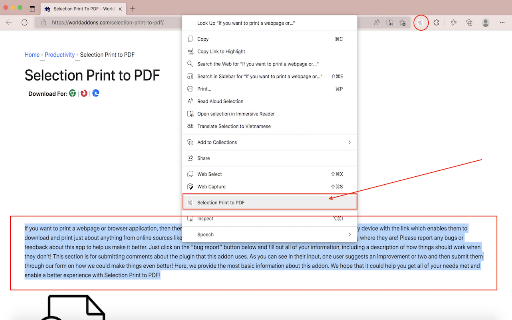
A Chrome extension that allows users to highlight text on a webpage and save it as a PDF document. It utilizes the open-source jsPDF library to generate files directly from the browser.

Developer:Steven Sanders
Version:0.1
Size:280KiB
Last updated:

Overview

Installs

1K+

Rating

4.2

16 reviews

Languages

1 locales

Includes English

Market analysis

Review-backed positioning, friction, and market signals for this Chrome extension.

Backed by review samples

Macro category

Automation & Workflow Efficiency

Pricing friction

Low review signal

Complaint intensity

Moderate review signal

Listing & review signals
Observed signals from store listing text and review samples.

Listing positioning

The product is positioned as a convenient utility for users to export specific portions of web text to PDF files via a right-click context menu. It emphasizes customization options for typeface, size, and layout.

Inferred product pattern

Single-feature productivity utility focusing on a specific browser interaction (Right-click to PDF).

Review-backed pain points

Users are frustrated that the tool creates 'flat' text blocks, removing original layout, bullet points, and styling from the source webpage.

Observed feature gaps

Lack of support for preserving HTML/CSS layout and structural elements like markdown or lists in the resulting PDF.

Tags
PDF ConverterText ExtractionProductivity ToolPrint to PDF
Target users

- Students

- Researchers

- Content Curators

- Administrative Professionals

Primary use cases

- Saving specific text snippets for offline use

- Archiving specific sentences or paragraphs without printing a full page

Positive themes

- Ease of use

- Convenience for frequent printing

- Operational stability

Negative themes

- Loss of original formatting

- Stripping of markdown and layout elements

- Intermittent functional failure

Observed friction

- No pricing friction observed; the tool appears to be free.

Evidence boundary: Data extracted from the store listing and 10 user review samples. Small sample size of reviews relative to the total user base.
Complaint summaries
Review-backed complaint signals grouped by operational area.

Support

No support or account-related complaints observed in the samples.

Reliability

One user reported the extension failed to trigger any action when clicking the context menu icon.

Privacy

No privacy or security complaints observed.

Access & pricing

- Free usage observed

- No account requirement observed

- Free plan or free usage claimed

Store listing facts

Listing assets

- Screenshots: 1

- Videos: 0

- Languages: 1

Trust signals

- Privacy policy

- Developer contact

- Official website

- Support link

Store metadata

- Version: 0.1

- Size: 280KiB

- Last updated:

Listing SEO keywords

Search intent keywords
Keyword signals for evaluating how users may discover, compare, or search for this extension category.

Core discovery

print selection to pdfsave text as pdfchrome extension pdf converter

Comparison

Selection Print to PDF vs print to pdfbest text to pdf chrome extension

Problem

how to save only part of a webpage as pdfprint selected text to pdf

Alternative

Selection Print to PDF alternativessave text snippet to pdf

Similar extensions

Jump to related discovery paths:

Screenshots

Selection Print to PDF screenshot

Links

Recommended Chrome extensions

Related listings from the same category, trending peers, and the same publisher portfolio.

Browse workflow