OP Auto Clicker icon

OP Auto Clicker Chrome Extension Analysis

Automation & Workflow Efficiency

Chrome extension ID: kpmbpdpbjjadabknommjfphilmecebab

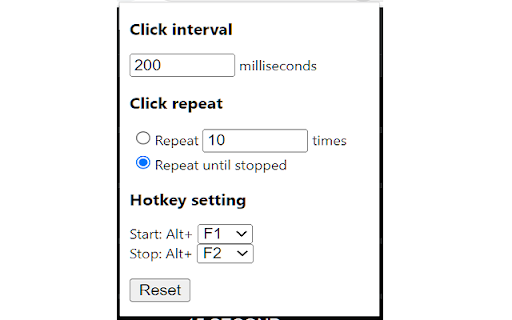
A browser extension that automates mouse clicking tasks on supported web pages. It allows users to set click limits and use hotkeys to trigger automation at specific or current cursor coordinates.

Developer:mousetool
Version:0.1.4
Size:11.27KiB
Last updated:

Overview

Installs

300K+

Rating

2.3

459 reviews

Languages

1 locales

Includes English (United States)

Market analysis

Review-backed positioning, friction, and market signals for this Chrome extension.

Backed by review samples

Macro category

Automation & Workflow Efficiency

Pricing friction

Low review signal

Complaint intensity

High review signal

Listing & review signals
Observed signals from store listing text and review samples.

Listing positioning

The product is positioned as a full-fledged autoclicker offering two modes: dynamic cursor location and pre-specified locations. It highlights flexibility in click volume (fixed or infinite) and the convenience of background hotkeys, while noting that a client software version is recommended for better compatibility.

Inferred product pattern

Simple browser-based utility for simulating repetitive mouse inputs.

Review-backed pain points

Users frequently report that the extension does not start, hotkeys do not work, and some experience browser crashes or 'panic' when attempting to use the tool.

Observed feature gaps

Users have specifically requested the addition of a visible start and stop button to avoid reliance on hotkeys.

Tags
Auto ClickerWeb AutomationCursor ToolProductivity
Target users

- Browser-based gamers

- Web automation enthusiasts

- Users performing repetitive web tasks

Primary use cases

- Automating repetitive clicks on websites

- Fast-clicking for browser games

Positive themes

No positive theme data.

Negative themes

- Total failure to function

- Difficulty with startup/activation

- Poor user interface/lack of buttons

- Browser instability

Observed friction

- Performance complaints detected

- No pricing friction observed as no payment requirements are mentioned.

Evidence boundary: Analysis based on store listing details and a sample of 10 low-rating user reviews. Review samples were exclusively low-rating, which may skew the sentiment analysis compared to the overall user base.
Complaint summaries
Review-backed complaint signals grouped by operational area.

Support

No direct support interaction complaints, but high frustration regarding the product's basic utility.

Reliability

Severe reliability issues with multiple reports of the extension being completely non-functional.

Privacy

No privacy or security complaints observed in the provided samples.

Access & pricing

- Free usage observed

- No account requirement observed

- Free plan or free usage claimed

Store listing facts

Listing assets

- Screenshots: 1

- Videos: 0

- Languages: 1

Trust signals

- Privacy policy

- Developer contact

Store metadata

- Version: 0.1.4

- Size: 11.27KiB

- Last updated:

Listing SEO keywords

Search intent keywords
Keyword signals for evaluating how users may discover, compare, or search for this extension category.

Core discovery

chrome auto clickerbrowser auto clickerweb autoclicker extension

Comparison

OP Auto Clicker vs client softwarebest browser autoclicker

Problem

how to auto click on websiteautomate repetitive clicks chrome

Alternative

auto clicker alternativesweb click automation

Similar extensions

Jump to related discovery paths:

Screenshots

OP Auto Clicker screenshot

Links

Recommended Chrome extensions

Related listings from the same category, trending peers, and the same publisher portfolio.

Browse workflow