Google Scholar Button icon

Google Scholar Button Chrome Extension Analysis

Automation & Workflow Efficiency

Chrome extension ID: ldipcbpaocekfooobnbcddclnhejkcpn

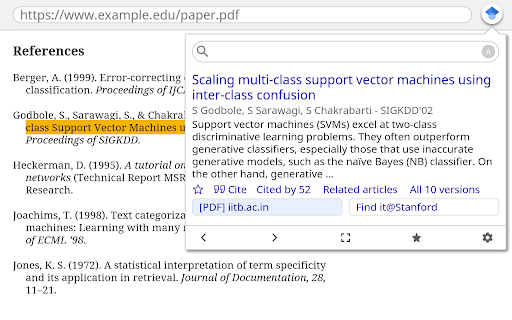
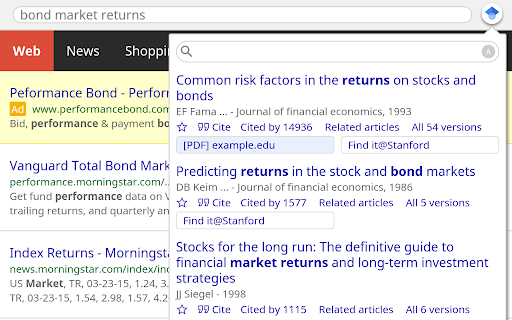
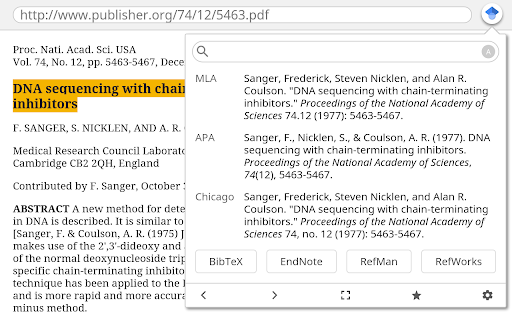
A productivity tool that integrates Google Scholar functionality into the browser. It allows users to search for scholarly papers, generate formatted citations, and manage research libraries directly from their web pages.

Version:3.6
Size:65.68KiB
Last updated:

Overview

Installs

3.0M+

Rating

★ 4.6

1,429 reviews

Languages

41 locales

Includes Deutsch, English, Filipino, Indonesia...

Market analysis

Review-backed positioning, friction, and market signals for this Chrome extension.

Backed by review samples

Macro category

Automation & Workflow Efficiency

Pricing friction

Low review signal

Complaint intensity

Moderate review signal

Listing & review signals
Observed signals from store listing text and review samples.

Listing positioning

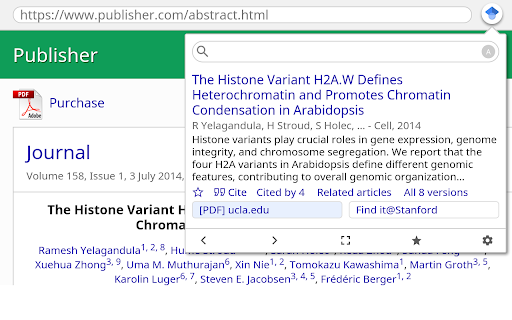
The extension is positioned as a seamless way to access Google Scholar while browsing the web. It emphasizes finding full-text articles, managing citations, and saving papers to a personal library.

Inferred product pattern

A browser-integrated research utility for academic workflow automation.

Review-backed pain points

Users report recurring server errors (403), the inability to retain specific search settings (like Case Law), and unwanted interference with typing in other Google services like Gmail.

Observed feature gaps

Missing an on/off switch, lack of Bibtex output within the extension panel (it opens a new tab), and a lack of direct integration with word processors like Google Docs or Microsoft Word.

Tags
Academic ResearchCitation ToolScholar SearchResearch Assistant
Target users

- Students

- Researchers

- Academics

- Librarians

Primary use cases

- Finding full-text scholarly articles

- Generating citations in various styles

- Saving articles to a Scholar library

- Searching US case law

Positive themes

- Convenient quick-access lookup

- Effective citation formatting

Negative themes

- Server connectivity and 403 errors

- Settings not persisting

- Interference with other web applications

Observed friction

- Performance complaints detected

- No pricing friction observed; the extension appears to be a free utility.

Evidence boundary: Data synthesized from the Chrome Web Store listing and a range of user reviews highlighting functionality and technical issues. The review sample includes some irrelevant entries and localized connectivity issues that may not represent global performance.
Complaint summaries
Review-backed complaint signals grouped by operational area.

Support

No specific complaints regarding customer support were identified.

Reliability

Reliability is impacted by server access errors, 403 forbidden errors, and settings failing to save.

Privacy

No privacy or security complaints were observed in the provided data.

Access & pricing

- Free usage observed

- Login needed for core features

- Free plan or free usage claimed

Store listing facts

Listing assets

- Screenshots: 4

- Videos: 0

- Languages: 41

Trust signals

- Privacy policy

- Developer contact

- Official website

Store metadata

- Version: 3.6

- Size: 65.68KiB

- Last updated:

Listing SEO keywords

Search intent keywords
Keyword signals for evaluating how users may discover, compare, or search for this extension category.

Core discovery

Google Scholarscholarly articlescitation generatoracademic research

Comparison

ZoteroEndNote

Problem

unable to access serverGoogle Scholar 403 errorscholar settings not saving

Alternative

citation managerresearch tools

Similar extensions

Jump to related discovery paths:

Screenshots

Google Scholar Button screenshot

Links

Recommended Chrome extensions

Related listings from the same category, trending peers, and the same publisher portfolio.

Browse tools
Chrome Remote Desktop icon

Chrome Remote Desktop

Chrome Remote Desktop Release Managers

Chrome Remote Desktop extension

Installs

40.0M+

Rating

★ 3.1

Google Translate icon

Google Translate

google-translate-chrome-extension-owners

View translations easily as you browse the web. By the Google Translate team.

Installs

38.0M+

Rating

★ 4.2

Video Downloader Plus icon

Video Downloader Plus

Video Downloader Plus

Download and save videos from any website instantly. A fast, simple video downloader that just works.

Installs

1.0M+

Rating

★ 4.5

Wordtune: AI Paraphrasing and Grammar Tool icon

Wordtune: AI Paraphrasing and Grammar Tool

Wordtune

Unlock your potential with Wordtune's free AI writer – paraphrase, rewrite, translate, fix grammar, and more.

Installs

1.0M+

Rating

★ 4.6

Поиск Яндексa icon

Поиск Яндексa

Yandex

Вводите запросы в адресную строку и получайте ответы от Яндекса

Installs

1.0M+

Rating

★ 3.2

Bing Search and Homepage icon

Bing Search and Homepage

Microsoft Corporation

Set Microsoft Bing as your default homepage and default search engine

Installs

1.0M+

Rating

★ 2.7

uberAgent icon

uberAgent

Cloud Software Group, Inc.

Enables uberAgent to collect web app usage and performance data (e.g., foreground tab, page load duration) from Chrome.

Installs

1.0M+

Rating

★ 3.0

Ace Script icon

Ace Script

Ace Stream

Everything can be scripted, allowing your browser to do more!

Installs

1.0M+

Rating

★ 3.4

MSN + Bing for Chrome icon

MSN + Bing for Chrome

Microsoft Corporation

Set MSN as your homepage and Bing as your search engine

Installs

1.0M+

Rating

★ 4.1

Google Analytics Opt-out Add-on (by Google) icon

Google Analytics Opt-out Add-on (by Google)

ga-extension-publishers

Tells the Google Analytics JavaScript not to send information to Google Analytics.

Installs

1.0M+

Rating

★ 4.0