Subscriber Count on Comments for YouTube™ icon

Subscriber Count on Comments for YouTube™ Chrome Extension Analysis

Social Media Growth & Marketing

Chrome extension ID: legnlfnnpadijhghmeagaafplkeljhki

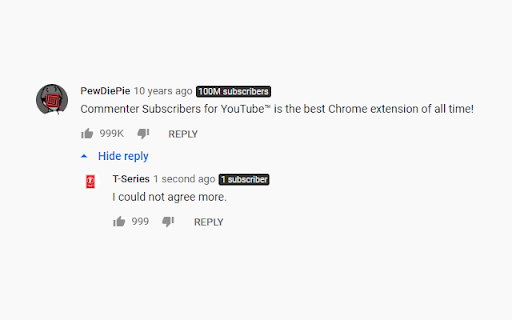
A Chrome extension that adds the subscriber count of a channel next to their username within YouTube comments. It allows users to quickly identify the size and influence of commenters without leaving the video page.

Developer:Matty Hempstead
Version:1.1.16
Size:10.48KiB
Last updated:

Overview

Installs

5K+

Rating

4.0

46 reviews

Languages

1 locales

Includes English

Market analysis

Review-backed positioning, friction, and market signals for this Chrome extension.

Backed by review samples

Macro category

Social Media Growth & Marketing

Pricing friction

Low review signal

Complaint intensity

Moderate review signal

Listing & review signals
Observed signals from store listing text and review samples.

Listing positioning

The product positions itself as a simple, automated utility that enhances the YouTube comment section by displaying subscriber counts. It emphasizes transparency and community contribution by highlighting its open-source status on GitHub.

Inferred product pattern

Single-purpose UI overlay leveraging public platform data for social proofing.

Review-backed pain points

Users report that the extension often stops working entirely, displays inflated or incorrect subscriber counts, and fails to function when the browser language is set to something other than English.

Observed feature gaps

Reviews indicate a lack of subscriber data on search and recommendation pages, as well as failures to accurately display counts for very large channels.

Tags
YouTube UtilitySubscriber CounterSocial AnalyticsOpen SourceComment Tool
Target users

- YouTube Content Creators

- Social Media Marketers

- YouTube Power Users

Primary use cases

- Identifying influential commenters

- Gauging channel authority in discussions

Positive themes

- Convenience of utility

- Useful alternative to VidIQ

Negative themes

- Frequent functional breakage

- Inaccurate subscriber data

- Language compatibility issues

- Limited functionality on top-level comments

Observed friction

- Performance complaints detected

- No pricing friction observed; the tool is described as open source.

Evidence boundary: Data extracted from the store listing and a sample of 10 user reviews. Review sample is skewed toward low ratings, and no official pricing or terms page was provided.
Complaint summaries
Review-backed complaint signals grouped by operational area.

Support

No direct support complaints, though users mention the tool is broken in reviews.

Reliability

Significant reliability issues reported, including the extension ceasing to work and displaying corrupted text strings.

Privacy

No privacy complaints observed.

Access & pricing

- Free usage observed

- No account requirement observed

- Free plan or free usage claimed

Store listing facts

Listing assets

- Screenshots: 1

- Videos: 0

- Languages: 1

Trust signals

- Developer contact

- Support link

Store metadata

- Version: 1.1.16

- Size: 10.48KiB

- Last updated:

Listing SEO keywords

Search intent keywords
Keyword signals for evaluating how users may discover, compare, or search for this extension category.

Core discovery

youtube subscriber count commentsyoutube comment sub countsee youtube subscribers in comments

Comparison

VidIQ alternativeyoutube subscriber counter extension

Problem

how to see subscriber count in youtube commentsyoutube comment sub count not working

Alternative

youtube comment analytics toolyt subscriber count extension

Similar extensions

Jump to related discovery paths:

Screenshots

Subscriber Count on Comments for YouTube™ screenshot

Links

Recommended Chrome extensions

Related listings from the same category, trending peers, and the same publisher portfolio.

Browse social