Imagera — AI Image & Video Studio icon

Imagera Chrome Extension Analysis

AI & Writing Assistants

Store listing title: Imagera — AI Image & Video Studio

Chrome extension ID: lelcepojimhcpgobknpeefpfchjnepho

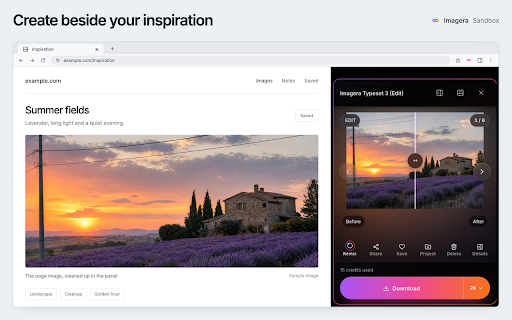
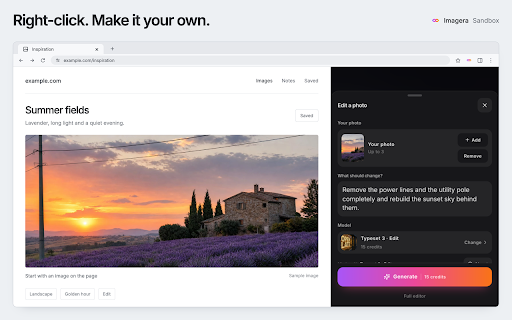
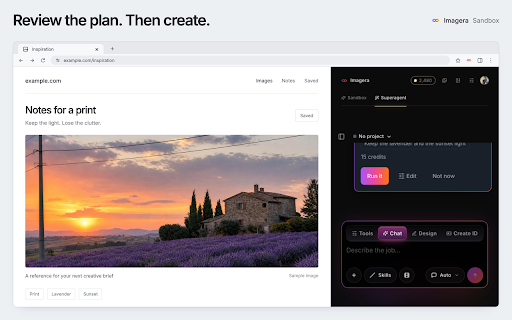
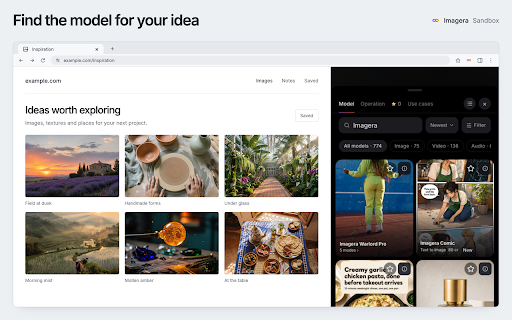
Imagera is a Chrome extension that brings AI image and video creation and editing capabilities to the user's browser sidebar. It allows users to generate content from prompts, edit existing images, animate them, upscale them, or record their screen for video creation. The extension requires an Imagera account and internet connection for its features.

Developer:Imagera AI
Version:1.2.0
Size:16.52MiB
Last updated:

Overview

Installs

0

Rating

★ —

0 reviews

Languages

1 locales

Includes English

Market analysis

Review-backed positioning, friction, and market signals for this Chrome extension.

No review samples found

Macro category

AI & Writing Assistants

Pricing friction

Low review signal

Complaint intensity

Low review signal

Listing & review signals
Observed signals from store listing text and review samples.

Listing positioning

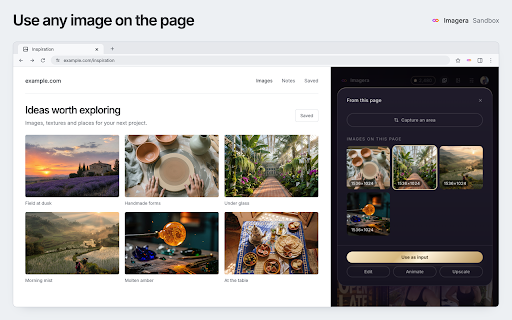
Imagera positions itself as an AI-powered studio integrated directly into Chrome's side panel, offering image and video creation and editing tools. It emphasizes its ability to work from any webpage by capturing screenshots, recording screens, or right-clicking images and text.

Inferred product pattern

AI Creative Suite

Review-backed pain points

No review-backed data is available.

Observed feature gaps

No review-backed data is available.

Tags
AI ImageAI VideoImage EditingVideo EditingAI Studio
Target users

- AI enthusiasts

- Content creators

- Graphic designers

- Video editors

Primary use cases

- AI image generation

- AI video generation

- Image editing from web

- Screen recording for video

- Content creation assistance

Positive themes

No positive theme data.

Negative themes

No negative theme data.

Observed friction

- The listing indicates that generations use account credits, with prices depending on the model and settings, managed on imagera.ai. It does not specify a free tier but mentions plans are managed on their website.

Evidence boundary: Listing data including title, short and long descriptions, and website. No user reviews were found, so no insights into user experience, pain points, or sentiment are available.
Complaint summaries
Review-backed complaint signals grouped by operational area.

Support

No review-backed data is available.

Reliability

No review-backed data is available.

Privacy

The listing states that Imagera does not sell personal information or creations and provides a link to its privacy policy.

Access & pricing

- Free entry with paid features

- Account required for core usage

- No clear pricing signal

Store listing facts

Listing assets

- Screenshots: 5

- Videos: 0

- Languages: 1

Trust signals

- Privacy policy

- Developer contact

- Official website

- Support link

Store metadata

- Version: 1.2.0

- Size: 16.52MiB

- Last updated:

Listing SEO keywords

Search intent keywords
Keyword signals for evaluating how users may discover, compare, or search for this extension category.

Core discovery

AI image generatorAI video editorChrome AI extensionWebpage AI toolsAI content creation

Comparison

Midjourney ChromeDALL-E ChromeStable Diffusion Chrome

Problem

image editing toolvideo recording toolAI assistantcontent creation help

Alternative

Imagera AIAI sandbox

Similar extensions

Jump to related discovery paths:

Screenshots

Imagera — AI Image & Video Studio screenshot

Links

Recommended Chrome extensions

Related listings from the same category, trending peers, and the same publisher portfolio.

Browse art
GlowCam: AI Beauty Filter for Zoom, Meet & Teams icon

GlowCam: AI Beauty Filter for Zoom, Meet & Teams

Imagera AI

Real-time beauty filter for browser calls. Skin, makeup, shaping and camera controls. Your video never leaves your device.

Installs

316

Rating

★ 2.3

Imagera Code for Chrome icon

Imagera Code for Chrome

Imagera AI

Let your Imagera Code sessions use Chrome: each session works in its own tab group, after you allow it.

Installs

0

Rating

★ —

Download All Images icon

Download All Images

MeryDev

Easily save images with a wide range of customization features, such as file size, dimensions, and image type.

Installs

200K+

Rating

★ 4.0

Custom profile picture for Netflix™ [QVI] icon

Custom profile picture for Netflix™ [QVI]

Great Browser Extensions

Customize your Netflix™ profile pictures.

Installs

200K+

Rating

★ 3.1

Custom Calendar Background icon

Custom Calendar Background

Pat Coleman

Adds background images to Google Calendar

Installs

200K+

Rating

★ 3.8

Save to Cosmos icon

Save to Cosmos

Cosmos

Saving extension for Chrome

Installs

100K+

Rating

★ 4.5

Bulk Image Downloader icon

Bulk Image Downloader

XEVIORA

Bulk download images from multiple tabs in one click. All common formats plus AI-generated images. Filter by size and type.

Installs

100K+

Rating

★ 4.8

Inkscape editor for draws and graphics icon

Inkscape editor for draws and graphics

officeonlinesystems

Create or edit vector graphics such as illustrations, diagrams, line arts, charts, logos and complex paintings

Installs

100K+

Rating

★ 3.2

PlayMemories Camera Apps Downloader icon

PlayMemories Camera Apps Downloader

Sony Corporation

This extension is needed to install PlayMemories Camera Apps applications.

Installs

100K+

Rating

★ 1.6

Tabliss - A Beautiful New Tab icon

Tabliss - A Beautiful New Tab

tabliss.io

A beautiful New Tab page with many customisable backgrounds and widgets that does not require any permissions.

Installs

100K+

Rating

★ 4.6