LinkedIn Formatter icon

LinkedIn Formatter Chrome Extension Analysis

Social Media Growth & Marketing

Chrome extension ID: lfjjnfalkjdbbbdhjeabfhioimccbcnp

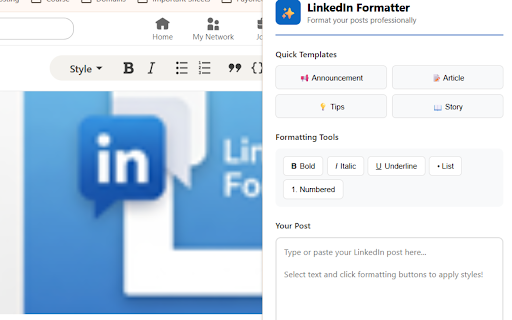
A Chrome extension that provides Unicode-based text styling for LinkedIn, including bold, italic, and underlined options. It features a template library, real-time previews, and list-making tools to help users organize their professional content.

Developer:Josh Allman
Version:1.0
Size:35.73KiB
Last updated:

Overview

Installs

21

Rating

5.0

2 reviews

Languages

1 locales

Includes English

Market analysis

Review-backed positioning, friction, and market signals for this Chrome extension.

No review samples found

Macro category

Social Media Growth & Marketing

Pricing friction

Low review signal

Complaint intensity

Low review signal

Listing & review signals
Observed signals from store listing text and review samples.

Listing positioning

The product is positioned as an essential tool for LinkedIn content creators to increase engagement and professional branding. It emphasizes the ability to overcome LinkedIn's native text limitations to create visually structured and readable posts.

Inferred product pattern

A lightweight utility extension that uses Unicode character substitution to provide advanced text styling on platforms with limited native formatting.

Review-backed pain points

Review-backed data is not available.

Observed feature gaps

LinkedIn's native editor lacks support for rich text formatting such as bold, italic, or underlined text.

Tags
LinkedIn FormattingText StylingContent CreationUnicode Text
Target users

- Content Creators

- Marketing Professionals

- Recruiters

- Entrepreneurs

- Sales Professionals

Primary use cases

- Formatting LinkedIn posts for better readability

- Using templates for professional announcements

- Adding emphasis to key insights in social media posts

Positive themes

- Review-backed data is not available.

Negative themes

- Review-backed data is not available.

Observed friction

- No pricing information is provided in the store listing.

Evidence boundary: Data extracted from the Chrome Web Store product description and feature set. No user reviews were available to validate user sentiment or product performance.
Complaint summaries
Review-backed complaint signals grouped by operational area.

Support

No support complaints were observed.

Reliability

No reliability or performance complaints were observed.

Privacy

No privacy complaints were observed; the listing claims all formatting happens locally in the browser.

Access & pricing

- No clear monetization signal

- No account requirement observed

- No clear pricing signal

Store listing facts

Listing assets

- Screenshots: 1

- Videos: 0

- Languages: 1

Trust signals

- Privacy policy

- Developer contact

- Official website

- Support link

Store metadata

- Version: 1.0

- Size: 35.73KiB

- Last updated:

Listing SEO keywords

Search intent keywords
Keyword signals for evaluating how users may discover, compare, or search for this extension category.

Core discovery

LinkedIn text formatterLinkedIn bold textLinkedIn italic textLinkedIn post templates

Comparison

LinkedIn rich text editor

Problem

LinkedIn no bold textLinkedIn formatting limitations

Alternative

LinkedIn text stylersocial media text formatter

Similar extensions

Jump to related discovery paths:

Screenshots

LinkedIn Formatter screenshot

Links

Recommended Chrome extensions

Related listings from the same category, trending peers, and the same publisher portfolio.

Browse workflow
View CSS icon

View CSS

Josh Allman

A Chrome extension to view the CSS of any website.

Installs

1K+

Rating

4.7

Arabic Keyboard icon

Arabic Keyboard

Josh Allman

Type Arabic on any website with a fast keyboard, transliteration, and smart typing tools.

Installs

738

Rating

5.0

AI Grammar Checker & Paraphraser – LanguageTool icon

AI Grammar Checker & Paraphraser – LanguageTool

lt-extension-publisher

Instantly Enhance Your Texts with LanguageTool’s Grammar Checker and Paraphrasing Tool

Installs

2.0M+

Rating

4.7

Evernote Web Clipper icon

Evernote Web Clipper

Evernote

Use the Evernote extension to save things you see on the web into your Evernote account.

Installs

2.0M+

Rating

4.7

Keeper® Password Manager & Digital Vault icon

Keeper® Password Manager & Digital Vault

Keeper Security

Generate strong passwords, autofill and protect your confidential info with zero-knowledge encryption.

Installs

2.0M+

Rating

4.8

Snow Web Application Metering icon

Snow Web Application Metering

snow_chrome_extensions

This extension tracks web application use for the purpose of license compliance and cost optimization. www.snowsoftware.com/browser

Installs

2.0M+

Rating

1.3

Mendeley Web Importer icon

Mendeley Web Importer

Mendeley

Fast, convenient import of references and PDFs to your Mendeley Reference Manager library.

Installs

2.0M+

Rating

2.3

Enable local file links icon

Enable local file links

Takashi Sugimoto (tksugimoto)

Make it possible to open by click a link to a local file that is disabled by Chrome.

Installs

2.0M+

Rating

3.9

Microsoft Defender Browser Protection icon

Microsoft Defender Browser Protection

Microsoft Corporation

Protect yourself against online threats, like phishing and malicious websites, with real-time protection from Microsoft.

Installs

2.0M+

Rating

4.2

Визуальные закладки icon

Визуальные закладки

Yandex

Визуальные закладки – это страница, на которой собраны ваши любимые сайты

Installs

2.0M+

Rating

3.4