MultiFind — Keyword Highlighter icon

MultiFind Chrome Extension Analysis

Automation & Workflow Efficiency

Store listing title: MultiFind — Keyword Highlighter

Chrome extension ID: likdfbdfkeapbijdfelonpnodacleaek

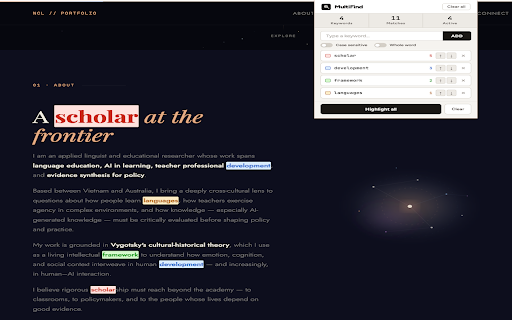
This extension allows users to search and highlight unlimited keywords on any webpage at once. It supports advanced search syntaxes, including Wildcards and Regex, and features customizable color-coding for individual terms.

Developer:ngoconglem
Version:1.0.1
Size:37.83KiB
Last updated:

Overview

Installs

88

Rating

★ —

0 reviews

Languages

1 locales

Includes English

Market analysis

Review-backed positioning, friction, and market signals for this Chrome extension.

No review samples found

Macro category

Automation & Workflow Efficiency

Pricing friction

Low review signal

Complaint intensity

Low review signal

Listing & review signals
Observed signals from store listing text and review samples.

Listing positioning

MultiFind positions itself as a robust, power-user alternative to the native browser 'Ctrl+F' function. It emphasizes the ability to track multiple terms simultaneously through a persistent, floating UI panel.

Inferred product pattern

Utility extension for browser-based text analysis and navigation.

Review-backed pain points

Review-backed data is not available.

Observed feature gaps

Review-backed data is not available.

Tags
Keyword HighlighterResearch ToolRegex SearchProductivity
Target users

- Researchers

- Editors

- Developers

- General readers

Primary use cases

- Cross-referencing multiple terms on a webpage

- Literature review

- Highlighting specific data points in long documents

Positive themes

No positive theme data.

Negative themes

No negative theme data.

Observed friction

- No pricing friction identified; listing suggests a free utility tool.

Evidence boundary: Analysis based strictly on the provided Chrome Web Store listing details as no user reviews are currently available. The lack of user reviews prevents assessment of real-world performance, bug frequency, or user satisfaction.
Complaint summaries
Review-backed complaint signals grouped by operational area.

Support

Review-backed data is not available.

Reliability

Review-backed data is not available.

Privacy

Review-backed data is not available.

Access & pricing

- Free usage observed

- No account requirement observed

- Free plan or free usage claimed

Store listing facts

Listing assets

- Screenshots: 1

- Videos: 0

- Languages: 1

Trust signals

- Privacy policy

- Developer contact

Store metadata

- Version: 1.0.1

- Size: 37.83KiB

- Last updated:

Listing SEO keywords

Search intent keywords
Keyword signals for evaluating how users may discover, compare, or search for this extension category.

Core discovery

multi keyword highlighterregex page searchhighlight multiple words on pagebrowser find alternative

Comparison

better than Ctrl+Fbrowser search tool

Problem

find multiple keywords on pagehighlighting keywords browser

Alternative

text highlighter chrome extension

Similar extensions

Jump to related discovery paths:

Screenshots

MultiFind — Keyword Highlighter screenshot

Links

Recommended Chrome extensions

Related listings from the same category, trending peers, and the same publisher portfolio.

Browse education
Scholar Metrics — Quartiles & Indexing icon

Scholar Metrics — Quartiles & Indexing

ngoconglem

Scopus SJR quartiles and Web of Science indexing (SCIE/SSCI/AHCI/ESCI) on Google Scholar. All lookups local, no data sent.

Installs

1K+

Rating

★ 5.0

Keyword Highlighter icon

Keyword Highlighter

ngoconglem

Highlight keywords in red and green and retain them after reload.

Installs

125

Rating

★ 5.0

Google Meet Breakout by Robert Hudek icon

Google Meet Breakout by Robert Hudek

Unknown developer

Only the teacher needs to install. Completely Free and your Data is Private. Google Classroom integration, Slider Control.

Installs

400K+

Rating

★ 4.4

Assessment Lock (Vretta) icon

Assessment Lock (Vretta)

google-web-store-admin

Assessment Security extension for e-Assessments running on ChromeOS

Installs

400K+

Rating

★ 2.1

Google Meet Attendance List icon

Google Meet Attendance List

MeetList

Easiest way to save the attendance list for your meetings or lectures

Installs

400K+

Rating

★ 4.8

Education Pro Browser Extension MV3 icon

Education Pro Browser Extension MV3

Ativion

Education Pro Browser Extension MV3 for use on Windows and Mac with EdPro client installed

Installs

400K+

Rating

★ 1.0

Scrible Extension icon

Scrible Extension

Scrible, Inc.

Smarter Web reading & research. Annotate, bookmark, save, cite, manage & share online articles. Use with your Scrible.com account.

Installs

400K+

Rating

★ 3.4

Certificate Enrollment for ChromeOS icon

Certificate Enrollment for ChromeOS

google.com

Request a certificate for your device.

Installs

400K+

Rating

★ 4.3

Add to Google Classroom icon

Add to Google Classroom

Canopy

This extension adds the current site to Google Classroom

Installs

400K+

Rating

★ 4.2

Trancy - AI Translator & Dual Subtitles icon

Trancy - AI Translator & Dual Subtitles

Trancy

Trancy provides bilingual subtitle for platforms like YouTube, Netflix, as well as AI translator for websites.

Installs

300K+

Rating

★ 4.4