Dialpad Chrome CTI icon

Dialpad Chrome CTI Chrome Extension Analysis

Automation & Workflow Efficiency

Chrome extension ID: lmecinlocgbbcdgbhkidmeijhdhlngjp

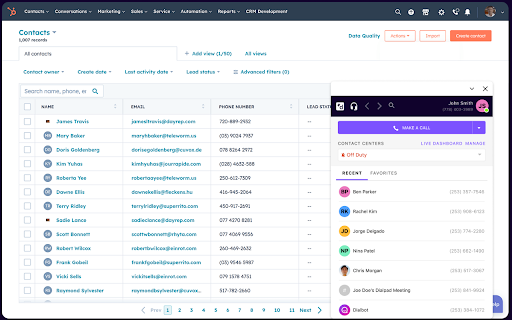
Dialpad Chrome CTI is a browser extension designed to enable click-to-call and click-to-text functionality. It allows users to interact with phone numbers on various websites and manage their Dialpad communication settings through a browser-based interface.

Developer:Dialpad, Inc
Version:0.1.45
Size:993KiB
Last updated:

Overview

Installs

60K+

Rating

★ 3.1

15 reviews

Languages

1 locales

Includes English

Market analysis

Review-backed positioning, friction, and market signals for this Chrome extension.

Backed by review samples

Macro category

Automation & Workflow Efficiency

Pricing friction

Moderate review signal

Complaint intensity

High review signal

Listing & review signals
Observed signals from store listing text and review samples.

Listing positioning

The product is positioned as a seamless integration for Chrome that allows users to perform telephony tasks without leaving their browser tabs. It emphasizes ease of setup and the ability to manage call center statuses and communication history directly within the browser.

Inferred product pattern

A specialized telephony integration tool for web-based workflows that currently suffers from significant stability and user interface friction.

Review-backed pain points

Users report that the 'Launch CTI' button often fails to function, the extension can be finicky, and a pop-up window frequently appears on every new tab, disrupting the browsing experience.

Observed feature gaps

Users have requested the ability to prevent the CTI window from opening automatically on every tab or an option to have it open minimized.

Tags
CTI DialerClick To CallBusiness Communication
Target users

- Sales representatives

- Customer support agents

- Call center operators

Primary use cases

- Click-to-call from web browsers

- Managing call center status

- Texting via Chrome

- Accessing communication history

Positive themes

- Seamless integration with Gmail

- Customizable website permissions

- Privacy features for sensitive data

Negative themes

- Technical unreliability and breakage

- Ineffective technical support

- Intrusive UI pop-ups

Observed friction

- Payment required for meaningful usage

- Refund complaints detected

- Performance complaints detected

- One user reported high frustration after paying for troubleshooting services that failed to resolve their technical issues.

Evidence boundary: Analysis based on the Chrome Web Store listing and a set of customer reviews detailing technical failures, support issues, and UI frustrations. The review sample size is relatively small (15 reviews).
Complaint summaries
Review-backed complaint signals grouped by operational area.

Support

Users expressed dissatisfaction with support agents who appeared unfamiliar with the extension or relied on standard documentation that did not solve the specific issues.

Reliability

Significant complaints regarding the extension failing to launch, unresponsive buttons, and unreliable click-to-dial integrations.

Privacy

No privacy complaints were observed; users highlighted positive updates regarding automatic recording disabling on sensitive sites.

Access & pricing

- Subscription model observed

- Login needed for core features

- No clear pricing signal

Store listing facts

Listing assets

- Screenshots: 1

- Videos: 1

- Languages: 1

Trust signals

- Privacy policy

- Developer contact

- Support link

Store metadata

- Version: 0.1.45

- Size: 993KiB

- Last updated:

Listing SEO keywords

Search intent keywords
Keyword signals for evaluating how users may discover, compare, or search for this extension category.

Core discovery

CTI extensionclick to call chromeDialpad integrationbrowser dialer

Comparison

JustCall

Problem

CTI not workingDialpad extension brokenclick to call fail

Alternative

browser telephonyweb dialer extension

Similar extensions

Jump to related discovery paths:

Screenshots

Dialpad Chrome CTI screenshot

Links

Recommended Chrome extensions

Related listings from the same category, trending peers, and the same publisher portfolio.

Browse social