Battery Status icon

Battery Status Chrome Extension Analysis

Automation & Workflow Efficiency

Chrome extension ID: lncamcnihkpmnbpioiooedpmmpaaohnb

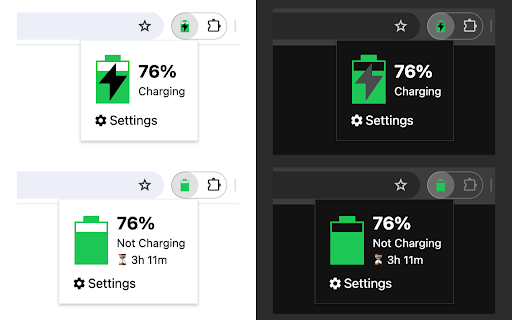
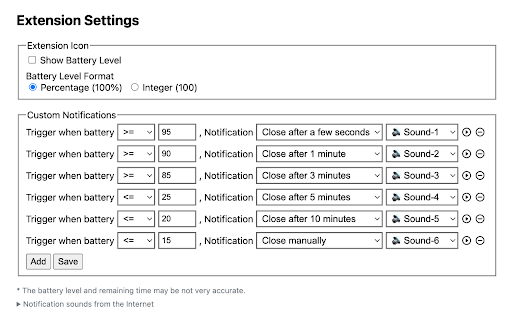
Battery Status is a Chrome extension that displays real-time battery percentage and charging status via the extension icon and a popup page. It provides visual cues (green/red colors) and allows users to set custom alerts for specific battery levels.

Version:3.0.1
Size:146KiB
Last updated:

Overview

Installs

10K+

Rating

★ 4.4

48 reviews

Languages

2 locales

Includes English, 中文(中国)

Market analysis

Review-backed positioning, friction, and market signals for this Chrome extension.

Backed by review samples

Macro category

Automation & Workflow Efficiency

Pricing friction

Low review signal

Complaint intensity

Low review signal

Listing & review signals
Observed signals from store listing text and review samples.

Listing positioning

The product is positioned as a simple utility to monitor battery levels and charging status directly from the browser toolbar. It highlights visual indicators like color-coded icons and the ability to configure custom notifications.

Inferred product pattern

Single-purpose system utility providing visual and audible alerts for hardware status.

Review-backed pain points

Users report that the percentage text on the icon is too small to read easily. There is also frustration regarding notifications not remaining on screen long enough to be noticed.

Observed feature gaps

Lack of adjustable text size for the icon, absence of 'sticky' or persistent notification windows, and a need for more diverse or looping audio alerts.

Tags
Battery MonitorSystem UtilityBattery NotificationsChromebook Tool
Target users

- Chromebook users

- Laptop users

- Users focused on battery longevity

Primary use cases

- Monitoring battery percentage without opening system settings

- Setting custom alerts for low or full battery

- Visual tracking of charging status via the browser icon

Positive themes

- Customizable notifications

- General utility and usefulness

- Simple setup and operation

Negative themes

- Small font size on the icon

- Transient notifications that disappear too quickly

- Limited audio alert options

Observed friction

- No pricing friction observed as the tool appears to be free.

Evidence boundary: Analysis based on the Chrome Web Store listing and a sample of 10 reviews. Small review sample size; specific hardware behavior varies across different OS/device types.
Complaint summaries
Review-backed complaint signals grouped by operational area.

Support

No major support complaints; one user noted the developer responded to a bug report.

Reliability

Some reports of custom notifications not triggering or disappearing too quickly due to browser behavior.

Privacy

No privacy complaints observed.

Access & pricing

- Free usage observed

- No account requirement observed

- Free plan or free usage claimed

Store listing facts

Listing assets

- Screenshots: 2

- Videos: 0

- Languages: 2

Trust signals

- Privacy policy

- Developer contact

- Official website

Store metadata

- Version: 3.0.1

- Size: 146KiB

- Last updated:

Listing SEO keywords

Search intent keywords
Keyword signals for evaluating how users may discover, compare, or search for this extension category.

Core discovery

Chrome battery monitorBattery percentage extensionLaptop battery alertsChromebook battery status

Comparison

Battery Status vs system trayBest battery monitor extension

Problem

Chromebook battery notification missingHow to see battery percentage in ChromeBattery health alerts

Alternative

Battery monitor alternativeBattery status tool

Similar extensions

Jump to related discovery paths:

Screenshots

Battery Status screenshot

Links

Website: guokai.dev

Privacy policy: https://guokai.dev/privacy/

Recommended Chrome extensions

Related listings from the same category, trending peers, and the same publisher portfolio.

Browse tools
Tab Groups Extension icon

Tab Groups Extension

Jackie(Guokai) Han

Automatically group tabs, save tabs/groups, and provide shortcuts for tabs/groups.

Installs

100K+

Rating

★ 4.4

QR Code icon

QR Code

Jackie(Guokai) Han

Generate and Scan QR Code.

Installs

100K+

Rating

★ 4.7

Microsoft Bing Search with Rewards icon

Microsoft Bing Search with Rewards

Microsoft Corporation

Use the Microsoft Rewards extension to find new ways to earn every day, easily track your points and set your default search to Bing

Installs

3.0M+

Rating

★ 4.4

Google Scholar Button icon

Google Scholar Button

scholar-chrome-extensions

Lookup scholarly articles as you browse the web.

Installs

3.0M+

Rating

★ 4.6

Dark Mode icon

Dark Mode

Grephy

A global dark theme for the web.

Installs

2.0M+

Rating

★ 3.6

YouTube Summary with ChatGPT & Claude icon

YouTube Summary with ChatGPT & Claude

Glasp

Summarize YouTube videos, web articles, and PDFs to save time, powered by ChatGPT, Claude, Mistral AI, and Gemini.

Installs

2.0M+

Rating

★ 4.3

ЮБуст - VPN для YouTube. Обход блокировки Ютуб без ВПН. VPN для браузера icon

ЮБуст - VPN для YouTube. Обход блокировки Ютуб без ВПН. VPN для браузера

Uboost

Ускоритель Ютуб без ВПН, VPN для браузера Яндекс, Chrome, Opera, Edge. Обход замедления Ютуба.

Installs

2.0M+

Rating

★ 4.2

Pie Adblock - A Powerful Free Ad Blocker icon

Pie Adblock - A Powerful Free Ad Blocker

Pie Extensions

Pie Adblock blocks ads & pop-ups, plus YouTube & Twitch video ads. You can customize your ad experience with Pie!

Installs

2.0M+

Rating

★ 4.9

HID Credential Management Extension icon

HID Credential Management Extension

hid-global-chrome-web-store

Browser extension for HID credential management solution.

Installs

2.0M+

Rating

★ 1.3

AI Chat for Search icon

AI Chat for Search

AI Chat for Search Team

Display AI Chat response alongside search engine results

Installs

2.0M+

Rating

★ 4.6