Change Case icon

Change Case Chrome Extension Analysis

Automation & Workflow Efficiency

Chrome extension ID: lpakoahdokkkonadfppfgmednkknpgbm

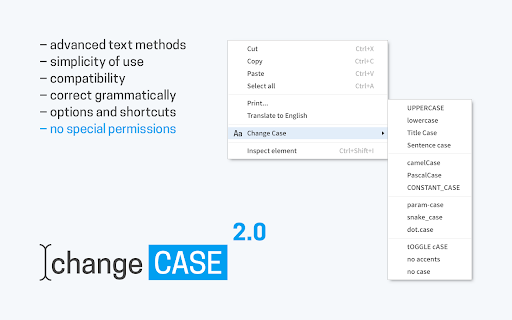
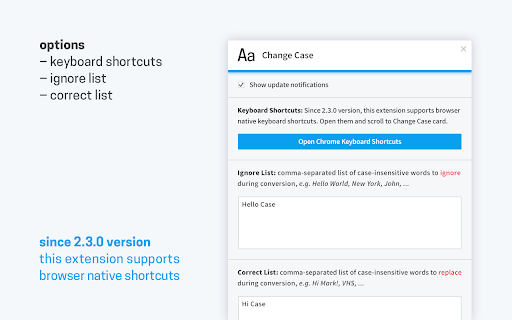
A productivity utility for Chrome that allows users to instantly convert text between multiple formats, including sentence case, title case, upper/lower case, and programming cases like camelCase. It provides conversion via context menus and customizable keyboard shortcuts.

Developer:Bartosz Lorek
Version:2.6.1
Size:74.04KiB
Last updated:

Overview

Installs

70K+

Rating

4.5

170 reviews

Languages

1 locales

Includes English

Market analysis

Review-backed positioning, friction, and market signals for this Chrome extension.

Backed by review samples

Macro category

Automation & Workflow Efficiency

Pricing friction

Low review signal

Complaint intensity

Moderate review signal

Listing & review signals
Observed signals from store listing text and review samples.

Listing positioning

The extension is positioned as an advanced set of text case transformation methods compatible with various web elements like inputs, textareas, and editable content. It emphasizes privacy by performing all transformations via local algorithms on the user's device.

Inferred product pattern

A utility-driven workflow tool focused on text manipulation through browser integration.

Review-backed pain points

Users report significant reliability issues where updates cause the extension to stop working, failures to respond to keyboard shortcuts, and inability to function within major web applications like Google Docs, Gmail, or the Brave browser.

Observed feature gaps

Lack of reliable support for complex web-based editors (Google Docs, Word Online) and issues with specific keyboard/language layouts.

Tags
Text Case ConverterText FormattingProductivity ToolCase Transformer
Target users

- Content Writers

- Developers

- Data Entry Specialists

- Students

Primary use cases

- Changing text case in web forms

- Formatting document titles

- Converting text for programming use

Positive themes

- Highly useful utility when functioning correctly

- Efficient text transformation

Negative themes

- Functionality breaking after updates

- Incompatibility with Google Docs and Gmail

- Keyboard shortcuts failing to respond

- Bugs in word-exclusion logic

Observed friction

- Performance complaints detected

- No pricing friction observed as no payment model is mentioned in the listing or reviews.

Evidence boundary: Data extracted from the Chrome Web Store listing and a sample of user reviews highlighting both core utility and recent technical regressions. The analysis is based on a small sample of reviews relative to the total user base.
Complaint summaries
Review-backed complaint signals grouped by operational area.

Support

No direct support complaints, though users are using reviews to request urgent bug fixes.

Reliability

Significant complaints regarding reliability, specifically regarding breaking updates, lack of response to commands, and failure to work on specific websites or browsers.

Privacy

No privacy complaints; the listing claims all data is processed locally.

Access & pricing

- No clear monetization signal

- No account requirement observed

- No clear pricing signal

Store listing facts

Listing assets

- Screenshots: 2

- Videos: 0

- Languages: 1

Trust signals

- Developer contact

- Official website

Store metadata

- Version: 2.6.1

- Size: 74.04KiB

- Last updated:

Listing SEO keywords

Search intent keywords
Keyword signals for evaluating how users may discover, compare, or search for this extension category.

Core discovery

change text casetext case converterupper case to lower casetitle case convertercamel case converter

Comparison

text case changercase converter extension

Problem

change case not workingtext case converter brokengoogle docs case change

Alternative

text formattercase converter

Similar extensions

Jump to related discovery paths:

Screenshots

Change Case screenshot

Links

Recommended Chrome extensions

Related listings from the same category, trending peers, and the same publisher portfolio.

Browse workflow