Twitch Stream Notifier icon

Twitch Stream Notifier Chrome Extension Analysis

Niche Lifestyle & Gaming Hacks

Chrome extension ID: lpkgicfflpkdinhalebfjlonfhehnpem

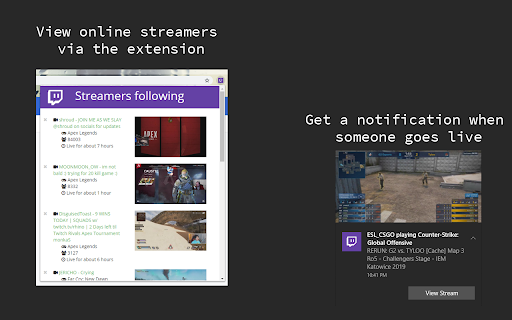
Twitch Stream Notifier allows users to monitor the live status of Twitch streamers directly from their browser. Users input streamer usernames to receive desktop notifications, bypassing the need for constant manual checks on the platform.

Version:2.7.1
Size:485KiB
Last updated:

Overview

Installs

4K+

Rating

4.1

38 reviews

Languages

1 locales

Includes English (United States)

Market analysis

Review-backed positioning, friction, and market signals for this Chrome extension.

Backed by review samples

Macro category

Niche Lifestyle & Gaming Hacks

Pricing friction

Low review signal

Complaint intensity

Moderate review signal

Listing & review signals
Observed signals from store listing text and review samples.

Listing positioning

The extension positions itself as a lightweight tracking tool for Twitch.tv users to stay updated on streamer activity. It offers both individual and bulk streamer tracking capabilities to ensure users receive timely alerts when their favorite creators go live.

Inferred product pattern

Simple utility extension that relies on scraping or API polling to trigger desktop notifications.

Review-backed pain points

Users frequently cite reliability issues where the extension stops working, requires constant reinstallation, or incorrectly identifies streamers as live when they are offline.

Observed feature gaps

Absence of a direct Twitch account login sync, lack of refresh rate customization, no import/export feature for streamer lists, and missing custom notification sounds.

Tags
TwitchNotificationsLive StreamingGaming Utility
Target users

- Twitch viewers

- Streamer fans

- Esports enthusiasts

Primary use cases

- Receiving browser notifications for live streams

- Tracking favorite streamers

- Bulk tracking of streamers

Positive themes

- Simple and straightforward interface

- Effective basic functionality when operational

- Useful for tracking multiple streamers

Negative themes

- Intermittent breakage requiring reinstallation

- Repetitive notification spam

- Inaccurate 'live' status reports

- Lack of integration with Twitch accounts

Observed friction

- Performance complaints detected

- No pricing friction observed as the extension is free.

Evidence boundary: Evidence is derived from 38 user reviews highlighting both the utility of the tracking feature and recurring stability issues with notification delivery. Review data is focused on long-term users, some of whom report issues over several years, which may not reflect current code patches.
Complaint summaries
Review-backed complaint signals grouped by operational area.

Support

Users report dissatisfaction with the stability of the tool, noting it often stops working entirely.

Reliability

High incidence of reliability complaints including notification bugs, false positives, and the need for frequent reinstalls to restore function.

Privacy

No privacy complaints found.

Access & pricing

- Free usage observed

- No account requirement observed

- Free plan or free usage claimed

Store listing facts

Listing assets

- Screenshots: 1

- Videos: 0

- Languages: 1

Trust signals

- Privacy policy

- Developer contact

- Official website

Store metadata

- Version: 2.7.1

- Size: 485KiB

- Last updated:

Listing SEO keywords

Search intent keywords
Keyword signals for evaluating how users may discover, compare, or search for this extension category.

Core discovery

Twitch live notificationsTwitch streamer trackerbrowser notification for Twitch

Comparison

Twitch desktop appTwitch follow alert extension

Problem

Twitch notifier not workingTwitch alerts broken

Alternative

Twitch live checkerStream monitor chrome extension

Similar extensions

Jump to related discovery paths:

Screenshots

Twitch Stream Notifier screenshot

Links

Recommended Chrome extensions

Related listings from the same category, trending peers, and the same publisher portfolio.

Browse social