Omni - Bookmark, History, & Tab Manager icon

Omni Chrome Extension Analysis

Tab & Bookmark Productivity

Store listing title: Omni - Bookmark, History, & Tab Manager

Chrome extension ID: mapjgeachilmcbbokkgcbgpbakaaeehi

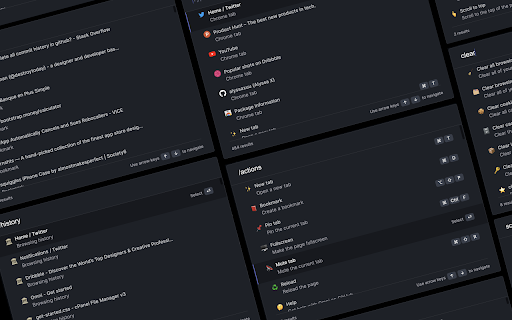
An open-source browser extension that provides an all-in-one command palette overlay to quickly search through tabs, history, and bookmarks. Users can trigger custom commands, execute browser actions, and integrate with third-party tools like Figma and Notion entirely via keyboard shortcuts. It focuses on local-first performance with an emphasis on speed and minimalist design.

Developer:Alyssa X
Version:1.4.7
Size:1.91MiB
Last updated:

Overview

Installs

20K+

Rating

4.5

66 reviews

Languages

1 locales

Includes English

Market analysis

Review-backed positioning, friction, and market signals for this Chrome extension.

Backed by review samples

Macro category

Tab & Bookmark Productivity

Pricing friction

Low review signal

Complaint intensity

Moderate review signal

Listing & review signals
Observed signals from store listing text and review samples.

Listing positioning

Omni is positioned as a powerful, keyboard-driven command interface for Google Chrome that allows users to manage tabs, bookmarks, and browser history efficiently. It promises to supercharge browser productivity using shortcuts and over 50 actions without requiring any sign-in or payment. The listing emphasizes a pro-user experience inspired by desktop launcher tools, with open-source transparency on GitHub.

Inferred product pattern

Local open-source productivity overlay tool leveraging keyboard-centric global listener commands.

Review-backed pain points

Users experience issues with shortcut key conflicts, particularly on macOS with background apps like Mail or Notion. There is also frustration regarding the inability to open results in a new tab (missing Shift+Enter shortcut), and the search input occasionally failing to auto-focus when launched, forcing manual cursor clicks.

Observed feature gaps

Missing options to open selected results in a new tab, inability to search within-page text (Ctrl+F integration), lack of basic command actions like clearing cache or deleting history, and lack of support for browsing bookmark subfolders hierarchically.

Tags
Tab ManagerBookmark ManagerCommand PaletteKeyboard ShortcutsProductivity Tool
Target users

- Keyboard-centric power users

- Developers and designers using Figma/Notion

- Users managing high volumes of open tabs and bookmarks

Primary use cases

- Quickly searching and switching between active browser tabs

- Accessing browser history and bookmarks via keyboard commands

- Triggering utility actions like pinning, muting, or copying URLs via shortcuts

Positive themes

- Intuitive and minimalist command palette design

- Fast and responsive tab switching via keyboard shortcuts

Negative themes

- Keyboard shortcut conflicts with native OS or other desktop apps

- Inability to open searched links in a new tab directly

- Search bar losing focus after being triggered

- Unreliable performance on specific browser contexts like blank tabs, homepages, or Edge/Brave environments

Observed friction

- Performance complaints detected

- No pricing friction reported. The product is entirely free, open-source, and does not require an account or sign-in.

Evidence boundary: Analyzed official Chrome Web Store listing metadata alongside user review samples highlighting compatibility concerns, shortcut collisions, and feature requests like opening links in new tabs. Review data is limited to 10 qualitative user samples, containing a mix of English and Chinese feedback, which may not capture all edge cases across different OS platforms.
Complaint summaries
Review-backed complaint signals grouped by operational area.

Support

No direct support complaints, though reviews note a lack of recent updates (some mentioning it hasn't been updated in years) and unaddressed bugs on modern OS versions like macOS Sonoma on M3 chips.

Reliability

Users report reliability issues such as the shortcut failing on blank tabs or local PDFs in Brave, the UI failing to load on Edge or blank tabs (showing a white screen), and conflicts triggering local macOS apps like Mail.

Privacy

No privacy complaints observed; the extension operates locally without sign-in and is open-source.

Access & pricing

- Free usage observed

- No account requirement observed

- Free plan or free usage claimed

Store listing facts

Listing assets

- Screenshots: 1

- Videos: 1

- Languages: 1

Trust signals

- Privacy policy

- Developer contact

- Support link

Store metadata

- Version: 1.4.7

- Size: 1.91MiB

- Last updated:

Listing SEO keywords

Search intent keywords
Keyword signals for evaluating how users may discover, compare, or search for this extension category.

Core discovery

chrome command palette extensionkeyboard driven tab searchquick bookmark search chromeall-in-one browser launcher

Comparison

omni vs raycast chromeomni vs alfred browser extensionomni search vs vimium

Problem

how to search tabs chrome keyboardfix duplicate tabs chrome shortcutchrome keyboard shortcut conflict notion

Alternative

RaycastAlfredVimiumOmni SearchSpotlight Search Chrome

Similar extensions

Jump to related discovery paths:

Screenshots

Omni - Bookmark, History, & Tab Manager screenshot

Links

Recommended Chrome extensions

Related listings from the same category, trending peers, and the same publisher portfolio.

Browse workflow