Floating Scientific Calculator icon

Floating Scientific Calculator Chrome Extension Analysis

Tab & Bookmark Productivity

Chrome extension ID: mbfnbhfjnjeedaknilkfegfnnmmmmpmn

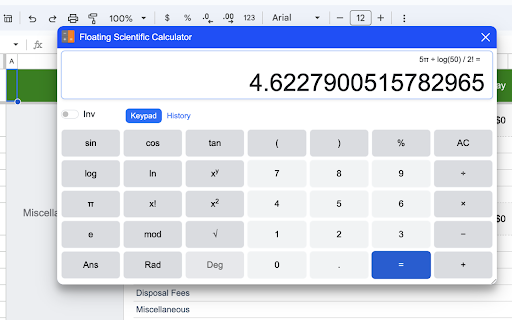
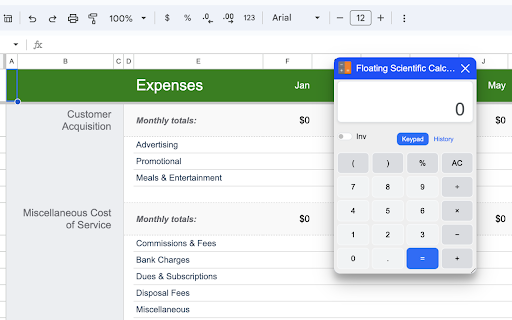
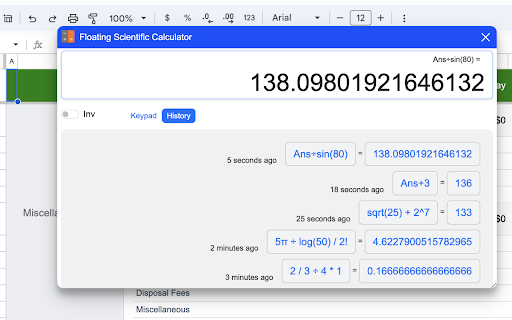
Floating Scientific Calculator is a browser tool that overlays a draggable math widget directly onto any active webpage. It provides both basic and scientific calculation modes, alongside a local computation history, to facilitate quick math tasks without needing to leave the browser window.

Developer:Essential Kit
Version:24.2.19
Size:5.36MiB
Last updated:

Overview

Installs

20K+

Rating

★ 4.7

108 reviews

Languages

47 locales

Includes Deutsch, English, Indonesia, Kiswahili...

Market analysis

Review-backed positioning, friction, and market signals for this Chrome extension.

Backed by review samples

Macro category

Tab & Bookmark Productivity

Pricing friction

Low review signal

Complaint intensity

Moderate review signal

Listing & review signals
Observed signals from store listing text and review samples.

Listing positioning

The store listing positions Floating Scientific Calculator as a convenient, always-on-top overlay widget designed to eliminate tab switching. It targets students and professionals who need rapid math computations while working on other screen-active tasks. Additionally, it highlights an upcoming AI integration feature with ChatGPT for step-by-step natural language problem-solving.

Inferred product pattern

Free open-source browser utility with planned premium feature monetization via AI/ChatGPT integrations.

Review-backed pain points

The most prominent pain point is keyboard usability, specifically that pressing the physical 'Enter' key does not output results in standard floating mode, requiring users to manually click the virtual '=' button. Users also experience page breakage on sites like Taobao and Klook, where the extension's presence interferes with login and payment forms.

Observed feature gaps

Reviewers suggest adding a 'basic-only' calculator layout to save screen real estate, resolving full-screen window incompatibility, fixing trigonometric outputs in degree mode, and addressing mathematical inaccuracies such as square root precision errors.

Tags
Floating CalculatorScientific CalculatorOverlay WidgetMath Tool
Target users

- Students

- Researchers

- Professionals handling numeric tasks online

Primary use cases

- Computing equations while referencing online source texts

- Maintaining an visible calculation workspace on top of active pages

- Quickly referencing calculation history during research

Positive themes

- Draggable layout utility for convenient positioning

- Quick access directly from the extension toolbar

Negative themes

- Broken keyboard integration where pressing 'Enter' fails to run the calculation

- Incompatibility with native page scripts, causing login forms and payment widgets to break

- Trigonometric calculation errors in degree mode

- Rounding errors and floating point calculation inaccuracies

Observed friction

- Performance complaints detected

- No payment or pricing-related friction was reported in the feedback; the product is positioned as a free tool.

Evidence boundary: Analyzed official developer claims on the Chrome Web Store alongside 11 user reviews highlighting interface conflicts with third-party web portals, input bugs, and precision issues. Findings are constrained by the sample size of 11 reviews, which may not fully represent the experience of the extension's active user base of 10,000+ profiles.
Complaint summaries
Review-backed complaint signals grouped by operational area.

Support

While one user referenced submitting a post in the support tab, there are no detailed complaints regarding developer communication or lack of support.

Reliability

Users report that the extension blocks login buttons on sites like taobao.com and breaks checkout/payment widgets on sites like klook.com. Some users note that it occasionally stops working completely or fails to load calculations properly in full-screen modes.

Privacy

No privacy or security concerns were raised in the analyzed reviews.

Access & pricing

- Free usage observed

- No account requirement observed

- Free plan or free usage claimed

Store listing facts

Listing assets

- Screenshots: 3

- Videos: 0

- Languages: 47

Trust signals

- Privacy policy

- Developer contact

- Official website

Store metadata

- Version: 24.2.19

- Size: 5.36MiB

- Last updated:

Listing SEO keywords

Search intent keywords
Keyword signals for evaluating how users may discover, compare, or search for this extension category.

Core discovery

floating calculator chrome extensionalways on top calculator on screendraggable scientific calculator

Comparison

on top calculator vs desktop calculatorfloating calculator vs side panel calculator

Problem

how to use calculator without switching tabsstop tab switching for calculations

Alternative

overlay scientific calculatorchrome browser calculator

Similar extensions

Jump to related discovery paths:

Screenshots

Floating Scientific Calculator screenshot

Links

Recommended Chrome extensions

Related listings from the same category, trending peers, and the same publisher portfolio.

Browse workflow