Instagram Video Controller Chrome Extension Analysis
Niche Lifestyle & Gaming HacksChrome extension ID: mglpimgmbjfjbkbdejhknelkhbeiekcm
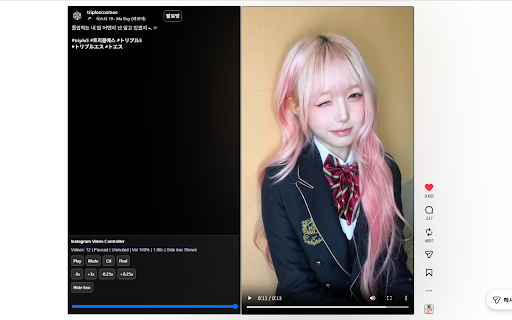
This Chrome extension provides users with enhanced controls for Instagram videos, including adjustable playback speed, volume, and a modified layout for Reels content. It aims to offer a more convenient and customizable viewing experience by automatically activating these features on relevant Instagram pages.
Overview
Installs
2K+
Rating
★ 3.3
32 reviews
Languages
17 locales
Includes English, Filipino, Indonesia, Türkçe...
Market analysis
Review-backed positioning, friction, and market signals for this Chrome extension.
Macro category
Niche Lifestyle & Gaming Hacks
Pricing friction
Low review signal
Complaint intensity
Moderate review signal
Listing positioning
The store listing positions the product as an Instagram video controller designed to enhance playback for Reels and regular posts. It highlights features like volume and speed control, as well as layout adjustments such as separating content and auto-expanding descriptions on Reels pages.
Inferred product pattern
A free utility browser extension designed to enhance the native video playback experience on Instagram, particularly for Reels, by offering custom controls for volume, speed, and minor layout adjustments.
Review-backed pain points
The most significant pain point reported by users is the extension's core functionality failing to work or being highly unreliable. Specific issues include videos muting automatically when restarted or forwarded, controls disappearing unexpectedly, and general non-functionality, leading to frustration and the perception of the extension as 'useless'.
Observed feature gaps
Review-backed data suggests observed feature gaps such as the inability to scroll through videos in full-screen mode, non-functional zoom features, and a lack of seamless control persistence when transitioning between photos and videos in the Instagram feed.
- Instagram users consuming video content and Reels
- Users seeking enhanced video playback controls on social media
- Controlling Instagram video playback speed
- Adjusting Instagram video volume and managing mute issues
- Improving the viewing experience on Instagram Reels by altering layout
- Ability to speed up video playback
- Option to view videos in full screen
- Feature to rewind videos
- Description content moved to the left side, off the video itself
- Extension not working at all or behaving like normal Instagram Reels
- Videos automatically muting or mute issues persisting despite user input
- Controls disappearing or requiring workarounds after encountering photos in the feed
- Issues with Reels alignment or visual presentation
- Unclear activation process for the extension
- Performance complaints detected
- Review-backed data is not available for pricing friction, as no payment is mentioned in the listing or reviews.
Support
Review-backed data suggests a potential UX issue where clicking the extension's pinned icon redirects to the developer page instead of displaying options, which could be perceived as a support or accessibility hurdle.
Reliability
Multiple reviews highlight significant reliability issues, including the extension not working at all, specific features like volume control (persistent muting), and video controls frequently disappearing or requiring manual workarounds.
Privacy
Review-backed data is not available for privacy or security complaints.
- No clear monetization signal
- No account requirement observed
- Free plan or free usage claimed
Store listing facts
- Screenshots: 1
- Videos: 0
- Languages: 17
- Developer contact
- Version: 2.1.5727
- Size: 93.2KiB
- Last updated:
Listing SEO keywords
Core discovery
Comparison
Problem
Alternative
Similar extensions
Jump to related discovery paths:
Screenshots