Awesome Window & Tab Manager icon

Awesome Window & Tab Manager Chrome Extension Analysis

Tab & Bookmark Productivity

Chrome extension ID: nfjaddknccljfohoaekkibpcceeenkah

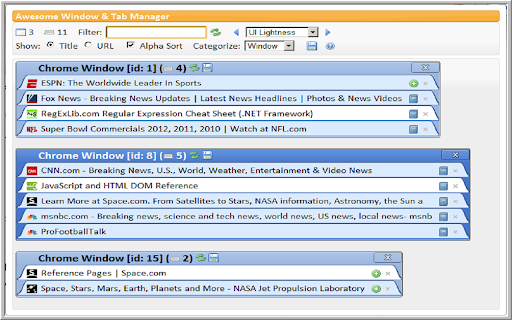
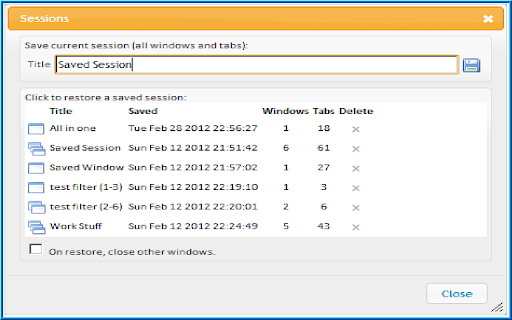
This extension provides a centralized interface to view and manage all open Chrome windows and tabs. Users can search for specific tabs, sort them alphabetically, and save groups of tabs as sessions for later use.

Version:3.0.0.1
Size:170KiB
Last updated:

Overview

Installs

877

Rating

3.8

30 reviews

Languages

1 locales

Includes English (United States)

Market analysis

Review-backed positioning, friction, and market signals for this Chrome extension.

Backed by review samples

Macro category

Tab & Bookmark Productivity

Pricing friction

Low review signal

Complaint intensity

High review signal

Listing & review signals
Observed signals from store listing text and review samples.

Listing positioning

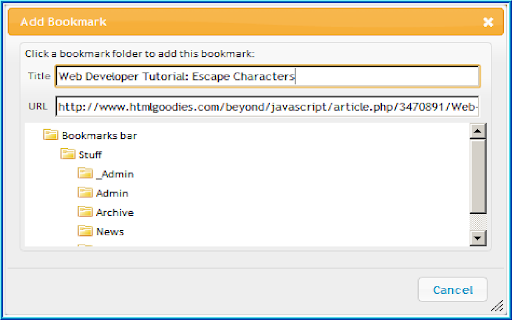
The product is positioned as a comprehensive management utility for Chrome users to organize, filter, and sort windows and tabs. It emphasizes the ability to save and restore entire tab sessions and categorize groups based on existing bookmark structures.

Inferred product pattern

A productivity utility focused on tab organization and session persistence that is currently struggling with reliability and data integrity.

Review-backed pain points

Users report significant frustration regarding the loss of open tabs and saved sessions, as well as the extension crashing or becoming non-responsive.

Observed feature gaps

The extension does not list suspended tabs and lacks the ability to move tabs to different windows or positions within the extension interface.

Tags
Tab ManagerWindow ManagementSession Saver
Target users

- Power users with high tab counts

- Researchers

- Users managing multiple browser windows

Primary use cases

- Organizing and categorizing open tabs

- Saving and restoring browser sessions

- Searching through active windows and tabs

Positive themes

- Effective session saving for re-opening windows

- Helpful summary of current tabs and windows

Negative themes

- Critical data loss (losing tabs and saved sessions)

- Frequent application crashes and non-responsiveness

- Incompatibility with suspended tabs

- Poor cross-browser support on Edge

Observed friction

- Performance complaints detected

- No pricing information or friction observed in the provided data.

Evidence boundary: Analysis based on the store description and a sample of user reviews highlighting both functional capabilities and critical reliability failures. The review sample size is small, and recent reviews may reflect specific version-related bugs.
Complaint summaries
Review-backed complaint signals grouped by operational area.

Support

Users have expressed feelings of abandonment by the developer due to unresolved bugs and stability issues.

Reliability

High frequency of reported crashes, non-responsiveness, and critical failure to preserve saved sessions and open tabs.

Privacy

No privacy or security complaints were observed.

Access & pricing

- No clear monetization signal

- No account requirement observed

- No clear pricing signal

Store listing facts

Listing assets

- Screenshots: 4

- Videos: 0

- Languages: 1

Trust signals

- Privacy policy

- Developer contact

- Official website

Store metadata

- Version: 3.0.0.1

- Size: 170KiB

- Last updated:

Listing SEO keywords

Search intent keywords
Keyword signals for evaluating how users may discover, compare, or search for this extension category.

Core discovery

tab managerwindow managersave chrome tabsbrowser session managerorganize tabs

Comparison

Opera window listtab organizer

Problem

lost tabsbrowser crashtab management error

Alternative

session manager extensiontab organizer tool

Similar extensions

Jump to related discovery paths:

Screenshots

Awesome Window & Tab Manager screenshot

Links

Recommended Chrome extensions

Related listings from the same category, trending peers, and the same publisher portfolio.

Browse workflow