Focus To-Do: Pomodoro Timer & To Do List icon

Focus To-Do Chrome Extension Analysis

Automation & Workflow Efficiency

Store listing title: Focus To-Do: Pomodoro Timer & To Do List

Chrome extension ID: ngceodoilcgpmkijopinlkmohnfifjfb

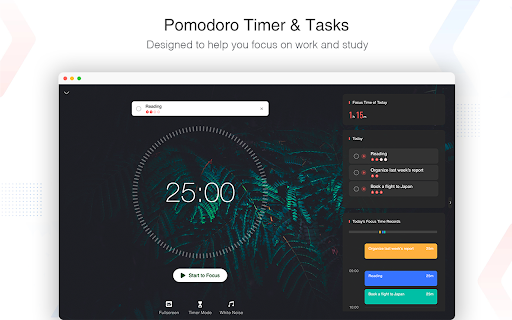
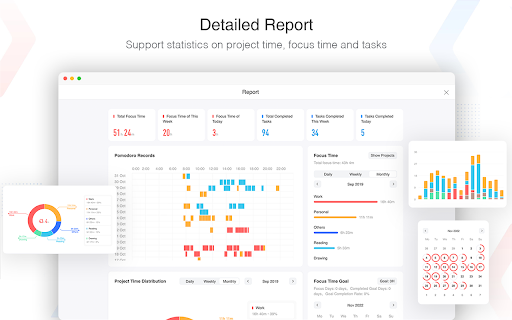
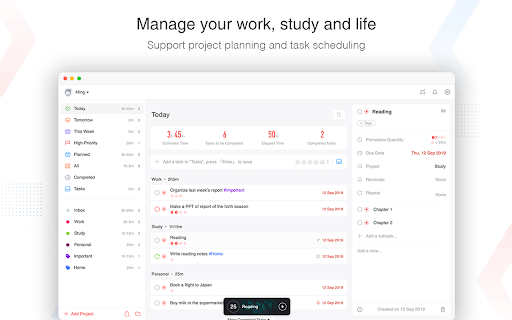
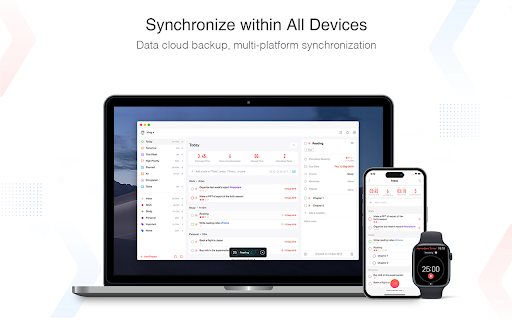
Focus To-Do is a productivity tool that merges the Pomodoro Technique with a to-do list manager. It helps users stay focused by organizing tasks, initiating work/study timers, setting reminders, and tracking time spent. The app supports cross-platform synchronization, allowing access to tasks and data from various devices.

Version:7.1.1
Size:26.13MiB
Last updated:

Overview

Installs

500K+

Rating

4.8

14,073 reviews

Languages

30 locales

Includes Deutsch, English, Filipino, Indonesia...

Market analysis

Review-backed positioning, friction, and market signals for this Chrome extension.

Backed by review samples

Macro category

Automation & Workflow Efficiency

Pricing friction

Moderate review signal

Complaint intensity

High review signal

Listing & review signals
Observed signals from store listing text and review samples.

Listing positioning

This Chrome extension positions itself as an integrated solution for productivity, combining the Pomodoro Technique with task management. It emphasizes motivation, focus, and getting things done through features like task organization, focus timers, reminders, and time tracking, aiming to help users manage their work and study effectively.

Inferred product pattern

A freemium productivity suite combining Pomodoro timer and task management with cross-platform sync. Core functionality is free, but advanced features and robust synchronization are locked behind a premium subscription, leading to user frustration regarding feature gating.

Review-backed pain points

Users report issues with synchronization leading to data loss, particularly between devices or after app crashes. Some users experience the timer stopping if the main extension window is not kept open, contrary to expectations of background operation. There are also complaints about critical features being moved to a premium tier.

Observed feature gaps

Some users desire the ability to add custom backgrounds in the free version. There is a request for better UI adaptation to window resizing and improved integration as a browser tab rather than a separate window. A lack of an immediate UI option to proceed to the next step (e.g., 'take a break') after a timer finishes is also noted.

Tags
Pomodoro TimerTask ManagementTime TrackingFocus AssistantProductivity App
Target users

- Students

- Remote Workers

- Freelancers

- Virtual Assistants

- Anyone struggling with procrastination

Primary use cases

- Improving focus during study sessions

- Organizing daily tasks and projects

- Tracking time spent on specific tasks

- Managing work and personal errands

- Reducing procrastination

Positive themes

- Helps users stay disciplined and focused

- Provides a sense of order and structure

- Smooth synchronization across devices

- Free version offers useful features without excessive ads

- Effective for time tracking and task management

Negative themes

- Sync issues and data loss

- Features becoming premium-only, perceived as greedy

- Application performance issues, crashes

- Timer stops when the main window is closed

- Lack of customization options in the free version

Observed friction

- Free-tier complaints detected

- Performance complaints detected

- Some users perceive a significant pricing friction, stating that many features have become 'premium only' and that the free version is heavily limited, leading to a feeling of greed from the developers. This shift in feature availability has led to dissatisfaction.

Evidence boundary: Review data was sourced from Chrome Web Store listings, including helpful and low-rated samples. Analysis focused on identifying positive and negative themes, as well as specific pain points related to functionality, reliability, and pricing. The review data is based on user-generated content and may not represent the entirety of the user base or all potential issues. Some reviews are from a different year, and the data is limited to publicly available information from the Chrome Web Store.
Complaint summaries
Review-backed complaint signals grouped by operational area.

Support

One user reported experiencing an SSL certificate error related to `mq.focustodo.net`, indicating a potential security or configuration issue with the application's connection. There are also reports of data loss during sync, with users seeking help for lost data.

Reliability

Multiple low-rating reviews indicate significant reliability issues, including the app freezing after a few days, not synchronizing data, crashing frequently, and losing all user data. The timer stopping when the main window is closed is also a notable reliability concern for some users.

Privacy

No direct privacy complaints were observed in the provided reviews.

Access & pricing

- Free entry with paid features

- Account required for core usage

- Limited free usage observed

Store listing facts

Listing assets

- Screenshots: 4

- Videos: 0

- Languages: 30

Trust signals

- Privacy policy

- Developer contact

Store metadata

- Version: 7.1.1

- Size: 26.13MiB

- Last updated:

Listing SEO keywords

Search intent keywords
Keyword signals for evaluating how users may discover, compare, or search for this extension category.

Core discovery

pomodoro timerto do listtask organizertime trackerfocus appproductivity extensionstudy timerwork plannerschedule plannerreminder app

Comparison

focus to-do vs forestpomodoro timer chrome extensionbest to do list extensiontime management tools

Problem

how to focusprocrastination solutionstask management problemstime blocking appstay focused at work

Alternative

tomato timertickticktodoistforest apppomofocus

Similar extensions

Jump to related discovery paths:

Screenshots

Focus To-Do: Pomodoro Timer & To Do List screenshot

Links

Recommended Chrome extensions

Related listings from the same category, trending peers, and the same publisher portfolio.

Browse workflow