Pretty HTML | CSS | XML icon

Pretty HTML Chrome Extension Analysis

Developer & Designer Tools

Store listing title: Pretty HTML | CSS | XML

Chrome extension ID: niehkhmblmdacopidbldobdogimagcfk

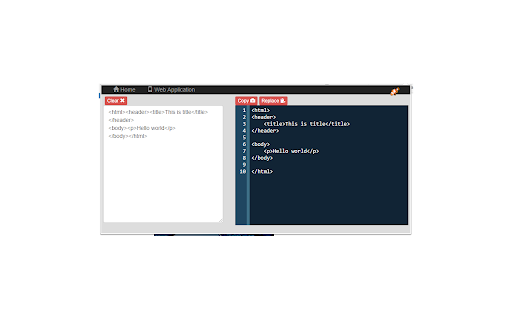
A developer utility that allows users to paste raw HTML, CSS, or XML code into a panel to receive a formatted, readable version. It provides basic text manipulation tools including append and replace buttons for source content.

Developer:LinangData
Version:1.0.4
Size:1.55MiB
Last updated:

Overview

Installs

4K+

Rating

3.0

12 reviews

Languages

1 locales

Includes English (United States)

Market analysis

Review-backed positioning, friction, and market signals for this Chrome extension.

Backed by review samples

Macro category

Developer & Designer Tools

Pricing friction

Low review signal

Complaint intensity

Moderate review signal

Listing & review signals
Observed signals from store listing text and review samples.

Listing positioning

The extension is positioned as a simple utility for 'pretty printing' HTML, CSS, and XML source code to improve readability. It highlights features like auto-detection of code formats, source memory, and one-click copy/replace functionality.

Inferred product pattern

Simple wrapper utility that provides a formatting interface for developer source code.

Review-backed pain points

Users are frustrated by the lack of automation, specifically that the tool requires manual copying and pasting rather than formatting the browser's active page or XML responses automatically.

Observed feature gaps

Automatic formatting of the current browser tab's source code; improved UI scaling for large code blocks (1000+ lines).

Tags
Code FormatterHTML Pretty PrintCSS FormatterXML FormatterDeveloper Utility
Target users

- Web Developers

- Frontend Engineers

- Software Testers

- Data Analysts

Primary use cases

- Formatting minified source code

- Tidying up XML data for analysis

- Improving readability of CSS files

Positive themes

No positive theme data.

Negative themes

- Manual copy-paste requirement

- Lack of automatic page formatting

- Cramped user interface for large files

- Misalignment between user expectations and actual tool functionality

Observed friction

- No pricing friction observed; no payment requirements mentioned.

Evidence boundary: Data extracted from store listing and 4 low-rating user reviews. Only negative reviews were provided in the sample, limiting the ability to identify positive themes.
Complaint summaries
Review-backed complaint signals grouped by operational area.

Support

No direct support interaction complaints, but general dissatisfaction with the product's value proposition.

Reliability

Users describe the tool as 'useless' for large files or those seeking automatic browser integration.

Privacy

No privacy or security complaints observed.

Access & pricing

- Free usage observed

- No account requirement observed

- Free plan or free usage claimed

Store listing facts

Listing assets

- Screenshots: 1

- Videos: 0

- Languages: 1

Trust signals

- Privacy policy

- Developer contact

- Official website

Store metadata

- Version: 1.0.4

- Size: 1.55MiB

- Last updated:

Listing SEO keywords

Search intent keywords
Keyword signals for evaluating how users may discover, compare, or search for this extension category.

Core discovery

HTML formatterCSS pretty printXML beautifiercode tidier extension

Comparison

best HTML formatter extensionCSS beautifier vs pretty print

Problem

how to read minified HTMLformat XML in chrometidy up source code

Alternative

online HTML formatter alternativeXML beautifier for browser

Similar extensions

Jump to related discovery paths:

Screenshots

Pretty HTML | CSS | XML screenshot

Links

Recommended Chrome extensions

Related listings from the same category, trending peers, and the same publisher portfolio.

Browse workflow