Enter Key Control for ChatGPT, Claude.ai, Google Gemini icon

Enter Key Control for ChatGPT, Claude.ai, Google Gemini Chrome Extension Analysis

Automation & Workflow Efficiency

Chrome extension ID: nllncjgkdkcabkomghcfgfaplgdnlcjo

This extension modifies the default input behavior of AI web interfaces like ChatGPT, Claude, and Gemini. It aims to prevent accidental message sending by remapping keys for standard text editing workflows.

Developer:Golda Davis
Version:2.1.0
Size:17.43KiB
Last updated:

Overview

Installs

5K+

Rating

3.3

27 reviews

Languages

2 locales

Includes English, 中文(中国)

Market analysis

Review-backed positioning, friction, and market signals for this Chrome extension.

Backed by review samples

Macro category

Automation & Workflow Efficiency

Pricing friction

Low review signal

Complaint intensity

Moderate review signal

Listing & review signals
Observed signals from store listing text and review samples.

Listing positioning

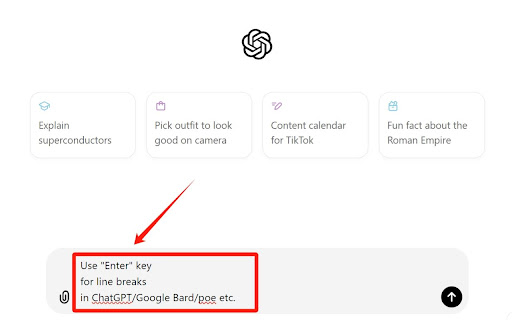
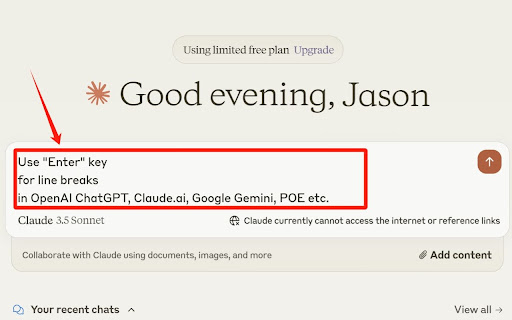
The product is positioned as a utility to modify keyboard input behavior for popular AI chatbots. It allows users to use the 'Enter' key for line breaks and 'Ctrl+Enter' to send messages, providing a toggle to enable or disable the functionality.

Inferred product pattern

Single-function browser utility targeting DOM-based input interception.

Review-backed pain points

Users consistently report that the extension fails to work across multiple platforms (Claude, ChatGPT, Gemini), or stops working entirely after a period of use.

Observed feature gaps

The extension lacks reliable cross-platform compatibility and appears to conflict with native site shortcuts, sometimes rendering text entry unusable.

Tags
ChatGPTClaudeProductivityInput ControlText Editing
Target users

- AI Chatbot Users

- Content Writers

- Power Users

Primary use cases

- Adding line breaks in AI chat interfaces

- Preventing premature message sending

Positive themes

- Initial functionality with specific services like Gemini

Negative themes

- Complete lack of functionality

- Inconsistent performance across different AI services

- Interference with native keyboard shortcuts

Observed friction

- Performance complaints detected

- No pricing friction reported; the extension is perceived as free, though its utility is questioned due to functional failures.

Evidence boundary: Evidence is drawn from multiple user reviews highlighting widespread functional failures across target AI services. The evidence is limited to user-reported experiences in the Chrome Web Store and does not account for potential silent failures or site-side updates.
Complaint summaries
Review-backed complaint signals grouped by operational area.

Support

No formal support complaints, but users express frustration through negative reviews regarding the product's failure to function.

Reliability

Multiple reports suggest the product is unreliable, frequently stops working, or causes input issues that make chatbots unusable.

Privacy

No privacy or security complaints found.

Access & pricing

- Free usage observed

- No account requirement observed

- Free plan or free usage claimed

Store listing facts

Listing assets

- Screenshots: 2

- Videos: 0

- Languages: 2

Trust signals

- Developer contact

Store metadata

- Version: 2.1.0

- Size: 17.43KiB

- Last updated:

Listing SEO keywords

Search intent keywords
Keyword signals for evaluating how users may discover, compare, or search for this extension category.

Core discovery

ChatGPT Enter keyClaude line breakGemini keyboard shortcut

Comparison

best ChatGPT input extensions

Problem

Claude extension not workingChatGPT prevent enter to send

Alternative

keyboard remapper for AI

Similar extensions

Jump to related discovery paths:

Screenshots

Enter Key Control for ChatGPT, Claude.ai, Google Gemini screenshot

Recommended Chrome extensions

Related listings from the same category, trending peers, and the same publisher portfolio.

Browse workflow