Chrome Logger icon

Chrome Logger Chrome Extension Analysis

Developer & Designer Tools

Chrome extension ID: noaneddfkdjfnfdakjjmocngnfkfehhd

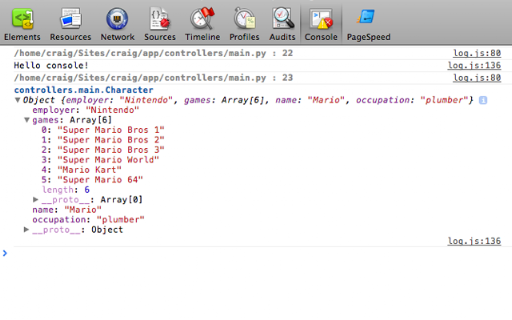
This extension allows developers to send server-side logs to the Chrome console. It requires integration with specific server-side code (typically PHP) to emit the necessary headers for the extension to display data in the browser.

Developer:Craig Campbell
Version:4.1.3
Size:21.02KiB
Last updated:

Overview

Installs

30K+

Rating

4.0

127 reviews

Languages

1 locales

Includes English

Market analysis

Review-backed positioning, friction, and market signals for this Chrome extension.

Backed by review samples

Macro category

Developer & Designer Tools

Pricing friction

Low review signal

Complaint intensity

Moderate review signal

Listing & review signals
Observed signals from store listing text and review samples.

Listing positioning

Chrome Logger positions itself as a specialized utility for server-side logging and debugging directly within the Chrome JavaScript console. It is framed as a successor to FirePHP designed to help developers visualize server-side application states.

Inferred product pattern

Legacy open-source developer utility with low maintenance activity.

Review-backed pain points

Users struggle with the steep learning curve and lack of clear documentation on how to initialize the connection. Common complaints include technical failures like headers being too large, logs disappearing between refreshes, and an overall lack of updates to resolve bugs.

Observed feature gaps

Lack of auto-expand functionality for objects, insufficient documentation for new users, and unresolved bugs related to event handling and buffer clearing.

Tags
DebuggingServer Side LoggingPHPWeb Development
Target users

- Web Developers

- Backend Engineers

- PHP Developers

Primary use cases

- Debugging server-side application code

- Logging variables to the browser console

Positive themes

- Conceptually useful debugging utility

- Historical utility for server-to-browser logging

Negative themes

- Lack of maintenance and developer responsiveness

- Difficulty in setup and configuration

- Intermittent performance/reliability issues

- Display limitations with large objects

Observed friction

- Performance complaints detected

- None. The product is free, but users report 'time-cost' friction due to poor documentation and setup difficulty.

Evidence boundary: Evidence is derived from 10 user reviews and the provided product description, highlighting a gap between original utility and current technical state. Reviews span a long period (2013-2023), reflecting legacy states of the extension that may not fully reflect the current version's performance.
Complaint summaries
Review-backed complaint signals grouped by operational area.

Support

Strong sentiment regarding the developer's lack of responsiveness and the project being perceived as unmaintained.

Reliability

Frequent reports of intermittent functionality, log loss during refreshes, and header size limitations.

Privacy

No privacy complaints observed.

Access & pricing

- Free usage observed

- No account requirement observed

- Free plan or free usage claimed

Store listing facts

Listing assets

- Screenshots: 2

- Videos: 0

- Languages: 1

Trust signals

- Developer contact

- Official website

Store metadata

- Version: 4.1.3

- Size: 21.02KiB

- Last updated:

Listing SEO keywords

Search intent keywords
Keyword signals for evaluating how users may discover, compare, or search for this extension category.

Core discovery

Chrome Logger extensionPHP debug consoleserver side logging chrome

Comparison

FirePHP alternativeChrome Logger vs DebugBar

Problem

Chrome Logger not workingChrome Logger headers too big

Alternative

browser debugging toolsweb developer logging

Similar extensions

Jump to related discovery paths:

Screenshots

Chrome Logger screenshot

Links

Recommended Chrome extensions

Related listings from the same category, trending peers, and the same publisher portfolio.

Browse developer