Recent Tabs icon

Recent Tabs Chrome Extension Analysis

Tab & Bookmark Productivity

Chrome extension ID: ocllfmhjhfmogablefmibmjcodggknml

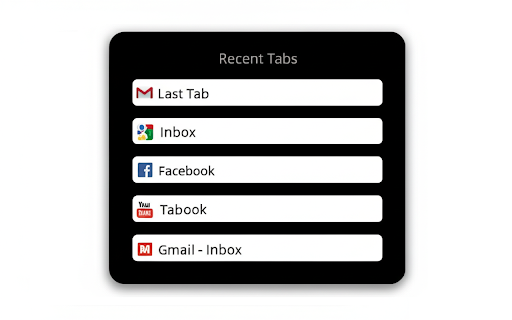
Recent Tabs is a Chrome extension that allows users to toggle between their most recently used browser tabs using configurable keyboard hotkeys. It is designed to emulate the operating system's window-switching behavior within the browser environment.

Developer:JasonSavard.com
Version:5.0
Size:137KiB
Last updated:

Overview

Installs

20K+

Rating

3.6

384 reviews

Languages

6 locales

Includes Deutsch, English, español, français...

Market analysis

Review-backed positioning, friction, and market signals for this Chrome extension.

Backed by review samples

Macro category

Tab & Bookmark Productivity

Pricing friction

Low review signal

Complaint intensity

High review signal

Listing & review signals
Observed signals from store listing text and review samples.

Listing positioning

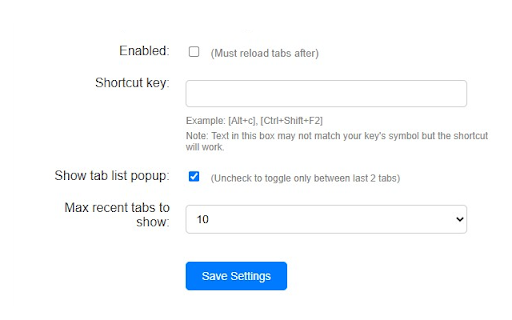
The extension positions itself as a productivity utility that brings 'Alt+Tab' style functionality to browser tabs. It offers customizable keyboard shortcuts to cycle through recently used tabs, aiming to streamline navigation for power users.

Inferred product pattern

Utility extension providing tab navigation shortcuts that appears to suffer from technical debt and lack of maintenance.

Review-backed pain points

Users frequently report that the extension fails to track tab history accurately, becomes unresponsive during navigation, or causes significant input lag in web-based editing tools.

Observed feature gaps

Lack of reliable performance on modern Chrome builds, failure to handle basic 'switch-back' logic consistently, and poor platform-specific (macOS) key handling.

Tags
Tab SwitcherMRU TabsProductivityKeyboard ShortcutsBrowser Utility
Target users

- Power users

- Multitaskers

- Browser-heavy professionals

Primary use cases

- Quickly switching between the last two active tabs

- Navigating a large number of open tabs

- Replacing default browser navigation with custom hotkeys

Positive themes

- Utility of MRU (Most Recently Used) navigation

- Improved workflow efficiency when functioning correctly

Negative themes

- Persistent tab-tracking failure

- UI elements getting stuck on screen

- Performance degradation/input lag in web apps like Google Docs

- Incompatibility or poor support for macOS shortcut conventions

Observed friction

- Performance complaints detected

- None reported; the extension appears to be free/not monetized via direct payment.

Evidence boundary: Based on a high volume of recent and historical user feedback documenting critical functional regressions and performance issues. Reviews cover a wide timespan (2014-2026), suggesting the extension's issues have persisted over many years.
Complaint summaries
Review-backed complaint signals grouped by operational area.

Support

Multiple users express frustration with developer support, noting that suggested fixes are often ineffective or ignore specific platform nuances.

Reliability

High; users report the extension frequently breaks, stops tracking tabs, and causes UI artifacts to stick on screen.

Privacy

No privacy-related complaints found.

Access & pricing

- Free usage observed

- No account requirement observed

- Free plan or free usage claimed

Store listing facts

Listing assets

- Screenshots: 2

- Videos: 1

- Languages: 6

Trust signals

- Privacy policy

- Developer contact

- Official website

Store metadata

- Version: 5.0

- Size: 137KiB

- Last updated:

Listing SEO keywords

Search intent keywords
Keyword signals for evaluating how users may discover, compare, or search for this extension category.

Core discovery

Chrome recent tabsMRU tab switcherAlt tab for browserChrome tab hotkeys

Comparison

Firefox tab switching vs Chromebrowser tab manager alternatives

Problem

extension not workingChrome extension input lagtab navigation glitch

Alternative

best tab switcher chrometab management extensions

Similar extensions

Jump to related discovery paths:

Screenshots

Recent Tabs screenshot

Links

Recommended Chrome extensions

Related listings from the same category, trending peers, and the same publisher portfolio.

Browse tools
Checker Plus for Gmail™ icon

Checker Plus for Gmail™

JasonSavard.com

Get notifications, read, listen to or delete emails without opening Gmail and easily manage multiple accounts.

Installs

900K+

Rating

4.7

Checker Plus for Google Calendar™ icon

Checker Plus for Google Calendar™

JasonSavard.com

See your next events, get meeting notifications and snooze events without opening the Google Calendar page!

Installs

300K+

Rating

4.4

WPS浏览器助手:文档在线阅读编辑 icon

WPS浏览器助手:文档在线阅读编辑

金山PDF

PDF、Excel、Word、PPT等文档无需下载即可在线预览,还能对文档进行编辑、打印、转换等处理。

Installs

2.0M+

Rating

3.0

Planet Search icon

Planet Search

Free VPN Planet

Enchanced default search engine.

Installs

2.0M+

Rating

3.4

Lightshot (screenshot tool) icon

Lightshot (screenshot tool)

Skillbrains

Simple and convenient screenshot tool. Select an area, edit your screenshot and upload it to the server.

Installs

2.0M+

Rating

4.4

Screen Recorder & Screenshot App for Chrome | Scrnli icon

Screen Recorder & Screenshot App for Chrome | Scrnli

scrnli

Screen recorder for Chrome: capture, edit, share screenshots and videos instantly

Installs

1.0M+

Rating

4.7

CSFloat Market Checker icon

CSFloat Market Checker

CSFloat Inc.

Shows the float value, paint seed, and more of Counter-Strike (CS:GO & CS2) items on the Steam Market or Inventories

Installs

1.0M+

Rating

3.9

PrintFriendly: Reader Mode, PDF Editor, Save as PDF & Screenshot icon

PrintFriendly: Reader Mode, PDF Editor, Save as PDF & Screenshot

PrintFriendly

Print clean web pages, save as PDF, edit PDFs, and capture full-page screenshots. Integrates with ChatGPT, Claude, and Gemini.

Installs

1.0M+

Rating

4.6

Mobile simulator - responsive testing tool icon

Mobile simulator - responsive testing tool

François Duprat

Smartphone and tablet simulator on computer with several models to test mobile responsive websites.

Installs

1.0M+

Rating

4.9

YouTube Summary with ChatGPT & Claude icon

YouTube Summary with ChatGPT & Claude

Glasp

Summarize YouTube videos, web articles, and PDFs to save time, powered by ChatGPT, Claude, Mistral AI, and Gemini.

Installs

1.0M+

Rating

4.3