Keyboard Shortcut URL Launcher icon

Keyboard Shortcut URL Launcher Chrome Extension Analysis

Automation & Workflow Efficiency

Chrome extension ID: oedpblhfddnhidddcgfafdiehgmohdac

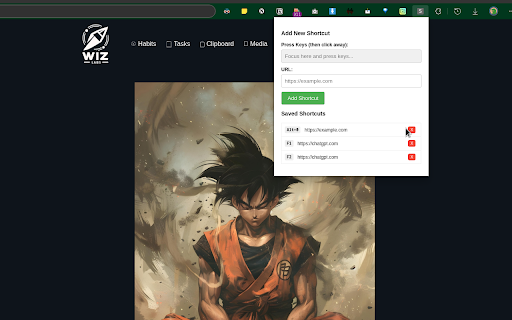
This extension enables users to create personalized keyboard shortcuts. When activated, these shortcuts automatically open predefined URLs in a new browser tab, streamlining access to websites and web applications.

Developer:luisdabarbosa
Version:1.0
Size:59.91KiB
Last updated:

Overview

Installs

14

Rating

4.0

1 reviews

Languages

1 locales

Includes English

Market analysis

Review-backed positioning, friction, and market signals for this Chrome extension.

Backed by review samples

Macro category

Automation & Workflow Efficiency

Pricing friction

Low review signal

Complaint intensity

Low review signal

Listing & review signals
Observed signals from store listing text and review samples.

Listing positioning

The Chrome extension is positioned as a straightforward productivity tool that allows users to define custom keyboard shortcuts for quickly opening specific URLs in new browser tabs. It emphasizes ease of use for launching frequently accessed web pages.

Inferred product pattern

A simple, single-purpose utility extension for automating URL launches via custom keyboard shortcuts.

Review-backed pain points

The primary pain point identified is the inability to open a URL using a shortcut within the *current* active tab, limiting user control over tab management.

Observed feature gaps

A notable feature gap is the absence of an option to launch URLs into the existing tab rather than exclusively opening a new tab.

Tags
Keyboard ShortcutsURL LauncherProductivity ToolWorkflow Automation
Target users

- Individuals who frequently visit specific URLs

- Productivity-focused users seeking faster web navigation

- Users who prefer keyboard-driven workflows

Primary use cases

- Quickly opening often-used websites or web applications

- Streamlining access to project management tools or internal dashboards

- Creating custom shortcuts for research resources or news sites

Positive themes

- Core functionality works as expected

Negative themes

- Lack of functionality to open URLs in the current tab

Observed friction

- Pricing-related data is not available from the store listing or review.

Evidence boundary: Analysis is based on the Chrome Web Store title, short description, long description, and a single user review. The analysis is limited by the very small number of users (12) and the presence of only one review, which may not represent a broad range of user experiences or sentiment.
Complaint summaries
Review-backed complaint signals grouped by operational area.

Support

Support, account, or refund-related complaint data is not available from reviews.

Reliability

Reliability or performance complaint data is not available from reviews.

Privacy

Privacy or security complaint data is not available from reviews.

Access & pricing

- Free usage observed

- No account requirement observed

- Free plan or free usage claimed

Store listing facts

Listing assets

- Screenshots: 1

- Videos: 0

- Languages: 1

Trust signals

- Privacy policy

- Developer contact

Store metadata

- Version: 1.0

- Size: 59.91KiB

- Last updated:

Listing SEO keywords

Search intent keywords
Keyword signals for evaluating how users may discover, compare, or search for this extension category.

Core discovery

keyboard shortcut URLlaunch URL shortcutcustom keyboard shortcuts Chromeopen URL new tab shortcutbrowser productivity shortcuts

Problem

slow URL accessmanual URL typingtab management efficiencyfrequent website access

Alternative

bookmark manager extensionsspeed dial extensionscustom hotkey extensions

Similar extensions

Jump to related discovery paths:

Screenshots

Keyboard Shortcut URL Launcher screenshot

Links

Recommended Chrome extensions

Related listings from the same category, trending peers, and the same publisher portfolio.

Browse workflow