PieSocket - WebSocket & SocketIO Test Client icon

PieSocket Chrome Extension Analysis

Developer & Designer Tools

Store listing title: PieSocket - WebSocket & SocketIO Test Client

Chrome extension ID: oilioclnckkoijghdniegedkbocfpnip

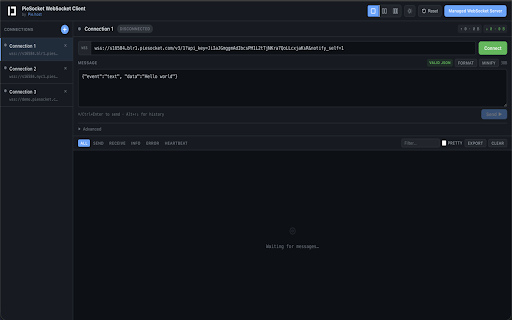
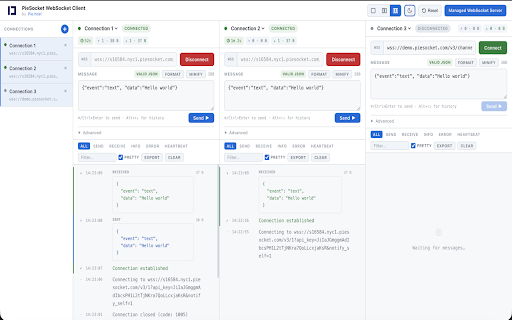
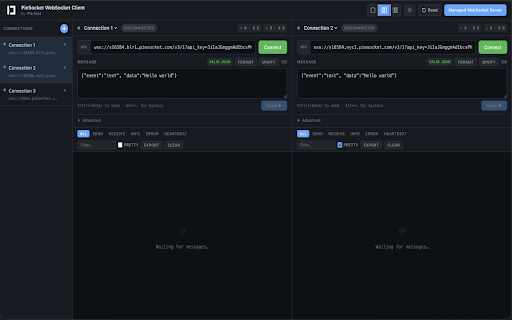
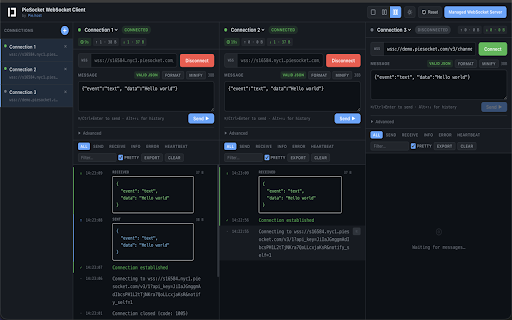
PieSocket is a Chrome extension designed for developers to test, debug, and monitor WebSocket (ws and wss) and SocketIO connections. It features multi-connection layouts, JSON pretty-printing, message history, and live connection statistics.

Version:4.1
Size:121KiB
Last updated:

Overview

Installs

30K+

Rating

4.3

7 reviews

Languages

1 locales

Includes English (United States)

Market analysis

Review-backed positioning, friction, and market signals for this Chrome extension.

Backed by review samples

Macro category

Developer & Designer Tools

Pricing friction

Low review signal

Complaint intensity

Moderate review signal

Listing & review signals
Observed signals from store listing text and review samples.

Listing positioning

The product is positioned as a comprehensive, browser-based client for testing and monitoring WebSocket and SocketIO connections. It emphasizes the convenience of debugging real-time traffic directly in the browser without the need for external tools or servers.

Inferred product pattern

A specialized developer utility for real-time protocol inspection and debugging within the browser.

Review-backed pain points

Users expressed frustration with the inability to specify certain protocols like graphql-ws and noted annoyance with long default WebSocket URLs appearing upon startup or connection closure.

Observed feature gaps

Support for the graphql-ws protocol.

Tags
WebSocket TesterSocketIO DebuggerDeveloper ToolsReal-time Debugging
Target users

- Backend Developers

- Frontend Developers

- QA Engineers

- DevOps Engineers

Primary use cases

- Testing WebSocket APIs

- Debugging real-time applications

- Monitoring WebSocket server health

- Validating connection protocols

Positive themes

- Ease of use

- Essential tool for developers

- Beautiful user interface

Negative themes

- Lack of specific protocol support

- Inconvenient default URL behavior

Observed friction

- No pricing information or friction observed in the provided data.

Evidence boundary: Data was extracted from the product's long description and a small sample of user reviews. The review sample size is very small (7 reviews), which may not represent the full user experience.
Complaint summaries
Review-backed complaint signals grouped by operational area.

Support

No support-related complaints were found in the reviews.

Reliability

No reliability or performance complaints were found in the reviews.

Privacy

No privacy or security complaints were found in the reviews.

Access & pricing

- No clear monetization signal

- No account requirement observed

- No clear pricing signal

Store listing facts

Listing assets

- Screenshots: 4

- Videos: 0

- Languages: 1

Trust signals

- Privacy policy

- Developer contact

- Official website

Store metadata

- Version: 4.1

- Size: 121KiB

- Last updated:

Listing SEO keywords

Search intent keywords
Keyword signals for evaluating how users may discover, compare, or search for this extension category.

Core discovery

websocket test clientsocketio debuggerwebsocket monitoring toolwss testingreal-time api debugger

Comparison

websocket clientsocketio tester

Problem

websocket debuggingtesting websocket connectionssocketio connection issues

Alternative

websocket browser extensionsocketio debugging tool

Similar extensions

Jump to related discovery paths:

Screenshots

PieSocket - WebSocket & SocketIO Test Client screenshot

Links

Recommended Chrome extensions

Related listings from the same category, trending peers, and the same publisher portfolio.

Browse developer