Mob to Laptop icon

Mob to Laptop Chrome Extension Analysis

Automation & Workflow Efficiency

Chrome extension ID: ookhnngoobbmpecpccgfjkldieghnokk

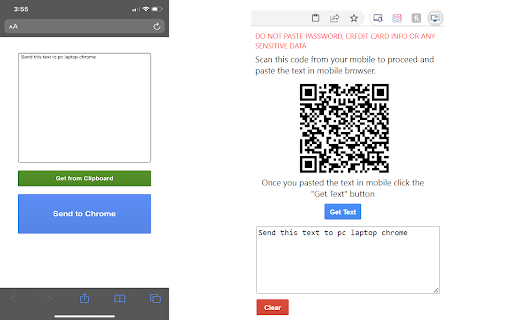
Mob to Laptop is a Chrome extension designed to bridge the clipboard gap between mobile phones and desktop browsers. It allows users to copy text on a mobile device and transmit it to their PC using a QR code scanning mechanism.

Developer:Arjun
Version:1.2
Size:52.95KiB
Last updated:

Overview

Installs

59

Rating

1.0

1 reviews

Languages

1 locales

Includes English

Market analysis

Review-backed positioning, friction, and market signals for this Chrome extension.

Backed by review samples

Macro category

Automation & Workflow Efficiency

Pricing friction

Low review signal

Complaint intensity

Moderate review signal

Listing & review signals
Observed signals from store listing text and review samples.

Listing positioning

The product is positioned as a lightweight utility for transferring text between mobile devices and a PC browser. It emphasizes a no-install requirement for the mobile side, leveraging a QR-based interface for convenience.

Inferred product pattern

Utility-focused sync bridge with limited UI and reliance on network-based QR display.

Review-backed pain points

Users report that the primary interface (QR code) fails to render or function, rendering the extension useless.

Observed feature gaps

The extension lacks fallback connection methods if the QR code fails and provides no clear troubleshooting documentation.

Tags
Clipboard SyncCross-Device UtilityProductivity Tool
Target users

- Remote Workers

- Productivity Enthusiasts

- Power Users

Primary use cases

- Copying text from phone to PC

- Cross-device clipboard synchronization

Positive themes

- None available

Negative themes

- Functional failure (QR code not rendering)

- General non-functionality

Observed friction

- Performance complaints detected

- No pricing friction observed; the utility appears to be free, but is currently non-functional.

Evidence boundary: The analysis is based on a limited store listing and a single critical user review documenting a failure in the core feature (QR code display). Evidence is constrained by a very low sample size of reviews (1) and minimal developer documentation provided in the store listing.
Complaint summaries
Review-backed complaint signals grouped by operational area.

Support

No specific support complaints, but user reporting indicates critical failure.

Reliability

Critical failure noted where the interface (QR code) does not load, preventing use.

Privacy

No privacy complaints found.

Access & pricing

- Free usage observed

- No account requirement observed

- Free plan or free usage claimed

Store listing facts

Listing assets

- Screenshots: 1

- Videos: 0

- Languages: 1

Trust signals

- Developer contact

Store metadata

- Version: 1.2

- Size: 52.95KiB

- Last updated:

Listing SEO keywords

Search intent keywords
Keyword signals for evaluating how users may discover, compare, or search for this extension category.

Core discovery

copy text mobile to pcsend text from phone to computerclipboard sync extension

Comparison

alternative to pushbulletclipboard sharing tools

Problem

chrome extension not workingqr code not showing

Alternative

clipboard sync appscross device text share

Similar extensions

Jump to related discovery paths:

Screenshots

Mob to Laptop screenshot

Recommended Chrome extensions

Related listings from the same category, trending peers, and the same publisher portfolio.

Browse workflow