Markdown to HTML: Paste, Preview, Export icon

Markdown to HTML Chrome Extension Analysis

Developer & Designer Tools

Store listing title: Markdown to HTML: Paste, Preview, Export

Chrome extension ID: papmlhjlabepdjejnnpdkefkembkohak

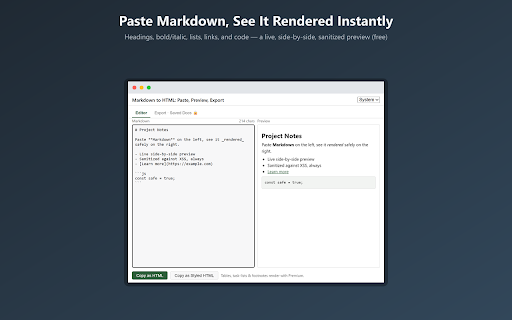
A utility that allows users to paste Markdown text and view a rendered HTML preview side-by-side. It enables copying sanitized HTML fragments or exporting full styled HTML documents entirely locally without requiring an account.

Developer:sourwoodlabsllc
Version:0.1.1
Size:132KiB
Last updated:

Overview

Installs

0

Rating

0 reviews

Languages

1 locales

Includes English

Market analysis

Review-backed positioning, friction, and market signals for this Chrome extension.

No review samples found

Macro category

Developer & Designer Tools

Pricing friction

Low review signal

Complaint intensity

Low review signal

Listing & review signals
Observed signals from store listing text and review samples.

Listing positioning

The product is positioned as a secure, local-first Markdown previewer and HTML exporter. It emphasizes a 'paste-only' design to minimize permission footprints and uses dual-layer sanitization to prevent XSS attacks.

Inferred product pattern

A privacy-centric, local-only conversion utility that avoids cloud dependencies and broad system permissions.

Review-backed pain points

Review-backed data is not available.

Observed feature gaps

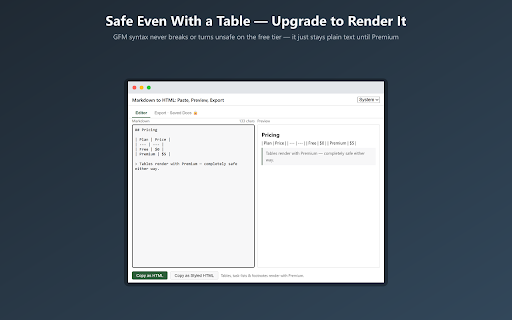
The listing explicitly states that there is no per-language syntax color-highlighting for code blocks.

Tags
Markdown PreviewHTML ConverterDeveloper ToolLocal RenderingPrivacy Focused
Target users

- Developers

- Technical Writers

- Documentation Managers

- GitHub Users

Primary use cases

- Reviewing README files before commit

- Drafting PR descriptions

- Previewing notes for wiki or email

- Converting Markdown to sanitized HTML

Positive themes

- Review-backed data is not available

Negative themes

- Review-backed data is not available

Observed friction

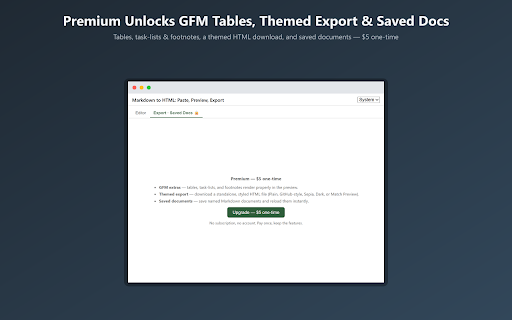
- No review data available; listing describes a simple $5 one-time payment for premium features.

Evidence boundary: Data extracted exclusively from the public Chrome Web Store listing. No user reviews were available to validate real-world performance, usability, or user satisfaction.
Complaint summaries
Review-backed complaint signals grouped by operational area.

Support

Review-backed data is not available.

Reliability

Review-backed data is not available.

Privacy

Review-backed data is not available.

Access & pricing

- Free entry with paid features

- No account requirement observed

- Limited free usage observed

Store listing facts

Listing assets

- Screenshots: 3

- Videos: 0

- Languages: 1

Trust signals

- Privacy policy

- Developer contact

- Official website

Store metadata

- Version: 0.1.1

- Size: 132KiB

- Last updated:

Listing SEO keywords

Search intent keywords
Keyword signals for evaluating how users may discover, compare, or search for this extension category.

Core discovery

Markdown to HTMLMarkdown PreviewerLocal Markdown ViewerSanitized HTML Export

Comparison

Markdown to HTML converterMarkdown viewer extension

Problem

render markdown safelymarkdown to clean htmlpreview readme locally

Alternative

Markdown editor alternativeOnline markdown preview alternative

Similar extensions

Jump to related discovery paths:

Screenshots

Markdown to HTML: Paste, Preview, Export screenshot

Links

Recommended Chrome extensions

Related listings from the same category, trending peers, and the same publisher portfolio.

Browse developer
Curl to Code: Python, JS & Node Converter icon

Curl to Code: Python, JS & Node Converter

sourwoodlabsllc

Convert curl to Python, JavaScript & Node code instantly. Runs on-device with no upload; your tokens never leave the browser.

Installs

8

Rating

Table to Markdown: Paste & Convert icon

Table to Markdown: Paste & Convert

sourwoodlabsllc

Convert tables to Markdown/CSV, or Markdown tables back to CSV. No page access, all processed locally in your browser.

Installs

7

Rating

Cookie-Editor icon

Cookie-Editor

cgagnier

Simple yet powerful Cookie Editor that allow you to quickly create, edit and delete cookies without leaving your tab.

Installs

2.0M+

Rating

4.4

Chromebook Recovery Utility icon

Chromebook Recovery Utility

google.com

Create recovery media for your Chromebook.

Installs

2.0M+

Rating

2.6

CRXLauncher icon

CRXLauncher

CRXLauncher

Effortlessly Launch Chrome Extensions with CRXLauncher

Installs

1.0M+

Rating

4.6

Stylus icon

Stylus

stylus.openstyles

Redesign the web with Stylus, a user styles manager. Stylus allows you to easily install themes and skins for many popular sites.

Installs

1.0M+

Rating

4.5

SEOquake: On-Page SEO Checker icon

SEOquake: On-Page SEO Checker

SEOquake

Run page-level SEO audits, check technical issues, analyze links and keyword density, and view Semrush metrics.

Installs

1.0M+

Rating

4.5

Similarweb - Website Traffic, AI Traffic & SEO Checker icon

Similarweb - Website Traffic, AI Traffic & SEO Checker

Similarweb

Instant website analysis, AI traffic insights, and SEO metrics at your fingertips.

Installs

1.0M+

Rating

4.6

Eye Dropper icon

Eye Dropper

Eye Dropper

Pick colors from any website.

Installs

1.0M+

Rating

4.3

Lighthouse icon

Lighthouse

lighthouse-extension-owners

Lighthouse is an open-source, automated tool for improving the performance, quality, and correctness of your web apps.

Installs

1.0M+

Rating

4.4