Easily Cache Cleaner icon

Easily Cache Cleaner Chrome Extension Analysis

Automation & Workflow Efficiency

Chrome extension ID: pbcgbhjiijkcconamckbikgncddgbmgp

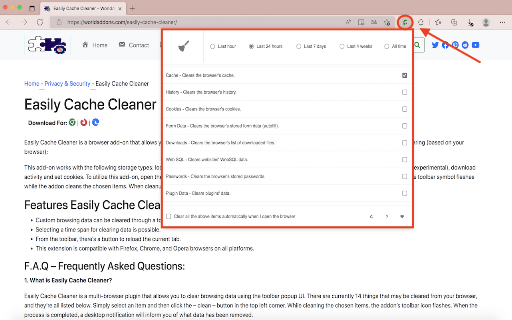
This extension allows users to clear browser-specific data, such as cookies, downloads, passwords, and app cache, directly from the toolbar. It leverages standard browser APIs to manage local storage footprint and improve perceived browser responsiveness.

Developer:fionapandora
Version:0.1
Size:84.18KiB
Last updated:

Overview

Installs

126

Rating

4.9

32 reviews

Languages

1 locales

Includes English

Market analysis

Review-backed positioning, friction, and market signals for this Chrome extension.

Backed by review samples

Macro category

Automation & Workflow Efficiency

Pricing friction

Low review signal

Complaint intensity

Low review signal

Listing & review signals
Observed signals from store listing text and review samples.

Listing positioning

Easily Cache Cleaner positions itself as a lightweight toolbar utility for managing and removing various browser data types. It emphasizes ease of use, providing a popup interface for selecting specific cache items and offering desktop notifications upon task completion.

Inferred product pattern

Single-purpose utility browser extension for local data maintenance.

Review-backed pain points

Minor reports of inconsistent performance or the tool occasionally failing to execute the cleanup.

Observed feature gaps

Some items may not display correctly in the UI due to underlying browser API limitations acknowledged by the developer.

Tags
Cache CleanerPrivacyBrowser OptimizationStorage Management
Target users

- Casual browser users

- Power users managing local storage

- Users experiencing slow browser performance

Primary use cases

- Clearing browser cache

- Freeing up local storage

- Deleting site-specific cookies and data

Positive themes

- Effective at reducing browser load

- Fast and efficient cleanup process

- Simple UI with desktop notifications

Negative themes

- Intermittent reliability issues where the tool fails to trigger

Observed friction

- Performance complaints detected

- None observed; the extension appears to be free to use.

Evidence boundary: The data is derived from the Chrome Web Store listing and a set of 32 user reviews, demonstrating a high satisfaction rate with minor reliability notes. Review sample size is relatively small, and current performance may be affected by browser-level API changes since the 2022 review timestamps.
Complaint summaries
Review-backed complaint signals grouped by operational area.

Support

No specific support complaints identified in the available review sample.

Reliability

Occasional reports that the tool does not always function as expected.

Privacy

No privacy or security concerns were raised in the review sample.

Access & pricing

- Free usage observed

- No account requirement observed

- Free plan or free usage claimed

Store listing facts

Listing assets

- Screenshots: 1

- Videos: 0

- Languages: 1

Trust signals

- Privacy policy

- Developer contact

- Official website

- Support link

Store metadata

- Version: 0.1

- Size: 84.18KiB

- Last updated:

Listing SEO keywords

Search intent keywords
Keyword signals for evaluating how users may discover, compare, or search for this extension category.

Core discovery

clear browser cache extensiondelete cookies chromebrowser storage cleanerfree cache cleaner

Comparison

best cache cleaner extensionEasily Cache Cleaner review

Problem

browser running slowclear local storage datahow to clear app cache

Alternative

CCleaner for browserChrome cleanup tools

Similar extensions

Jump to related discovery paths:

Screenshots

Easily Cache Cleaner screenshot

Links

Recommended Chrome extensions

Related listings from the same category, trending peers, and the same publisher portfolio.

Browse workflow