SEI Pro icon

SEI Pro Chrome Extension Analysis

Automation & Workflow Efficiency

Chrome extension ID: pdbbapplhjopafpgidbgceccbbmehcjj

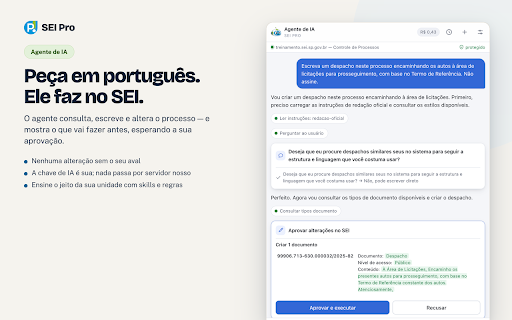
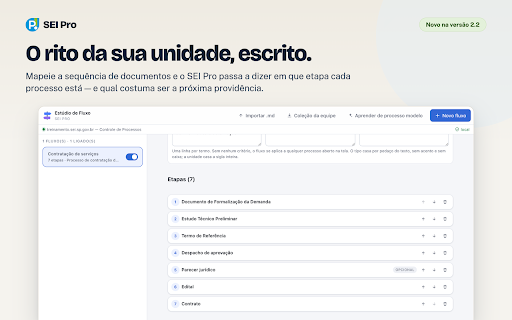
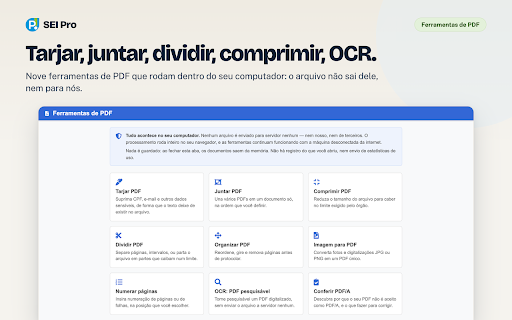
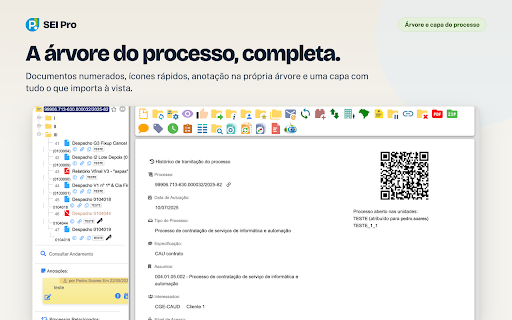
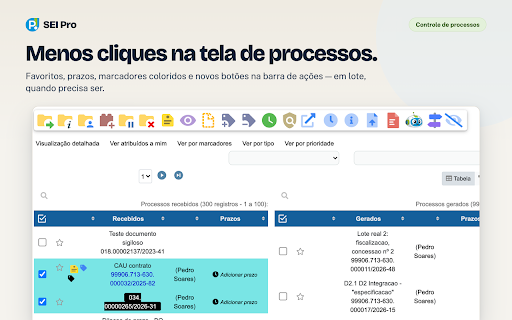
A Chrome extension that enhances the SEI platform with features like dark mode, process grouping, batch document actions, and an advanced text editor. It integrates AI tools and productivity shortcuts to streamline public administration tasks.

Developer:pedrohsoares
Version:2.2
Size:15.69MiB
Last updated:

Overview

Installs

200K+

Rating

★ 4.3

203 reviews

Languages

1 locales

Includes português (Brasil)

Market analysis

Review-backed positioning, friction, and market signals for this Chrome extension.

Backed by review samples

Macro category

Automation & Workflow Efficiency

Pricing friction

Low review signal

Complaint intensity

Moderate review signal

Listing & review signals
Observed signals from store listing text and review samples.

Listing positioning

Positions itself as a comprehensive power-user tool for the Sistema Eletrônico de Informações (SEI). It emphasizes adding advanced organizational, editing, and automation capabilities to a standard government administrative system.

Inferred product pattern

UX/UI overlay and utility wrapper for a legacy government administrative system.

Review-backed pain points

Users report significant frustration when SEI system updates render the extension non-functional. There are also complaints regarding UI elements (like search bars) overlapping other functions and stability issues that force frequent re-logins.

Observed feature gaps

Missing specific search behaviors present in older extensions (e.g., SEI++) and the inability to specify document types during batch external uploads.

Tags
SEI EnhancementsGovernment WorkflowDocument ManagementAdministrative ProductivityAI Assistant
Target users

- Government employees

- Public administration officials

- Legal professionals using SEI

Primary use cases

- Managing high volumes of electronic processes

- Advanced document drafting and formatting

- Workflow organization using markers and deadlines

Positive themes

- High potential for productivity

- Comprehensive feature set

Negative themes

- UI/UX bugs and overlapping elements

- Breakage following SEI system updates

- Performance instability and login loops

- Failure of batch action features

Observed friction

- Performance complaints detected

- No pricing friction mentioned in review samples.

Evidence boundary: Extracted from store listing and 10 representative user reviews. Review samples are predominantly low-rating to capture pain points; they do not represent the full 4.3-star distribution.
Complaint summaries
Review-backed complaint signals grouped by operational area.

Support

Users express frustration that bugs persist, though no specific support tickets or response times were cited.

Reliability

Frequent reports of the extension breaking after system updates and experiencing general instability that hinders work dynamics.

Privacy

No privacy complaints observed in samples.

Access & pricing

- No clear monetization signal

- No account requirement observed

- No clear pricing signal

Store listing facts

Listing assets

- Screenshots: 5

- Videos: 1

- Languages: 1

Trust signals

- Privacy policy

- Developer contact

- Official website

- Support link

Store metadata

- Version: 2.2

- Size: 15.69MiB

- Last updated:

Listing SEO keywords

Search intent keywords
Keyword signals for evaluating how users may discover, compare, or search for this extension category.

Core discovery

SEI ProSEI extensionSistema Eletrônico de Informações advancedSEI productivity

Comparison

SEI Pro vs SEI++best extension for SEI

Problem

SEI document managementSEI slow editororganize SEI processes

Alternative

SEI++ alternativeSEI tools

Similar extensions

Jump to related discovery paths:

Screenshots

SEI Pro screenshot
SEI Pro screenshot
SEI Pro screenshot
SEI Pro screenshot
SEI Pro screenshot

Links

Recommended Chrome extensions

Related listings from the same category, trending peers, and the same publisher portfolio.

Browse workflow
夸克网盘-网页嗅探 icon

夸克网盘-网页嗅探

广州市动悦信息技术有限公司

识别到网页资源时,可一键存夸克网盘

Installs

3.0M+

Rating

★ 1.7

Mendeley Web Importer icon

Mendeley Web Importer

Mendeley

Fast, convenient import of references and PDFs to your Mendeley Reference Manager library.

Installs

3.0M+

Rating

★ 2.3

Enable local file links icon

Enable local file links

Takashi Sugimoto (tksugimoto)

Make it possible to open by click a link to a local file that is disabled by Chrome.

Installs

3.0M+

Rating

★ 3.9

Content Server Browser Web Extension icon

Content Server Browser Web Extension

OpenText Corporation

Content Server Browser Web Extension for Chrome

Installs

3.0M+

Rating

★ 2.8

Sound Booster - increase volume up icon

Sound Booster - increase volume up

Sound-ultimate.com

Volume Booster helps boost sound video or music on any tab! Increase volume and bass booster, equalizer. Volume control.

Installs

2.0M+

Rating

★ 4.5

Адаптер Рутокен Коннект icon

Адаптер Рутокен Коннект

АО "Актив-Софт"

Защищенное TLS-соединение в браузере по ГОСТу с Рутокен

Installs

2.0M+

Rating

★ 1.6

Pop up blocker for Chrome™ - Poper Blocker icon

Pop up blocker for Chrome™ - Poper Blocker

dingosolutions

Block popups, ads, cookie requests, trackers, notifications, ads on social media & more. A clean browsing experience starts today.

Installs

2.0M+

Rating

★ 4.8

AI Grammar Checker & Paraphraser – LanguageTool icon

AI Grammar Checker & Paraphraser – LanguageTool

lt-extension-publisher

Instantly Enhance Your Texts with LanguageTool’s Grammar Checker and Paraphrasing Tool

Installs

2.0M+

Rating

★ 4.7

Momentum icon

Momentum

Momentum

Transform your browser into a beautifully designed tab that helps you feel calm, keep focus, and stay energized.

Installs

2.0M+

Rating

★ 4.5

My Apps Secure Sign-in Extension icon

My Apps Secure Sign-in Extension

Microsoft

My Apps Secure Sign-in Extension

Installs

2.0M+

Rating

★ 2.2