RedactLive — Privacy Mask for Screen Sharing icon

RedactLive Chrome Extension Analysis

Privacy, Security & Ad Blockers

Store listing title: RedactLive — Privacy Mask for Screen Sharing

Chrome extension ID: pjogfmoemcboohhbecfmbofmlbloplol

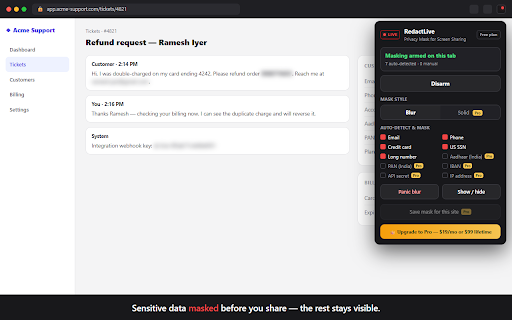
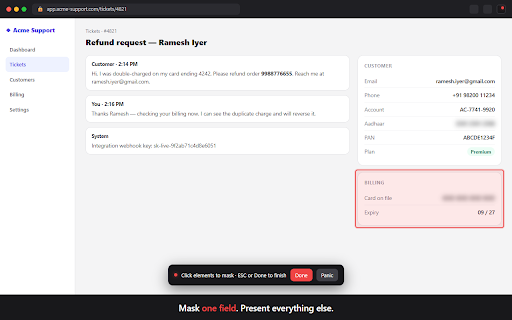
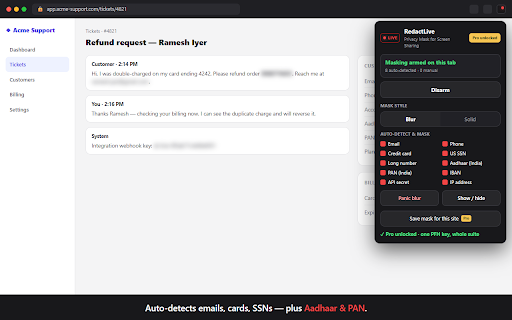
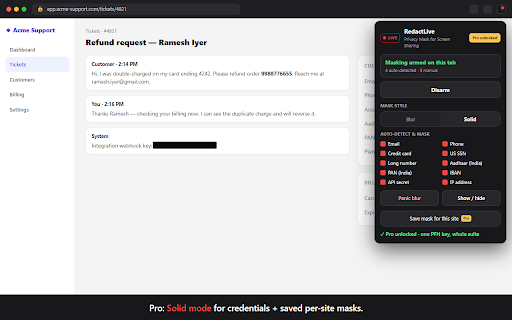
RedactLive is a Chrome extension that allows users to mask sensitive information like emails, account numbers, and customer names on a specific browser tab. It offers automatic detection of common patterns and manual click-to-mask capabilities.

Developer:Yogesh Nichal
Version:1.0.0
Size:27.29KiB
Last updated:

Overview

Installs

3

Rating

0 reviews

Languages

1 locales

Includes English

Market analysis

Review-backed positioning, friction, and market signals for this Chrome extension.

No review samples found

Macro category

Privacy, Security & Ad Blockers

Pricing friction

Low review signal

Complaint intensity

Low review signal

Listing & review signals
Observed signals from store listing text and review samples.

Listing positioning

The product positions itself as a privacy-first tool for professionals to prevent accidental exposure of sensitive PII during screen sharing. It emphasizes 100% local processing with no data ever leaving the user's machine.

Inferred product pattern

Privacy-focused utility for professionals who need to redact sensitive data in real-time locally during browser-based presentations.

Review-backed pain points

Review-backed data is not available.

Observed feature gaps

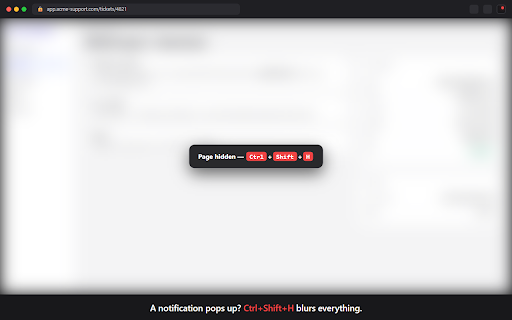
The tool cannot mask OS notifications, other browser windows, or the browser's address bar.

Tags
Privacy MaskScreen SharingData RedactionPII ProtectionProductivity
Target users

- Customer support and success representatives

- Sales engineers

- Recruiters and HR professionals

- Consultants and bookkeepers

Primary use cases

- Masking customer PII during support calls

- Redacting sensitive data during live product demos

- Hiding private inbox details while sharing a screen

- Protecting financial data in client dashboards

Positive themes

No positive theme data.

Negative themes

No negative theme data.

Observed friction

- No review-backed pricing friction observed; Pro features require a monthly or lifetime subscription.

Evidence boundary: Data extracted exclusively from the Chrome Web Store listing description. No user reviews were available for analysis.
Complaint summaries
Review-backed complaint signals grouped by operational area.

Support

Review-backed data is not available.

Reliability

Review-backed data is not available.

Privacy

Review-backed data is not available.

Access & pricing

- Free entry with paid features

- No account requirement observed

- Limited free usage observed

Store listing facts

Listing assets

- Screenshots: 5

- Videos: 0

- Languages: 1

Trust signals

- Privacy policy

- Developer contact

- Official website

- Support link

Store metadata

- Version: 1.0.0

- Size: 27.29KiB

- Last updated:

Listing SEO keywords

Search intent keywords
Keyword signals for evaluating how users may discover, compare, or search for this extension category.

Core discovery

screen share privacy maskredact sensitive data chrome extensionmask PII during zoom callhide emails in screen share

Comparison

RedactLive vs Blurbest screen sharing redaction tool

Problem

accidentally shared sensitive datahow to hide customer emails during demoprevent PII leak on google meet

Alternative

RedactLive alternativesPII masker for chrome

Similar extensions

Jump to related discovery paths:

Screenshots

RedactLive — Privacy Mask for Screen Sharing screenshot

Links

Recommended Chrome extensions

Related listings from the same category, trending peers, and the same publisher portfolio.

Browse tools
Nano Banana Automator — Auto Flow icon

Nano Banana Automator — Auto Flow

Yogesh Nichal

Batch generate AI images on Google Flow. Queue prompts, add reference images, auto-download — all from one panel.

Installs

205

Rating

1.0

ChatGPT Automation — Auto ChatGPT icon

ChatGPT Automation — Auto ChatGPT

Yogesh Nichal

Batch generate AI images & text on ChatGPT. Queue prompts, auto-download results — all from one panel.

Installs

69

Rating

迅雷下载支持 icon

迅雷下载支持

Shenzhen Xunlei Network Technology Co., Ltd.

迅雷下载支持

Installs

65.0M+

Rating

2.8

Claude icon

Claude

Anthropic

Claude in Chrome

Installs

13.0M+

Rating

2.8

Browsec VPN - Free VPN for Chrome icon

Browsec VPN - Free VPN for Chrome

Browsec

Browsec VPN is a Chrome VPN extension that protects your IP from Internet threats and lets you browse privately for free.

Installs

8.0M+

Rating

4.5

Zotero Connector icon

Zotero Connector

Zotero

Save references to Zotero from your web browser

Installs

7.0M+

Rating

4.0

AnyDoc Translator - Translate Web and PDF icon

AnyDoc Translator - Translate Web and PDF

www.wps.com

The ultimate AI translator for web, files, ebooks, academic papers, images, and text

Installs

6.0M+

Rating

4.6

WPS PDF - Read, Edit, Fill, Convert, and AI Chat PDF with Ease icon

WPS PDF - Read, Edit, Fill, Convert, and AI Chat PDF with Ease

www.wps.com

Easy-to-use PDF tools to view, edit, convert, fill, e-sign PDF files, and more in your browser.

Installs

6.0M+

Rating

4.5

Sider: Chat with all AI: GPT-5, Claude, DeepSeek, Gemini, Grok icon

Sider: Chat with all AI: GPT-5, Claude, DeepSeek, Gemini, Grok

ChatGPT Sidebar

ChatGPT, DeepSeek, Gemini, Claude, Grok all in one AI sidebar, for AI search, read, and write.

Installs

5.0M+

Rating

4.9

Norton Safe Search icon

Norton Safe Search

NortonLifeLock Inc

Search safely online by enabling Norton Safe Search as your default search provider for maximum protection on Chrome.

Installs

5.0M+

Rating

2.4