nicovideo-player-expander icon

nicovideo-player-expander Chrome Extension Analysis

Niche Lifestyle & Gaming Hacks

Chrome extension ID: plgcngmhicjaoicgamcklfceeagoaefa

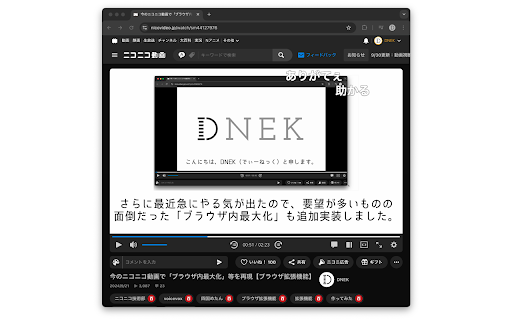
nicovideo-player-expander is a free, open-source browser extension designed to scale the playback window of NicoNico Video. It provides theater layout and browser-level maximization options with persistent control visibility. It acts as an enhancement tool to restore or improve native video-sizing features on the platform.

Developer:DNEK
Version:4.0
Size:9.48KiB
Last updated:

Overview

Installs

2K+

Rating

5.0

27 reviews

Languages

1 locales

Includes 日本語

Market analysis

Review-backed positioning, friction, and market signals for this Chrome extension.

Backed by review samples

Macro category

Niche Lifestyle & Gaming Hacks

Pricing friction

Low review signal

Complaint intensity

Low review signal

Listing & review signals
Observed signals from store listing text and review samples.

Listing positioning

This extension is positioned as a convenient utility that expands the NicoNico video player into either 'Theater Mode' or 'Maximize in Browser'. It features simple toggling options through a bottom-right player icon or dedicated keyboard shortcuts. The developer explicitly notes compatibility with official platform changes, positioning it as a dual-size management tool for power users.

Inferred product pattern

Free open-source browser utility that patches and enhances layout features on a specific video platform.

Review-backed pain points

Users occasionally encounter layout bugs such as unexpected blank margins when maximizing in the browser. Some users also experience frustration because expanding the player hides the comment sidebar, which they prefer to keep visible.

Observed feature gaps

The extension lacks a dedicated layout mode that retains the comment sidebar on the right side of the expanded video screen. Additionally, changes in the official website's CSS can occasionally cause unexpected rendering layout offsets.

Tags
NicoNico VideoVideo PlayerTheater ModeBrowser Maximize
Target users

- NicoNico Video viewers

- Users seeking customizable player sizes

- Power users utilizing keyboard shortcuts for video playback

Primary use cases

- Expanding the NicoNico video player size to fill the browser window

- Toggling between standard monitor fullscreen and browser-level scaling using shortcuts

Positive themes

- Restoring highly requested layout features that were officially removed

- Ease of use through simple shortcut key controls

- Deep appreciation for the developer filling platform feature gaps

Negative themes

- Desire to keep the comment section visible on the right while the video is expanded

- Layout issues causing uninvited margins/blank space during browser maximization

Observed friction

- No pricing friction is observed as the product is open-source and entirely free.

Evidence boundary: Based on developer documentation, update logs addressing official platform changes, and ten highly positive user reviews detailing feature restoration and minor layout feedback. The evidence is restricted to a small sample size of ten translated Japanese reviews and public store listing details.
Complaint summaries
Review-backed complaint signals grouped by operational area.

Support

No support or account-related complaints were identified in the review samples.

Reliability

One user noted a potential layout bug where an unnatural blank margin space appears when using the 'Maximize in Browser' function.

Privacy

No privacy or security concerns were raised by users.

Access & pricing

- Free usage observed

- No account requirement observed

- Free plan or free usage claimed

Store listing facts

Listing assets

- Screenshots: 1

- Videos: 0

- Languages: 1

Trust signals

- Developer contact

- Official website

Store metadata

- Version: 4.0

- Size: 9.48KiB

- Last updated:

Listing SEO keywords

Search intent keywords
Keyword signals for evaluating how users may discover, compare, or search for this extension category.

Core discovery

nicovideo player expanderniconico theater modeniconico browser fullscreenniconico video layout extension

Comparison

niconico official fullscreen vs expanderniconico theater mode vs default layout

Problem

niconico theater mode missinghow to maximize video on niconico

Alternative

niconico layout optimizernicovideo browser maximize shortcut

Similar extensions

Jump to related discovery paths:

Screenshots

nicovideo-player-expander screenshot

Links

Website: dnek.net

Recommended Chrome extensions

Related listings from the same category, trending peers, and the same publisher portfolio.

Browse entertainment
nicovideo-autoplay-canceler icon

nicovideo-autoplay-canceler

DNEK

ニコニコ動画で動画の自動再生が開始された直後に自動的に一時停止します。停止に少しラグがあるため、停止時の再生時間が3秒未満の場合は0秒まで戻します。

Installs

455

Rating

5.0

Earth 3D icon

Earth 3D

Earth 3D

Instantly view stunning 3D satellite imagery of any location on Earth, directly from your browser's search bar.

Installs

40K+

Rating

1.0

90kids Games icon

90kids Games

cristi

Relive your childhood memories.

Installs

40K+

Rating

3.2

Audio Equalizer - EQ icon

Audio Equalizer - EQ

Cute Cursors

Audio Equalizer - adjust volume of sound, bass booster, sound booster, dim the highs. EQ Audio Equalizer for all webs!

Installs

30K+

Rating

3.8

Enhancer for Netflix, Crunchyroll, etc icon

Enhancer for Netflix, Crunchyroll, etc

Simkl

Show trailers, IMDb/Simkl ratings, secret categories and much more, on the Netflix page. Sync Netflix or Crunchyroll to Simkl.

Installs

30K+

Rating

3.8

Spreen Points icon

Spreen Points

h4x

Transforma tus puntos del canal de Twitch de Spreen y obten puntos en Kick

Installs

30K+

Rating

4.8

Video Speed Control icon

Video Speed Control

Sevina

Easily control HTML5 video playback speed via toolbar popup

Installs

30K+

Rating

4.9

Netflix Skipper: skip intros, recaps & more [QVI] icon

Netflix Skipper: skip intros, recaps & more [QVI]

dogooodapp

Automatically skip intros, recaps, 'Are you still watching?' and next episode on Netflix

Installs

30K+

Rating

4.1

New Netflix 1080p icon

New Netflix 1080p

jangxx

Forces 1080p and 5.1 playback for Netflix as well as other QoL improvements.

Installs

30K+

Rating

4.2

video downloader icon

video downloader

Video Downloader Pro

Video Downloader extension that enhances your Chrome browsing experience, enabling downloads of videos in multiple formats.

Installs

30K+

Rating

4.4