Youtube™ Controller icon

Youtube™ Controller Chrome Extension Analysis

Niche Lifestyle & Gaming Hacks

Chrome extension ID: poalplpedjpddipkghmlhkmgbcnmecop

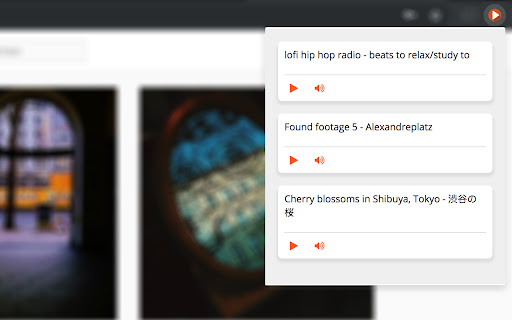
Youtube™ Controller is a Chrome extension that provides remote control functionality for YouTube videos. Users can play, pause, and manage volume for open YouTube tabs using global hotkeys or the extension popup.

Developer:Maroun Baydoun
Version:3.0.0
Size:33.18KiB
Last updated:

Overview

Installs

1K+

Rating

4.8

52 reviews

Languages

1 locales

Includes English

Market analysis

Review-backed positioning, friction, and market signals for this Chrome extension.

Backed by review samples

Macro category

Niche Lifestyle & Gaming Hacks

Pricing friction

Low review signal

Complaint intensity

Moderate review signal

Listing & review signals
Observed signals from store listing text and review samples.

Listing positioning

The product is positioned as a utility that allows users to control YouTube video playback without needing to be on the YouTube tab. It emphasizes the use of customizable keyboard shortcuts to play and pause videos from any web page or the background.

Inferred product pattern

Single-purpose browser utility for remote media control via API/shortcuts.

Review-backed pain points

Users express frustration over the lack of skip/forward/backward buttons. Some report that the extension only maps to the first few open videos rather than the currently playing one, and some cannot map hardware media keys from Bluetooth headsets.

Observed feature gaps

Missing seek/skip intervals (e.g., 10s forward/back), lack of automatic 'active video' detection, and incomplete integration with system-level media hardware keys.

Tags
YouTube ControlMedia PlayerKeyboard ShortcutsProductivityGaming Utility
Target users

- Gamers

- Multi-taskers

- YouTube listeners

- Multi-monitor users

Primary use cases

- Controlling background music while gaming in fullscreen

- Managing video playback while working in different browser tabs

- Quickly pausing videos without switching windows

Positive themes

- Simple and clean interface

- Effective global hotkey support

- Convenient for multi-monitor setups

Negative themes

- Lack of seek/skip functionality

- Intermittent reliability issues

- Limited support for multiple open videos

Observed friction

- Performance complaints detected

- No pricing friction observed; the tool appears to be free.

Evidence boundary: Analysis based on store listing metadata and 10 representative user reviews. Review sample size is small; no external pricing or documentation page was analyzed.
Complaint summaries
Review-backed complaint signals grouped by operational area.

Support

No support or account-related complaints found in the provided samples.

Reliability

Some users report the extension occasionally fails to work or the popup appears blank.

Privacy

No privacy or security complaints observed.

Access & pricing

- Free usage observed

- No account requirement observed

- Free plan or free usage claimed

Store listing facts

Listing assets

- Screenshots: 1

- Videos: 0

- Languages: 1

Trust signals

- Developer contact

- Official website

- Support link

Store metadata

- Version: 3.0.0

- Size: 33.18KiB

- Last updated:

Listing SEO keywords

Search intent keywords
Keyword signals for evaluating how users may discover, compare, or search for this extension category.

Core discovery

YouTube controllercontrol YouTube from any tabYouTube global hotkeys

Comparison

YouTube controller vs native media keysbest YouTube shortcut extension

Problem

cannot pause YouTube without switching tabsYouTube background control

Alternative

YouTube remote control extensionYouTube media key fix

Similar extensions

Jump to related discovery paths:

Screenshots

Youtube™ Controller screenshot

Links

Recommended Chrome extensions

Related listings from the same category, trending peers, and the same publisher portfolio.

Browse entertainment