Chromebook Recovery Utility icon

Chromebook Recovery Utility Chrome Extension Analysis

Developer & Designer Tools

Chrome extension ID: pocpnlppkickgojjlmhdmidojbmbodfm

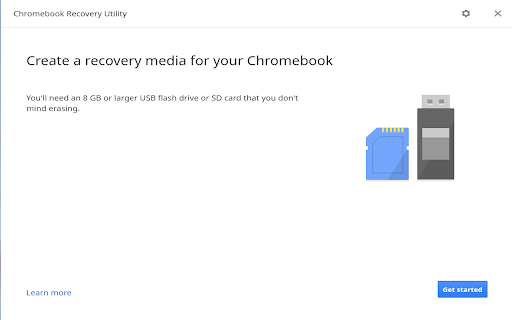
This extension is designed to help users create bootable recovery USB drives for their Chromebook devices. It automates the process of fetching the correct OS image and formatting the external storage media required for system recovery.

Developer:google.com
Version:0.2.3
Size:1.87MiB
Last updated:

Overview

Installs

2.0M+

Rating

★ 2.6

2,177 reviews

Languages

52 locales

Includes Deutsch, English, English (United Kingdom), Filipino...

Market analysis

Review-backed positioning, friction, and market signals for this Chrome extension.

Backed by review samples

Macro category

Developer & Designer Tools

Pricing friction

Low review signal

Complaint intensity

High review signal

Listing & review signals
Observed signals from store listing text and review samples.

Listing positioning

The store listing positions this utility as the official Google-provided tool for creating recovery media for Chromebooks. It is marketed as a cross-platform solution compatible with ChromeOS, Windows, and Mac to facilitate system restoration.

Inferred product pattern

Official utility tool with legacy technical debt and poor current maintenance state.

Review-backed pain points

Users frequently report that the tool fails to initiate downloads, hangs at 0% progress, or becomes unresponsive upon clicking. Significant frustration is expressed regarding the bricking of USB drives and the inability of the extension to launch from the browser interface.

Observed feature gaps

Lack of support for Linux environments, absence of manual download links within the UI, and insufficient error messaging when the process fails to execute.

Tags
ChromebookSystem RecoveryBootable DriveChrome OS
Target users

- Chromebook users

- IT support staff

- System administrators

Primary use cases

- Creating Chromebook recovery media

- Fixing corrupted ChromeOS installations

Positive themes

- None observed in recent high-rating samples.

Negative themes

- Persistent download failures

- Extension unresponsive or failing to launch

- USB drive corruption/bricking

- Lack of clear instructions

- Limited platform compatibility

Observed friction

- Performance complaints detected

- None; the product is free.

Evidence boundary: Analysis based on 2,045 reviews highlighting systemic technical failures, unresponsiveness, and hardware-related complaints from users attempting to use the tool for OS recovery. The evidence is derived from negative user feedback, which reflects a biased sample of users experiencing technical difficulties with the extension.
Complaint summaries
Review-backed complaint signals grouped by operational area.

Support

Users report that official support resources are inadequate and the extension provides no meaningful feedback when tasks fail.

Reliability

High; users report widespread technical failures, frozen UI, and hardware-level issues including bricked USB drives.

Privacy

None observed.

Access & pricing

- Free usage observed

- No account requirement observed

- Free plan or free usage claimed

Store listing facts

Listing assets

- Screenshots: 1

- Videos: 0

- Languages: 52

Trust signals

- Developer contact

- Official website

Store metadata

- Version: 0.2.3

- Size: 1.87MiB

- Last updated:

Listing SEO keywords

Search intent keywords
Keyword signals for evaluating how users may discover, compare, or search for this extension category.

Core discovery

Chromebook recovery toolChromeOS recovery utilityfix chromebookcreate recovery media

Comparison

Chromebook recovery utility alternativemanual chromebook recovery

Problem

Chromebook recovery utility not workingdownload interruptedusb drive not detected

Alternative

chromeos recovery imageflash chromebook

Similar extensions

Jump to related discovery paths:

Screenshots

Chromebook Recovery Utility screenshot

Links

Website: google.com

Recommended Chrome extensions

Related listings from the same category, trending peers, and the same publisher portfolio.

Browse developer
Chrome Remote Desktop icon

Chrome Remote Desktop

Chrome Remote Desktop Release Managers

Chrome Remote Desktop extension

Installs

40.0M+

Rating

★ 3.1

Google Translate icon

Google Translate

google-translate-chrome-extension-owners

View translations easily as you browse the web. By the Google Translate team.

Installs

38.0M+

Rating

★ 4.2

Meta Ads Data Advisor icon

Meta Ads Data Advisor

Meta

Meta Ads Data Advisor automates connecting your website and marketing data to Meta for better ad performance. No developers needed.

Installs

3.0M+

Rating

★ 3.9

Tag Assistant icon

Tag Assistant

Google

The Tag Assistant extension works with Tag Assistant to help troubleshoot installation of gtag.js and Google Tag Manager.

Installs

3.0M+

Rating

★ 3.9

Take Webpage Screenshots Entirely - FireShot icon

Take Webpage Screenshots Entirely - FireShot

Evgeny Vokilsus

Take FULL webpage screenshots. Capture, edit and save them to PDF/JPEG/GIF/PNG, upload, print, send to OneNote, clipboard or email.

Installs

3.0M+

Rating

★ 4.8

WhatFont icon

WhatFont

Chengyin Liu

The easiest way to identify fonts on web pages.

Installs

3.0M+

Rating

★ 4.0

JSON Formatter icon

JSON Formatter

Code Formatter

Makes JSON easy to read

Installs

2.0M+

Rating

★ 4.3

Cookie-Editor icon

Cookie-Editor

cgagnier

Simple yet powerful Cookie Editor that allow you to quickly create, edit and delete cookies without leaving your tab.

Installs

2.0M+

Rating

★ 4.4

Similarweb - Website Traffic, AI Traffic & SEO Checker icon

Similarweb - Website Traffic, AI Traffic & SEO Checker

Similarweb

Instant website analysis, AI traffic insights, and SEO metrics at your fingertips.

Installs

1.0M+

Rating

★ 4.6

SEOquake: On-Page SEO Checker icon

SEOquake: On-Page SEO Checker

SEOquake

Run SEO audits, check technical issues, analyze links and keyword density, and see Semrush metrics as you browse and search.

Installs

1.0M+

Rating

★ 4.5