Enhancer for YouTube™ icon

Enhancer for YouTube™ Chrome Extension Analysis

Niche Lifestyle & Gaming Hacks

Chrome extension ID: ponfpcnoihfmfllpaingbgckeeldkhle

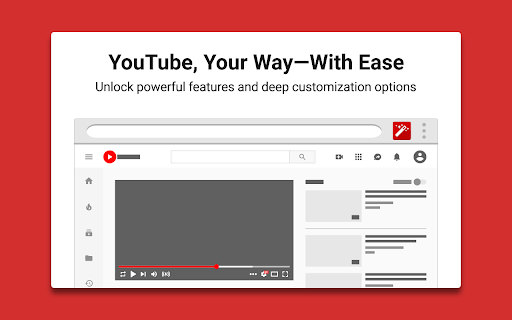
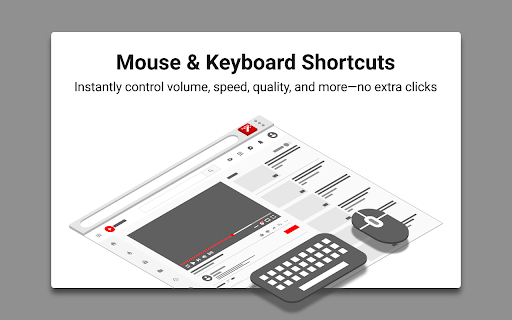
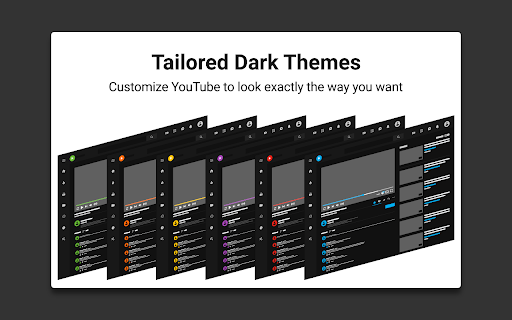
Enhancer for YouTube™ is a Chrome extension designed to customize and enhance the YouTube viewing experience. It offers features like granular control over video playback speed, quality, and volume, along with appearance modifications such as custom themes and an enhanced dark mode. The extension also includes tools for managing distractions, such as blocking shorts, end screens, and recommendations.

Developer:Max RF
Version:3.0.19
Size:487KiB
Last updated:

Overview

Installs

1.0M+

Rating

4.7

17,422 reviews

Languages

45 locales

Includes Deutsch, English (United Kingdom), English (United States), Indonesia...

Market analysis

Review-backed positioning, friction, and market signals for this Chrome extension.

Backed by review samples

Macro category

Niche Lifestyle & Gaming Hacks

Pricing friction

Low review signal

Complaint intensity

High review signal

Listing & review signals
Observed signals from store listing text and review samples.

Listing positioning

The store listing positions Enhancer for YouTube™ as the 'ultimate tool' to supercharge the YouTube experience with highly customizable features. It emphasizes complete control over playback settings, appearance, and distraction management to tailor YouTube to individual needs, making it smoother and more enjoyable.

Inferred product pattern

A utility extension focused on providing extensive customization and control over the YouTube viewing experience, from playback parameters to UI appearance and distraction removal.

Review-backed pain points

Users experience significant frustration when core features unexpectedly break or become unreliable following YouTube updates, often rendering the extension almost unusable. Pain points include loss of expected functionality like pop-up player control, playback speed adjustments, and media key compatibility. There's also friction with UI customization, where settings may not persist or controls cannot be fully hidden, impacting the overall user experience.

Observed feature gaps

One observed feature gap is the lack of an option to 'Hide Watched Videos'. Additionally, some users desire the ability to completely disable custom controls or hide UI elements without a 'gray blob' remaining.

Tags
YouTube EnhancerVideo CustomizationPlayback ControlDistraction BlockerDark Mode
Target users

- Frequent YouTube viewers

- YouTube power users

- Users seeking personalized viewing experiences

- Individuals wanting to remove distractions from YouTube

Primary use cases

- Adjusting video playback speed and quality

- Customizing YouTube's visual appearance and themes

- Blocking YouTube Shorts and other distracting UI elements

- Enhancing audio volume and looping specific video segments

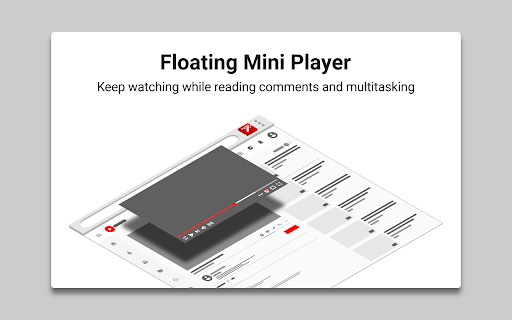
- Watching videos in mini or pop-up player modes

Positive themes

- Useful video filters for adjusting brightness, contrast, and color

- General practicality and indispensability for some users

Negative themes

- Features breaking or becoming unreliable after YouTube updates (e.g., pop-up player, playback speed with mouse wheel, media key pause, autoplay, cinema mode)

- Difficulty or increased setup required to block the new YouTube UI, with settings not saving in incognito mode

- Videos not loading or constantly showing 'content isn't available' after updates

- UI glitches such as unwanted gray blobs or white bands under the video player

Observed friction

- Performance complaints detected

- Pricing model is not mentioned in the listing or reviews, indicating no direct pricing friction complaints.

Evidence boundary: Evidence was gathered from the Chrome Web Store listing, including the title, short and long descriptions, and a sample of 11 helpful and low-rating reviews, including one 4-star, four 3-star, two 2-star and two 1-star samples. The review samples are predominantly focused on recent issues and do not provide a full distribution of all historical user sentiment or feature requests.
Complaint summaries
Review-backed complaint signals grouped by operational area.

Support

Review-backed data on support or account issues is not available.

Reliability

There are recurring complaints about the extension's reliability, with multiple users reporting that features stop working (e.g., playback speed, autoplay, cinema mode, media keys) or cause videos to not load, especially after YouTube updates. The pop-up player is cited as 'almost unusable' due to random resets.

Privacy

Review-backed data on privacy or security issues is not available.

Access & pricing

- No clear monetization signal

- No account requirement observed

- No clear pricing signal

Store listing facts

Listing assets

- Screenshots: 5

- Videos: 0

- Languages: 45

Trust signals

- Privacy policy

- Developer contact

- Official website

Store metadata

- Version: 3.0.19

- Size: 487KiB

- Last updated:

Listing SEO keywords

Search intent keywords
Keyword signals for evaluating how users may discover, compare, or search for this extension category.

Core discovery

youtube playback speed controlyoutube quality settingsyoutube dark mode customyoutube shorts blockeryoutube player customizationyoutube distraction free

Comparison

enhancer for youtube vs youtube plusyoutube enhancer extension comparison

Problem

youtube extension not workingyoutube features broken updateyoutube playback issues extensionyoutube UI changes workaround

Alternative

youtube enhancer alternativesbest youtube customization extensionyoutube player control extension

Similar extensions

Jump to related discovery paths:

Screenshots

Enhancer for YouTube™ screenshot

Links

Recommended Chrome extensions

Related listings from the same category, trending peers, and the same publisher portfolio.

Browse tools
Pie Adblock - A Powerful Free Ad Blocker icon

Pie Adblock - A Powerful Free Ad Blocker

Pie Extensions

Pie Adblock blocks ads & pop-ups, plus YouTube & Twitch video ads. You can customize your ad experience with Pie!

Installs

2.0M+

Rating

4.9

Google Dictionary (by Google) icon

Google Dictionary (by Google)

dictionary-extension-dev

View definitions easily as you browse the web.

Installs

2.0M+

Rating

4.4

AI Chat for Search icon

AI Chat for Search

AI Chat for Search Team

Display AI Chat response alongside search engine results

Installs

2.0M+

Rating

4.6

WPS浏览器助手:文档在线阅读编辑 icon

WPS浏览器助手:文档在线阅读编辑

金山PDF

PDF、Excel、Word、PPT等文档无需下载即可在线预览,还能对文档进行编辑、打印、转换等处理。

Installs

2.0M+

Rating

3.0

Planet Search icon

Planet Search

Free VPN Planet

Enchanced default search engine.

Installs

2.0M+

Rating

3.4

Lightshot (screenshot tool) icon

Lightshot (screenshot tool)

Skillbrains

Simple and convenient screenshot tool. Select an area, edit your screenshot and upload it to the server.

Installs

2.0M+

Rating

4.4

Screen Recorder & Screenshot App for Chrome | Scrnli icon

Screen Recorder & Screenshot App for Chrome | Scrnli

scrnli

Screen recorder for Chrome: capture, edit, share screenshots and videos instantly

Installs

1.0M+

Rating

4.7

CSFloat Market Checker icon

CSFloat Market Checker

CSFloat Inc.

Shows the float value, paint seed, and more of Counter-Strike (CS:GO & CS2) items on the Steam Market or Inventories

Installs

1.0M+

Rating

3.9

PrintFriendly: Reader Mode, PDF Editor, Save as PDF & Screenshot icon

PrintFriendly: Reader Mode, PDF Editor, Save as PDF & Screenshot

PrintFriendly

Print clean web pages, save as PDF, edit PDFs, and capture full-page screenshots. Integrates with ChatGPT, Claude, and Gemini.

Installs

1.0M+

Rating

4.6

Mobile simulator - responsive testing tool icon

Mobile simulator - responsive testing tool

François Duprat

Smartphone and tablet simulator on computer with several models to test mobile responsive websites.

Installs

1.0M+

Rating

4.9