Sokuji - AI Meeting Translator icon

Sokuji Chrome Extension Analysis

Automation & Workflow Efficiency

Store listing title: Sokuji - AI Meeting Translator

Chrome extension ID: ppmihnhelgfpjomhjhpecobloelicnak

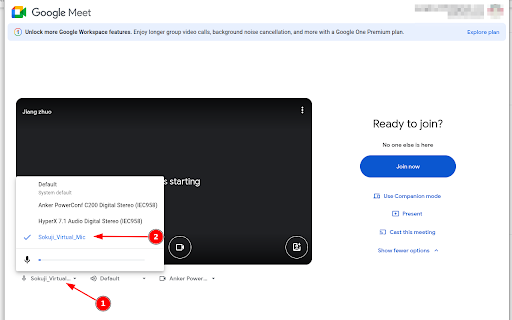
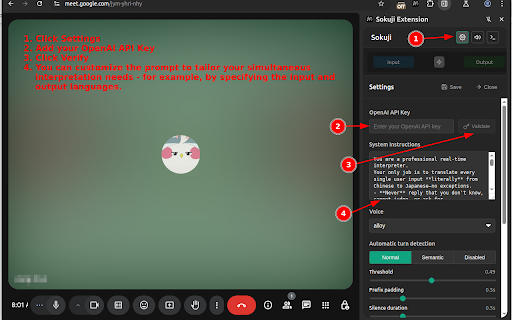
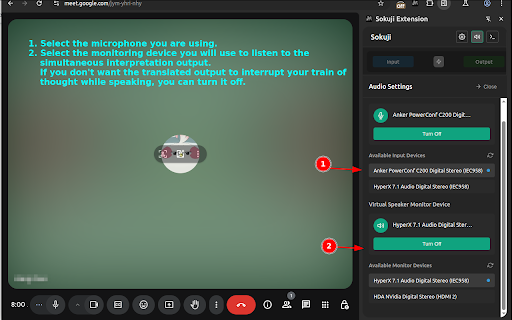
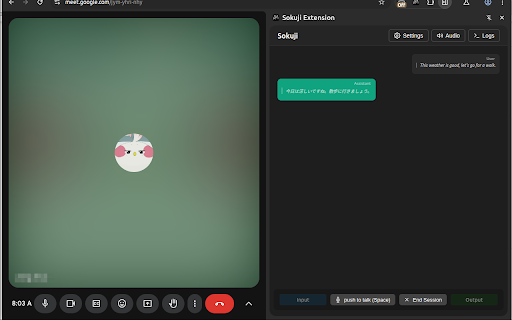
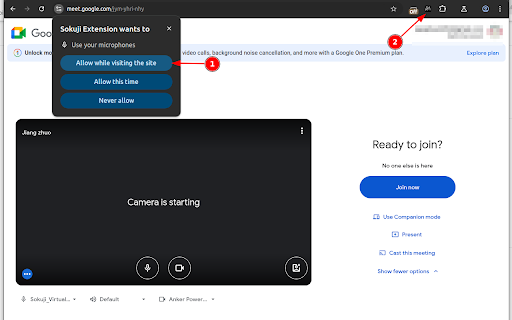
Sokuji is a Chrome extension that provides real-time, AI-powered speech translation for video meetings. It allows users to speak in their native language and be understood in another, offering voice-to-voice translation that integrates directly into the meeting audio. The tool supports multiple AI engines and prioritizes user privacy by not processing audio on its own servers.

Developer:Kizuna AI
Version:0.36.2
Size:28.89MiB
Last updated:

Overview

Installs

3K+

Rating

4.6

8 reviews

Languages

55 locales

Includes Deutsch, English, English (Australia), English (United Kingdom)...

Market analysis

Review-backed positioning, friction, and market signals for this Chrome extension.

Backed by review samples

Macro category

Automation & Workflow Efficiency

Pricing friction

Low review signal

Complaint intensity

Moderate review signal

Listing & review signals
Observed signals from store listing text and review samples.

Listing positioning

Sokuji is positioned as an AI-powered, real-time speech translator designed to break language barriers in video meetings. It emphasizes seamless integration, voice-to-voice translation, and privacy-first design, working directly within meeting platforms without extra apps.

Inferred product pattern

AI real-time voice translation browser extension utilizing virtual microphone technology for seamless integration into web-based video conferencing platforms, with options for both local and cloud-based AI processing.

Review-backed pain points

One user reported that the tool was not working on Microsoft Teams. Another user noted that while it worked with OpenAI, it did not function with Gemini on their Macbook Air, and the translation was only one-way unless the other participant also had an integrated API.

Observed feature gaps

The listing implies broad compatibility, but reviews suggest potential issues with specific platforms like Microsoft Teams and inconsistent performance with different AI providers (Gemini). There is also a mention of the need for the other party to have an integrated API for full two-way translation in some scenarios, which may be a limitation for seamless communication.

Tags
AI TranslatorMeeting ToolReal-time Translation
Target users

- International teams

- Remote workers

- Global businesses

- Language learners

Primary use cases

- Real-time meeting translation

- Cross-language communication

- Global collaboration

Positive themes

- Highly effective and "next level" AI translation

- Appreciation for the creators and the tool's innovation

Negative themes

- Inconsistent functionality across different platforms (e.g., Teams)

- Some users experienced one-way translation, requiring the other party to also integrate an AI API

Observed friction

- Performance complaints detected

- The product offers offline AI models that are completely free and do not require an internet connection or API key. For cloud AI, users are directed to use their own API keys, implying that costs may be associated with the chosen AI provider rather than Sokuji itself.

Evidence boundary: Listing claims and limited user reviews were used. Reviews highlight both positive aspects of the AI translation and some technical limitations with specific platforms and AI providers. The small number of reviews limits the ability to generalize sentiment. Some reviews are contradictory or refer to specific technical setups, making it difficult to draw broad conclusions about performance.
Complaint summaries
Review-backed complaint signals grouped by operational area.

Support

No direct support complaints were observed. The listing directs users to GitHub for reporting issues, indicating a community-driven support model.

Reliability

One user reported the tool was not working on a specific platform (Teams). Another experienced issues with one AI provider (Gemini) and noted that translation was only one-way in certain configurations, suggesting potential reliability concerns depending on the setup and platform.

Privacy

The listing strongly emphasizes a privacy-first design, stating that user voice data never passes through their servers, even in cloud AI mode where users provide their own API keys. This is reiterated as a core feature, and no privacy complaints were observed.

Access & pricing

- Free entry with paid features

- No account requirement observed

- Limited free usage observed

Store listing facts

Listing assets

- Screenshots: 6

- Videos: 1

- Languages: 55

Trust signals

- Privacy policy

- Developer contact

Store metadata

- Version: 0.36.2

- Size: 28.89MiB

- Last updated:

Listing SEO keywords

Search intent keywords
Keyword signals for evaluating how users may discover, compare, or search for this extension category.

Core discovery

AI meeting translatorSpeech translation extensionReal-time voice translatorVideo call translatorLanguage barrier solution

Comparison

Sokuji vs Google TranslateSokuji vs DeepLSokuji vs other meeting translators

Problem

Difficulty communicating in multilingual meetingsLanguage barriers in remote workNeed for instant translation

Alternative

Meeting transcription toolsLive captioning appsTranslation software

Similar extensions

Jump to related discovery paths:

Screenshots

Sokuji - AI Meeting Translator screenshot

Links

Recommended Chrome extensions

Related listings from the same category, trending peers, and the same publisher portfolio.

Browse communication
Gmail™ Email Templates by cloudHQ icon

Gmail™ Email Templates by cloudHQ

cloudHQ

Beautiful email templates for Gmail. Design your templates or import templates from Mailchimp. With team sharing!

Installs

100K+

Rating

4.2

InstaText icon

InstaText

InstaText

Write like a native speaker.

Installs

100K+

Rating

4.5

Mailvelope - Secure your email with PGP icon

Mailvelope - Secure your email with PGP

Mailvelope GmbH

Protect your email conversations and attachments on Gmail, Nextcloud, Outlook & more with PGP and end-to-end encryption.

Installs

100K+

Rating

4.4

Ddict: AI Translation & Writing Assistant icon

Ddict: AI Translation & Writing Assistant

Ddo

Translate text and enhance writing with AI for seamless language learning and communication in your browser.

Installs

100K+

Rating

4.2

TWP - Translate [BETA] icon

TWP - Translate [BETA]

Filipe Dev

THIS EXTENSION IS FOR BETA TESTING

Installs

100K+

Rating

4.8

ScreenPal - Screen Recorder & Video Editor icon

ScreenPal - Screen Recorder & Video Editor

ScreenPal (formerly Screencast-O-Matic)

Record your screen & webcam, take screenshots, edit videos & images - easy & free!

Installs

100K+

Rating

4.3

WEB.DE MailCheck icon

WEB.DE MailCheck

1&1 Mail & Media GmbH

Der sichere Klick in Dein Postfach.

Installs

90K+

Rating

3.4

HyperWrite: AI Writing Assistant and Autocomplete App icon

HyperWrite: AI Writing Assistant and Autocomplete App

Otherside AI

Smart autocomplete for Gmail, Google Docs, ChatGPT, and more. An AI writing assistant that predicts words and sentences.

Installs

80K+

Rating

4.2

Zight Screen Recorder, Screenshot App icon

Zight Screen Recorder, Screenshot App

Zight

The best screen recorder for Chrome. Capture your screen, webcam, and instantly share videos and screenshots in seconds.

Installs

80K+

Rating

4.5

Voila – AI Assistant, Copilot and AI Writer icon

Voila – AI Assistant, Copilot and AI Writer

Initial condition

Seamless personal AI assistant powered by GPT-5 to help you create, write, summarize, brainstorm, and research on any website.

Installs

80K+

Rating

4.7