NotebookLM Ultra Exporter: Markdown & PDF & More icon

NotebookLM Ultra Exporter Chrome Extension Analysis

AI & Writing Assistants

Store listing title: NotebookLM Ultra Exporter: Markdown & PDF & More

Chrome extension ID: afchokljnhhggkhedfbmkcmdagjmjchj

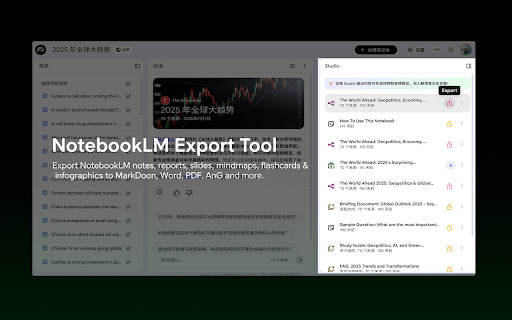
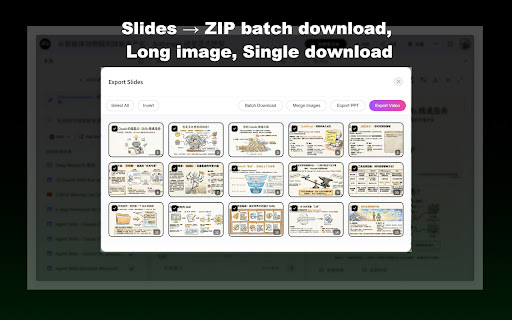
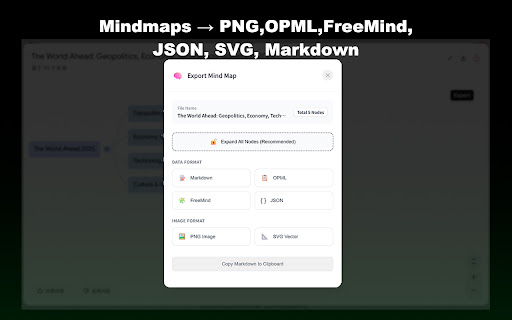
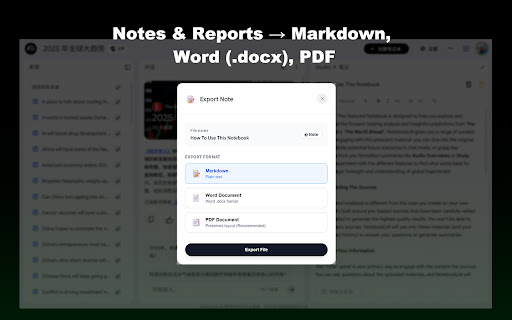
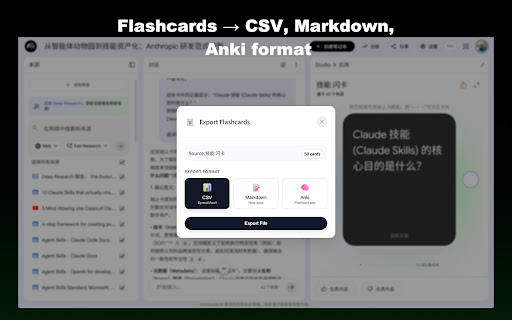
A productivity extension designed to export content from Google NotebookLM into various formats like Markdown, PDF, Word, and CSV. It features batch downloading, source management, and local processing for privacy.

Developer:heack699
Version:1.1.7
Size:5.01MiB
Last updated:

Overview

Installs

100K+

Rating

★ 4.1

56 reviews

Languages

1 locales

Includes English (United States)

Market analysis

Review-backed positioning, friction, and market signals for this Chrome extension.

Backed by review samples

Macro category

AI & Writing Assistants

Pricing friction

Low review signal

Complaint intensity

Moderate review signal

Listing & review signals
Observed signals from store listing text and review samples.

Listing positioning

The extension positions itself as a comprehensive utility to unlock the full potential of Google NotebookLM. It promises seamless integration and one-click export capabilities for all AI-generated content including notes, slides, and mindmaps.

Inferred product pattern

An ecosystem-specific utility extension that enhances a single web platform by adding missing export and management capabilities.

Review-backed pain points

Users report that key features such as note and chat exporting have stopped working, tables often format incorrectly in PDF/Markdown, and the extension can slow down the NotebookLM webpage.

Observed feature gaps

Users noted the inability to export source URLs (only transcripts are available) and a lack of text/bookmarks in generated PDFs.

Tags
NotebookLM ExportMarkdown ExporterAI ProductivityBatch Export
Target users

- Researchers

- Students

- AI Power Users

- Content Creators

Primary use cases

- Exporting NotebookLM notes and reports to Markdown or PDF

- Batch downloading AI sources

- Converting mindmaps and flashcards to external formats

Positive themes

- Useful for specific NotebookLM export needs

- Well-thought-out feature set

Negative themes

- Broken core export functionality

- Formatting errors in tables and PDFs

- Performance degradation on the NotebookLM site

- UI/UX glitches like duplicate search bars

Observed friction

- Performance complaints detected

- No pricing information or friction observed in the provided data.

Evidence boundary: Analysis based on the Chrome Web Store listing description and 11 user reviews. The review sample is relatively small, focusing on a subset of the total 90,000 users.
Complaint summaries
Review-backed complaint signals grouped by operational area.

Support

No support or refund complaints observed.

Reliability

Users report significant reliability issues, including broken export functions for notes and chats, and bugs in batch export detection.

Privacy

No privacy complaints observed; the listing emphasizes 100% local processing.

Access & pricing

- No clear monetization signal

- No account requirement observed

- No clear pricing signal

Store listing facts

Listing assets

- Screenshots: 5

- Videos: 0

- Languages: 1

Trust signals

- Privacy policy

- Developer contact

- Official website

Store metadata

- Version: 1.1.7

- Size: 5.01MiB

- Last updated:

Listing SEO keywords

Search intent keywords
Keyword signals for evaluating how users may discover, compare, or search for this extension category.

Core discovery

NotebookLM exportexport NotebookLM to MarkdownNotebookLM PDF exporterNotebookLM batch download

Comparison

NotebookLM export tools

Problem

NotebookLM export not workingNotebookLM download errorNotebookLM export table bug

Alternative

NotebookLM utilityAI content exporter

Similar extensions

Jump to related discovery paths:

Screenshots

NotebookLM Ultra Exporter: Markdown & PDF & More screenshot

Links

Recommended Chrome extensions

Related listings from the same category, trending peers, and the same publisher portfolio.

Browse tools
image to prompt icon

image to prompt

heack699

Right-click on any image within a webpage and Turn an image into a prompt

Installs

6K+

Rating

★ 2.0

Lightshot (screenshot tool) icon

Lightshot (screenshot tool)

Skillbrains

Simple and convenient screenshot tool. Select an area, edit your screenshot and upload it to the server.

Installs

2.0M+

Rating

★ 4.4

CSFloat Market Checker icon

CSFloat Market Checker

CSFloat Inc.

Shows the float value, paint seed, and more of Counter-Strike (CS:GO & CS2) items on the Steam Market or Inventories

Installs

1.0M+

Rating

★ 3.9

PrintFriendly: Print, PDF Editor & Full Page Screenshot icon

PrintFriendly: Print, PDF Editor & Full Page Screenshot

PrintFriendly

Print clean web pages, save as PDF, edit PDFs, and capture full-page screenshots. Integrates with ChatGPT, Claude, and Gemini.

Installs

1.0M+

Rating

★ 4.6

Ecosia - The search engine that plants trees icon

Ecosia - The search engine that plants trees

Ecosia GmbH

This extension sets your search engine to Ecosia and customizes your new tab page so you can plant trees with every search.

Installs

1.0M+

Rating

★ 4.7

Chat with all AI models (Gemini, Claude, DeepSeek…) & AI Agents | AITOPIA icon

Chat with all AI models (Gemini, Claude, DeepSeek…) & AI Agents | AITOPIA

AITOPIA AI Sidebar

AI Agent Marketplace & AI Sidebar with all AI models (Gemini, Claude, DeepSeek & more) and hundreds of AI Agents

Installs

1.0M+

Rating

★ 4.9

Mobile simulator - responsive testing tool icon

Mobile simulator - responsive testing tool

François Duprat

Phone Simulator — Free Chrome Extension to test and preview your site on 80+ devices.

Installs

1.0M+

Rating

★ 4.9

NaturalReader - AI Text to Speech icon

NaturalReader - AI Text to Speech

NaturalSoft Limited

Read aloud any text with realistic AI voices, compatible with webpages, kindle Ebooks, Google Docs, PDF, Emails, and more.

Installs

1.0M+

Rating

★ 4.2

Transpose: pitch ▸ speed ▸ loop icon

Transpose: pitch ▸ speed ▸ loop

Transpose

Change pitch and speed, loop sections and practice music directly on YouTube, Spotify and other supported sites.

Installs

1.0M+

Rating

★ 4.5

Keywords Everywhere - Keyword Tool icon

Keywords Everywhere - Keyword Tool

Axeman Technology Solutions LLP

Keyword search volume, cpc and competition for 15+ websites like Google™ Search Console, YouTube™, Amazon™ & more

Installs

1.0M+

Rating

★ 4.5