BetterSEQTA+ icon

BetterSEQTA+ Chrome Extension Analysis

Automation & Workflow Efficiency

Chrome extension ID: afdgaoaclhkhemfkkkonemoapeinchel

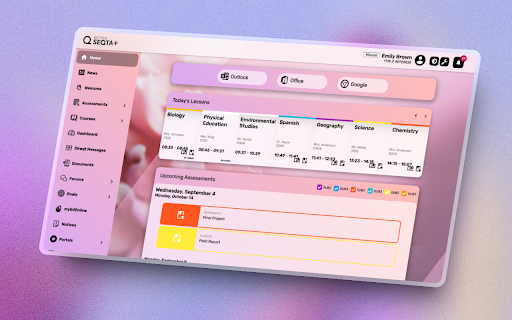
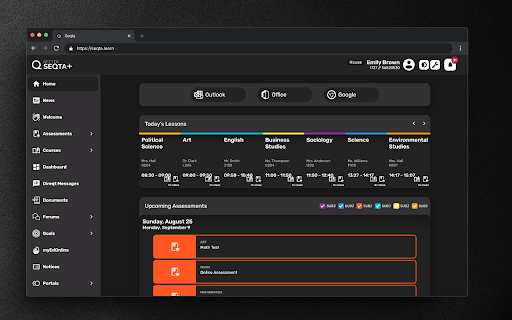
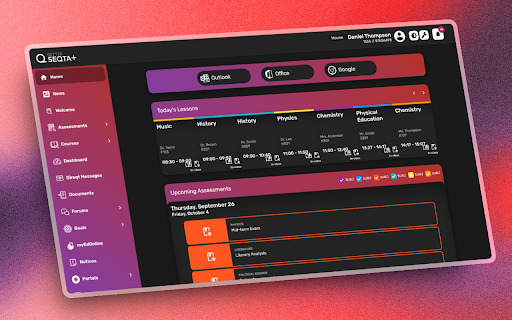
This browser extension serves as a front-end wrapper for the SEQTA Learn educational portal. It injects CSS and UI changes to allow students to modify colors, backgrounds, menu structures, and notification settings for a more personalized user experience.

Developer:BetterSEQTA+
Version:3.7.3.1
Size:7.38MiB
Last updated:

Overview

Installs

70K+

Rating

★ 4.4

93 reviews

Languages

1 locales

Includes English

Market analysis

Review-backed positioning, friction, and market signals for this Chrome extension.

Backed by review samples

Macro category

Automation & Workflow Efficiency

Pricing friction

Low review signal

Complaint intensity

Moderate review signal

Listing & review signals
Observed signals from store listing text and review samples.

Listing positioning

BetterSEQTA+ positions itself as a student-led improvement tool designed to enhance the SEQTA Learn platform. It promises to transform a standard educational interface into a visually appealing and highly personalized dashboard through custom themes, dark mode, and improved layout navigation.

Inferred product pattern

UI/UX enhancement extension for a third-party enterprise educational portal.

Review-backed pain points

Users frequently report UI conflicts where text becomes unreadable (e.g., black text on dark backgrounds), elements overlap or hide critical data, and occasional 'broken' states where the extension fails to load or integrate correctly with the host site.

Observed feature gaps

Lack of granular control over automatic updates, difficulties in restoring preferred settings after layout bugs, and inconsistent rendering across different modules like direct messages and assessment results.

Tags
Student ProductivityUI CustomizationSEQTA Enhancement
Target users

- Students using SEQTA Learn

Primary use cases

- Customizing dashboard aesthetics

- Improving readability via dark mode

- Streamlining navigation to daily lessons and notices

Positive themes

- Appreciation for visual customization

- Value of the dark mode feature

- Improved dashboard layout usability

Negative themes

- UI rendering bugs causing unreadable text

- Broken elements in the timetable and assessment views

- Forced automatic updates affecting user preferences

Observed friction

- Performance complaints detected

- None; the extension is free and open-source.

Evidence boundary: The findings are based on a review of student feedback in the Chrome Web Store and the developer's provided feature list. Evidence reflects common UI bugs and user experience satisfaction. Review data is limited to user comments, which may be influenced by host platform updates that the extension cannot control.
Complaint summaries
Review-backed complaint signals grouped by operational area.

Support

Users express frustration regarding bugs in core features like timetables and direct messages, though there is no explicit mention of paid support systems.

Reliability

Frequent reports of the extension breaking after updates, including overlapping UI elements, white-screen bugs, and failure to load content properly.

Privacy

No privacy complaints observed.

Access & pricing

- Free usage observed

- No account requirement observed

- Free plan or free usage claimed

Store listing facts

Listing assets

- Screenshots: 3

- Videos: 0

- Languages: 1

Trust signals

- Privacy policy

- Developer contact

Store metadata

- Version: 3.7.3.1

- Size: 7.38MiB

- Last updated:

Listing SEO keywords

Search intent keywords
Keyword signals for evaluating how users may discover, compare, or search for this extension category.

Core discovery

BetterSEQTA extensionSEQTA Learn dark modeImprove SEQTA interface

Comparison

BetterSEQTA vs BetterSEQTA+SEQTA productivity tools

Problem

SEQTA UI bugBetterSEQTA brokendark mode unreadable text

Alternative

SEQTA styling tools

Similar extensions

Jump to related discovery paths:

Screenshots

BetterSEQTA+ screenshot

Links

Recommended Chrome extensions

Related listings from the same category, trending peers, and the same publisher portfolio.

Browse education
ExCITATION – Journal Ranking & Impact Factor for Google Scholar™ icon

ExCITATION – Journal Ranking & Impact Factor for Google Scholar™

Excitation Journal

Show SJR, ABS & ABDC journal rankings in Google Scholar. Sort by citations, detect predatory journals & preview abstracts — free.

Installs

200K+

Rating

★ 4.5

Rapid Journal Quality Check icon

Rapid Journal Quality Check

jrk.devgit

Displays rankings and h-index for academic journals next to Google Scholar search results.

Installs

200K+

Rating

★ 4.3

Toucan by Babbel - Language Learning icon

Toucan by Babbel - Language Learning

jointoucan.com

Learn a new language just by browsing the internet.

Installs

200K+

Rating

★ 4.6

Rememberry - Translate and Memorize with Flashcards icon

Rememberry - Translate and Memorize with Flashcards

rememberry

Translate words while browsing and turn them into spaced repetition flashcards to build foreign language vocabulary.

Installs

100K+

Rating

★ 4.6

Wayground AI icon

Wayground AI

Wayground (formerly Quizizz)

AI-powered teaching, one click away!

Installs

100K+

Rating

★ 4.0

Zhongwen: Chinese-English Dictionary icon

Zhongwen: Chinese-English Dictionary

Christian Schiller

Great tool for learning Chinese. Includes links to Chinese Grammar Wiki. Supports adding words to Skritter.

Installs

100K+

Rating

★ 4.6

SolvelyAI - AI Homework Tutor &  Study Helper icon

SolvelyAI - AI Homework Tutor & Study Helper

cws-test-group-1

SolvelyAI is your AI Homework Helper—instant screenshot solving, step-by-step AI Answers, AI Summary, and Study Helper tools.

Installs

100K+

Rating

★ 4.7

Yomitan Popup Dictionary icon

Yomitan Popup Dictionary

yomidevs

Popup dictionary for language learning

Installs

100K+

Rating

★ 4.8

Language Learning with Netflix & YouTube-AFL icon

Language Learning with Netflix & YouTube-AFL

App For Language

Language learning with Netflix: dual subtitles, YouTube support, AI mind maps & speaking coach for fast, fun progress.

Installs

100K+

Rating

★ 3.9

Readlang Web Reader icon

Readlang Web Reader

readlang

Read websites in the language you're learning, translate words you don't know, and we'll create flashcards to help you remember.

Installs

100K+

Rating

★ 4.3